

Key takeaways:
The best AI agents for automating business processes are the ones that fit your real workflows, connect to your actual systems, and scale safely across teams. For most large organizations, that means a mix of custom-built agents and a few carefully chosen platforms, not one off-the-shelf bot. Start in narrow, high-volume workflows like support triage, IT self-service, and invoice processing, prove value, then expand to sales, HR, finance, and operations. Keep humans in control of goals and sensitive decisions, wire agents into your CRM, ERP, ITSM, and HRIS, and put governance and audit trails in place before production. Integration and guardrails, not model choice, decide whether the program scales.
Key points of claude code vs github copilot:
- Start AI agents in narrow, high-volume workflows (support triage, IT self-service, invoice processing), then expand.
- Pick agents that run multi-step workflows and integrate with your CRM, ERP, ITSM, and HRIS.
- Keep humans in the loop for high-risk actions, with clear escalation and audit rules.
- Expect gains in efficiency, cost, and consistency; plan for over-automation and data-quality risk.
- A mix of custom agents and platforms, with a roadmap and governance, balances speed and control.
At a glance
| Topic | Key insight | Why it matters | First action |
| What agents are | Agents reason and act in your systems, not just chat | They complete tasks across tools, far past FAQ bots | Pick 2–4 processes where an agent reads and updates core systems |
| Benefits | Efficiency, cost, consistency, scale, and better process data | You serve more customers with the same headcount | Set KPIs (response time, resolution rate, FTE hours, error rate) before any pilot |
| Use cases | Support, sales, IT, HR, finance, and operations fit first | High-volume, repeatable work makes ROI clear | Rank use cases by volume, rule intensity, and risk; pick 1–2 |
| Solution types | Platforms, CRM-native, custom frameworks, regulated tools | No single tool fits; the right mix depends on your stack | Shortlist one platform and one custom or hybrid option to compare |
| Governance | Identity, privacy, audit trails, and human approvals are core | Weak governance stalls programs on compliance and trust | Define access, logging, and approval policies before production |
| Integration | CRM, ERP, ITSM, and HRIS integration is the hard part, not the model | Without it, agents stay isolated from chatbots | Involve IT early; plan API, queue, and RPA patterns up front |
| Rollout | Staged: discover, choose, design, govern, pilot, scale | Avoids costly experiments that never scale | Follow the six-step plan with success criteria per stage |
| Pitfalls | Over-automation, weak data, and thin user input cause failure | They damage trust, even when the technology is strong | Test with real users and data; keep humans on sensitive cases |
Introduction
An AI agent that answers questions is a party trick. An AI agent that closes the ticket, updates the CRM, and routes the invoice without a human babysitting it is a coworker. The gap between those two is where most enterprise automation programs quietly die, and the cause is rarely the model. It is that the agent never connects to a real system. This post is for the CTO, head of operations, or transformation lead who has to cross that gap and run agents in production across support, IT, HR, and finance. You walk away with a way to spot high-value use cases, a checklist for choosing the best AI agents for automating business processes, a six-step rollout, and a clear read on when to build custom versus buy a platform.
What are enterprise AI agents, and why do they matter now?
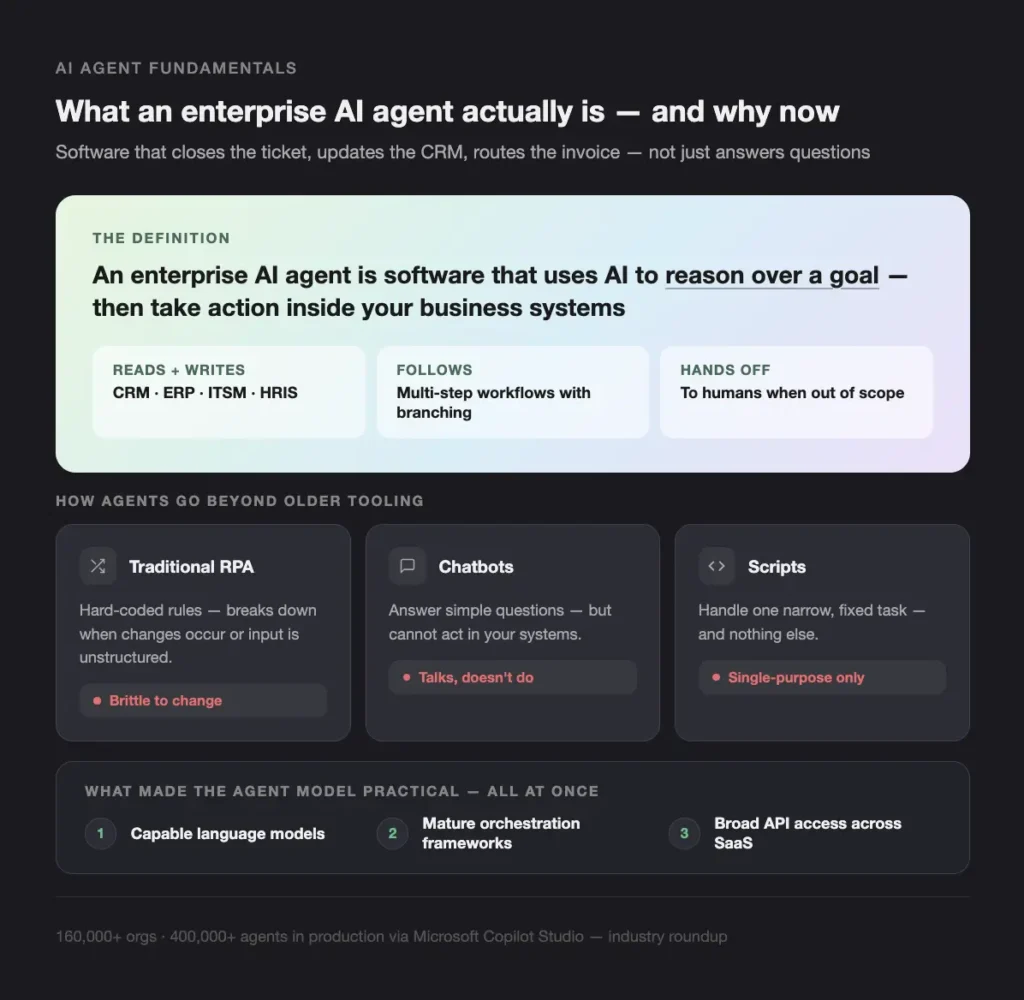
Enterprise AI agents are software workers that use AI to understand context, reason over a goal, and take actions inside your business systems. They go well past scripts and FAQ bots: a modern agent can read and write to your CRM, ERP, ITSM, and HRIS, follow a multi-step workflow with branching logic, and hand off to a human when a case falls outside its boundaries.
The difference from older tooling is concrete:
- Traditional RPA relies on hard-coded rules and breaks down when changes occur or when input is unstructured.
- Chatbots answer simple questions but cannot act in your systems.
- Scripts handle one narrow, fixed task and nothing else.
Three things made the agent model practical at once: capable language models, mature orchestration frameworks, and broad API access across modern SaaS. Adoption is moving fast. One industry roundup reports Microsoft Copilot Studio is already used by 160,000+ organizations with 400,000+ agents in production. The pressure behind that curve is familiar to every executive: faster response expectations, talent shortages in support and operations, demand for 24/7 service without 24/7 headcount, and cost scrutiny in every department.
Where do AI agents for business automation pay off first?
The best AI agents for automating business processes pay off first in high-volume, rule-heavy workflows where the same steps repeat thousands of times a week. Those are the areas with clear ROI and lower risk, which is why we start clients there before touching anything customer-critical or regulated.
| Department | What the agent does | Systems it touches |
| Customer support | Triage, routing, status checks, suggested resolutions | Zendesk, ServiceNow, Jira Service Management, knowledge base |
| Sales and CRM | Lead enrichment, outreach drafts, call summaries, data hygiene | Salesforce, HubSpot, marketing automation |
| IT service desk | Password resets, access requests, guided troubleshooting | ITSM, identity provider, runbooks |
| HR and people ops | Policy and benefits answers, onboarding, and offboarding | HRIS, ticketing, internal portals |
| Finance and operations | Invoice capture, validation, approval routing, and exception handling | ERP, AP automation, document stores |
Set the metrics before the pilot, not after: first-response time, resolution rate, FTE hours saved, error rate, and cost per transaction. Industry reviews of high-volume task automation consistently rank cost and efficiency as the primary reasons enterprises adopt these tools (G2 discussion on enterprise task automation). Each department gets a different agent, but they share a single governance model and set of guardrails.
How do you choose the best AI agents for automating business processes?
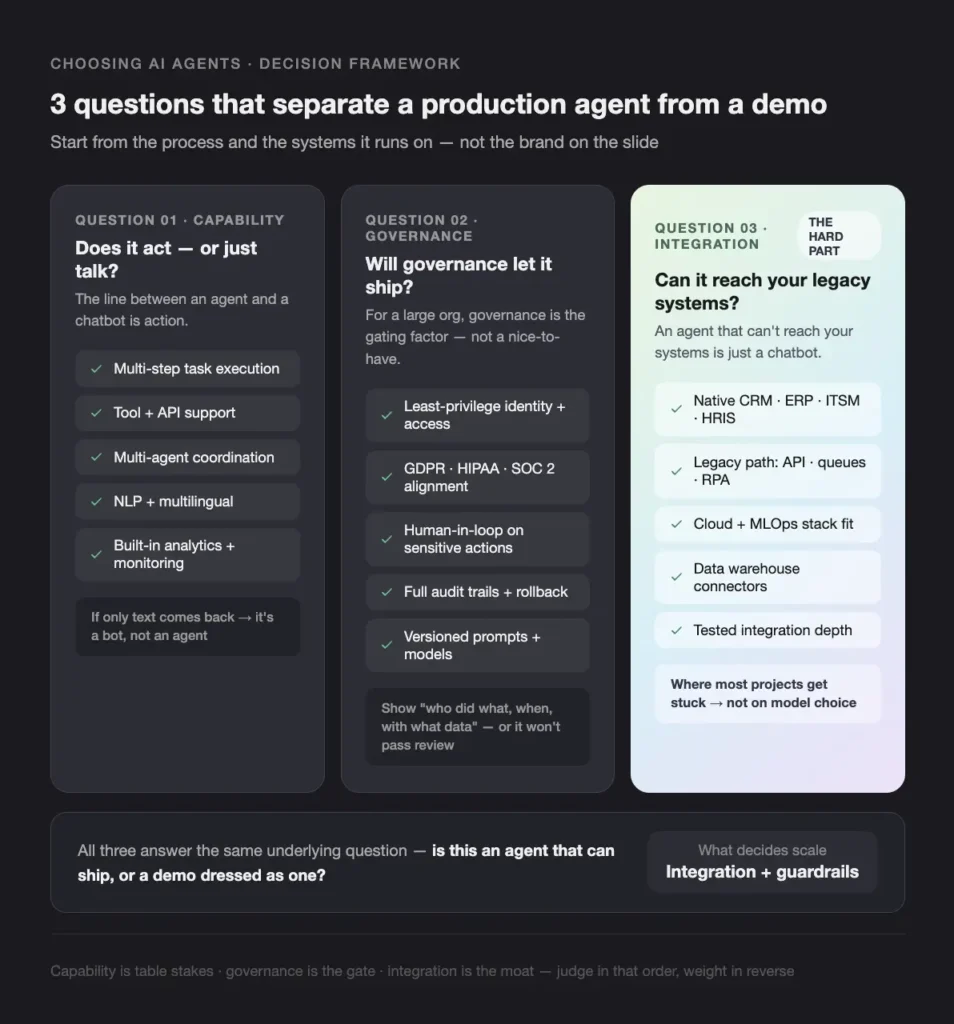
Choosing the best AI agents for automating business processes is a question of fit, not brand. The same applies when choosing AI agent development services. Start from the process and the systems it runs on, then judge each option against the workflow, the integration surface, and your risk profile. The three questions below are the ones that actually separate a production agent from a demo.
What separates AI agents for workflow automation from chatbots?
The line is action. AI agents for workflow automation execute multi-step tasks with conditions and loops, call tools and APIs in your stack, and can coordinate as multiple specialized agents (one retrieves data, one reasons, one acts). When you evaluate an option, check for tool and API support, integration with your systems, multi-agent orchestration, strong natural-language and multilingual understanding, and built-in analytics and monitoring. A bot that only returns text is not an agent, however good the writing looks.
What security and governance do enterprise agents need?
For a large organization, governance is the gating factor, not a nice-to-have. The non-negotiables are identity and access control with least privilege, data residency and privacy controls aligned to GDPR, HIPAA, or SOC 2 where they apply, human-in-the-loop approval for sensitive actions, and full versioning, audit trails, and rollback. The test is simple: the platform must make it easy to show who did what, when, and with which data. For agents that pick their own next step, our notes on building AI agents and on the LLM evaluation harness cover the monitoring those workflows need.
Why is integration with legacy systems the hardest part?
Integration is where most projects get stuck, because an agent that cannot reach your systems is just a chatbot. Check for native connectors to your CRM, ERP, ITSM, HRIS, and data warehouse, and a clear path to legacy systems through APIs, message queues, or an RPA layer. Confirm it fits your cloud and MLOps stack. We spend more time on AI agents’ integration with legacy systems than on model selection, because that is what decides whether the agent automates a process or just talks about one.
What types of AI agent solutions can you choose from?
No single tool fits every need, so when you compare AI agents for automating business processes, think in categories rather than brands. Most enterprises end up with a mix.
| Solution type | Best for | Trade-off |
| Broad automation platforms | Fast, wide rollout across many departments with central control | Less depth for complex or unique workflows |
| CRM-native agents | Quick wins for sales and service inside existing tools | Scoped to the CRM ecosystem |
| Open-source/custom frameworks | Deep integration and full control with a strong engineering team | Requires in-house skill to build and maintain |
| Contact-center and task platforms | High-volume support and IT service desks | Tuned for conversations, less for back-office logic |
| Regulated-environment platforms | Finance, healthcare, and the public sector with on-prem or VPC needs | Fewer features, heavier compliance overhead |
Frameworks such as LangGraph, CrewAI, and AutoGen anchor the custom end of this spectrum, and adoption in large enterprises is real rather than experimental. The practical answer for most organizations is a hybrid: a platform covers simple, broad flows, and custom agents handle the workflows that carry your differentiation or your compliance load.
How do you roll out AI agents without a failed pilot?
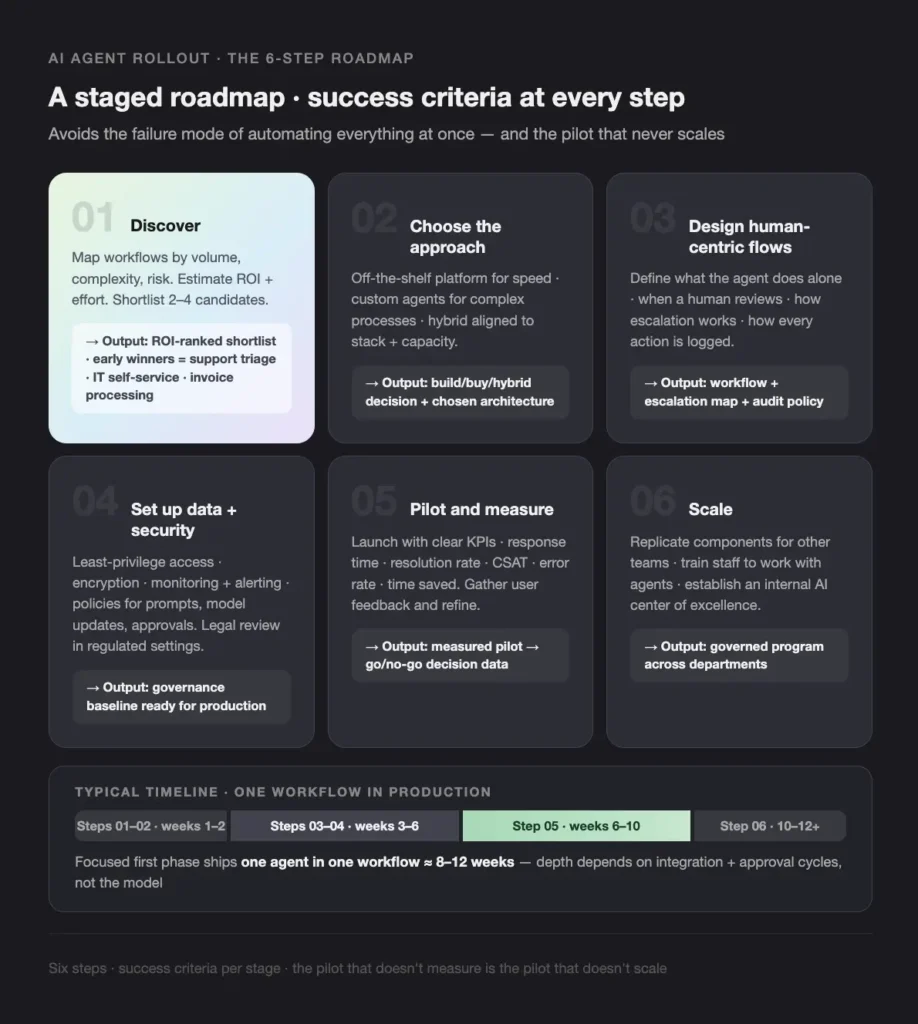
You roll out AI agents to automate business processes by following a staged roadmap with success criteria at every step, rather than automating everything at once. This is the six-step pattern we run with clients.
Scale. Replicate the working components for other teams, train staff to work alongside agents, and establish an internal AI center of excellence to maintain consistent governance.
Discover. Map workflows by volume, complexity, and risk. Estimate ROI and effort, then shortlist two to four candidates. Early winners are usually support triage, IT self-service, and invoice processing.
Choose the approach. Decide between an off-the-shelf platform for speed, custom agents for complex processes, or a hybrid, aligned to your stack and team capacity.
Design human-centric workflows. Define what the agent does alone, when a human reviews, how escalation works, and how every action is logged.
Set up data, security, and governance. Least-privilege access, encryption, monitoring and alerting, and policies for prompts, model updates, and approvals. In regulated settings, this step includes legal review.
Pilot and measure. Launch with clear KPIs (response time, resolution rate, satisfaction, error rate, time saved), gather user feedback, and refine prompts and workflows.
What are the most common mistakes with enterprise AI agents?
The most common failures are organizational, not technical: even strong technology stalls when these go unmanaged.
- Over-automation without clear goals, which produces low-impact pilots and erodes trust.
- Underestimating integration, especially with legacy systems that lack modern APIs.
- Ignoring data quality, which turns even good agents into confident generators of wrong answers.
- Weak governance, which creates security and compliance exposure that stalls the whole program.
- Leaving end users out, which slows adoption, no matter how good the build is.
- Trusting vendor claims without testing on realistic data and real users.
Run structured tests with real data and real users before you scale, and keep humans in charge of sensitive or ambiguous cases.
Should you build custom AI agents or buy a platform?
Buy a platform when you want many teams to get basic automation quickly and your processes are fairly standard. Build custom when workflows are complex, integration or compliance requirements are serious, or the process is part of your differentiation. Most enterprises land on a hybrid and bring in a partner when modernization and AI delivery have to happen at the same time.
| Path | Best when | Watch out for |
| Buy a platform | Standard processes, many teams, speed is the priority | Limited depth for unique or complex workflows; per-seat cost at scale |
| Build custom | Complex, differentiated, or compliance-heavy processes | Needs engineering capacity and ongoing ownership |
| Hybrid | Platform handles simple flows, custom agents handle the hard ones | Requires clear boundaries and one shared governance model |
This is where Teamvoy fits, and where we differ from a tool vendor: the engineer who designs the agent writes the code, owns the integration, and stays on the call when it breaks. We run the discovery and ROI modeling, design and build agents that combine LLM reasoning with deterministic rules, RPA, and APIs, handle the integration into your CRM, ERP, ITSM, and HRIS, and stay on for tuning and safe scaling. If you are weighing the team shape, our comparison of staff augmentation vs. outsourcing lays out the trade-offs. We build agents to be explainable and auditable, not black boxes.
Conclusion
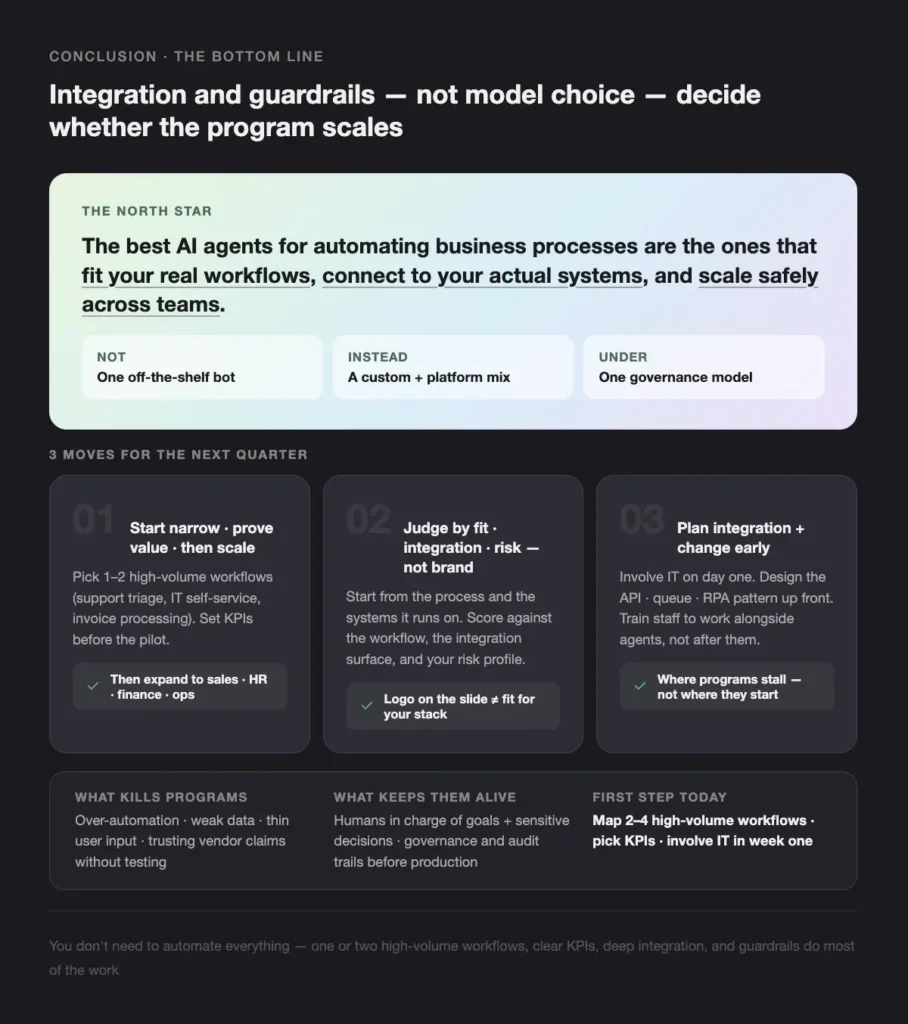
You do not need to automate everything to get value from the best AI agents for automating business processes. You need one or two high-volume workflows, clear KPIs, deep integration, and guardrails that keep humans in control of the decisions that matter.
- Start narrow, prove value, then scale across departments under one governance model.
- Judge options by workflow fit, integration surface, and risk, not by brand.
- Plan for integration and change management early, because that is where programs stall.
If you want a partner to guide this, book a free 30-minute consultation with a Teamvoy engineer. We will map your processes, prioritize the use cases, and design secure, integrated agents that fit how your business actually runs.