

Key takeaways:
The honest answer to the claude code vs github copilot question is that they are not direct substitutes, but if you force a head-to-head verdict, the wins split cleanly by category. GitHub Copilot wins in-editor autocomplete, broad-rollout pricing, and out-of-the-box enterprise governance through GitHub Enterprise. Claude Code wins multi-file refactors, blind-review code quality, coordinated multi-agent work, and source-code-on-the-laptop residency. For a CTO at a regulated-industry shop, the practical move is to deploy each in the lane it wins and instrument both behind a single guardrails layer.
Key points of claude code vs github copilot:
- GitHub Copilot is an IDE assistant with an agent layer; Claude Code is an autonomous agent in your terminal.
- Copilot wins on per-line autocomplete, IDE chat, and per-seat pricing for broad rollouts.
- Claude Code wins on multi-file refactors, code quality on hard diffs, and computer use.
- For regulated industries, source-code residency favors Claude Code; built-in audit favors Copilot.
- Most mature engineering orgs ship both; the decision is which lane gets which tool.
Introduction
If you are a CTO at a fintech, insurer, or healthcare platform deciding where the next $200,000 of AI tooling budget lands, the github copilot vs claude code call sits next to your Snowflake vs Databricks call on the platform roadmap. It carries multi-year consequences, a security review, and an org-design layer underneath. This guide gives you a category-by-category verdict instead of a feature checklist. It covers what each tool actually is in 2026, where each one wins, where each one loses, and how Teamvoy deploys both inside regulated codebases without leaking source or burning six figures of token spend on bad workflows.
Сlaude Сode vs Github Copilot: What is the real difference?
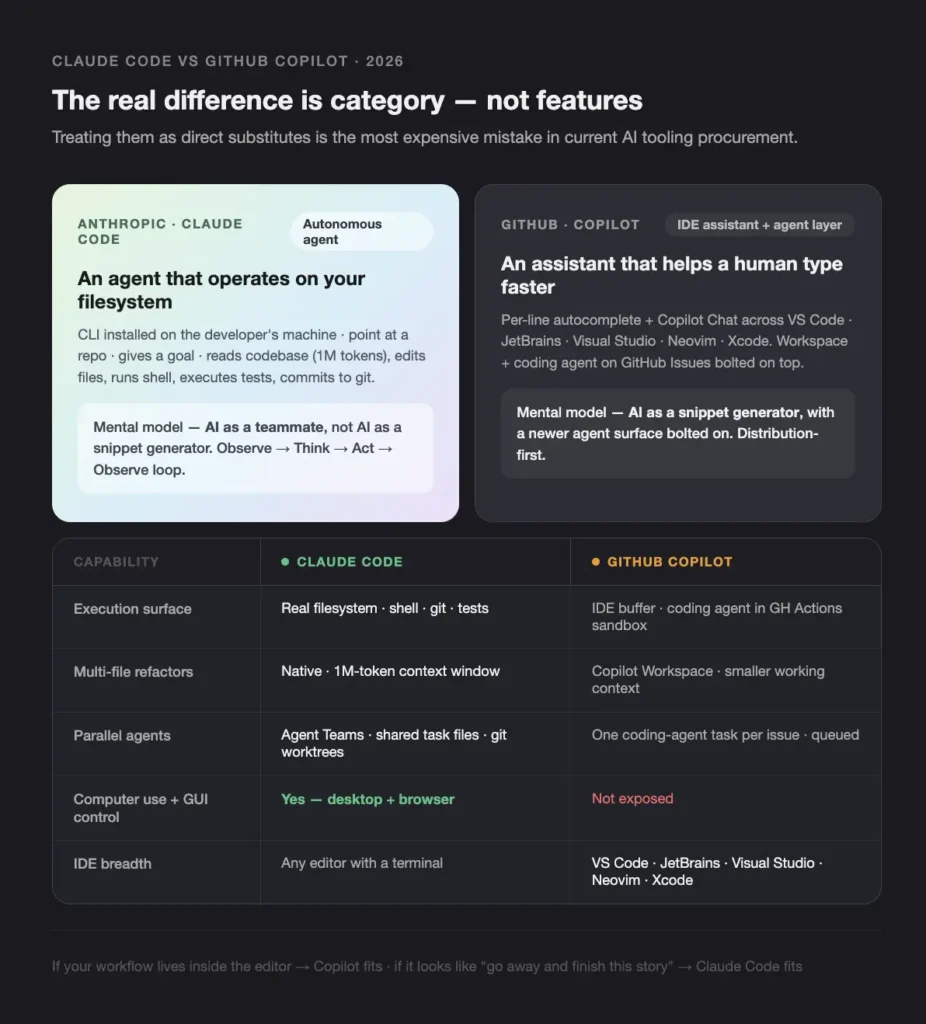
The real difference between Claude Code and GitHub Copilot is category, not features. Claude Code is an autonomous agent that operates on your filesystem. GitHub Copilot is an IDE assistant that helps a human type faster, with an agent layer (Copilot Workspace and the Copilot coding agent on GitHub Issues) bolted on top. Treating them as substitutes is the most expensive mistake we see in current AI tooling procurement, because the workflow you build around each one looks completely different.
Claude Code: an autonomous agent for the codebase
Claude Code is a CLI you install on a developer’s machine. You point it at a repository, give it a goal, and it reads the codebase (up to a 1M-token context window), edits files, runs shell commands, executes tests, and commits to git. It is closest to what we describe in our piece on autonomous AI agents: a system that follows an Observe, Think, Act, Observe loop, holds context across long sessions, and triggers real engineering work like opening PRs or running migrations. The mental model is “AI as a teammate,” not “AI as a snippet generator.”
GitHub Copilot: an IDE assistant with an agent layer bolted on
GitHub Copilot is a multi-product family. The classic surface is per-line autocomplete and Copilot Chat inside VS Code, JetBrains, Visual Studio, and Neovim. The newer surfaces are Copilot Workspace (a task-scoped planning and editing environment) and the Copilot coding agent that picks up a GitHub Issue, opens a draft PR, and iterates inside the GitHub Actions sandbox. The strength is breadth of distribution. Any team already on GitHub Enterprise turns Copilot on with a billing change, not a security review. The cost is that the agent surfaces are newer and less battle-tested than Claude Code’s CLI loop.lients, this article is intentionally vendor neutral. Our aim is to give you a practical cursor vs claude code comparison you can use in planning, not to cheer for one tool.
Capability comparison
| Capability | Claude Code | GitHub Copilot | Notes |
| Category | Autonomous CLI agent | IDE assistant with agent surfaces | Different shapes of product |
| Install model | npm-installed CLI, runs locally | Editor extension and GitHub.com integration | Copilot lower setup cost |
| Code execution surface | Real filesystem, shell, git, tests | IDE buffer; coding agent runs in GitHub Actions sandbox | Claude deeper, Copilot more isolated |
| Multi-file refactors | Native, 1M-token context | Copilot Workspace; smaller working context | Claude leads on monorepo work |
| Parallel agents | Agent Teams with shared task files and git worktrees | One coding-agent task per issue, queued | Claude richer coordination |
| Computer use and GUI control | Yes, including desktop and browser | Not exposed | Claude only |
| Extensibility | Skills and Plugins, MCP servers | Copilot Extensions and partner connectors | Different ecosystems |
| IDE breadth | Any editor that runs a terminal | VS Code, JetBrains, Visual Studio, Neovim, Xcode | Copilot leads on in-editor reach |
The table makes the substitute fallacy concrete. If your workflow lives inside the editor, Copilot is the more direct fit. If your workflow looks like “go away and finish this story,” Claude Code is.
Claude Code vs GitHub Copilot comparison by category
A claude code vs github copilot comparison only gets useful when you break it into the work each tool will actually do. The categories below are the ones that come up in every CTO procurement call we run with regulated-industry clients. Each sub-section commits to a winner and names the trade-off you accept by picking it.
Per-line autocomplete and IDE chat. Winner: GitHub Copilot
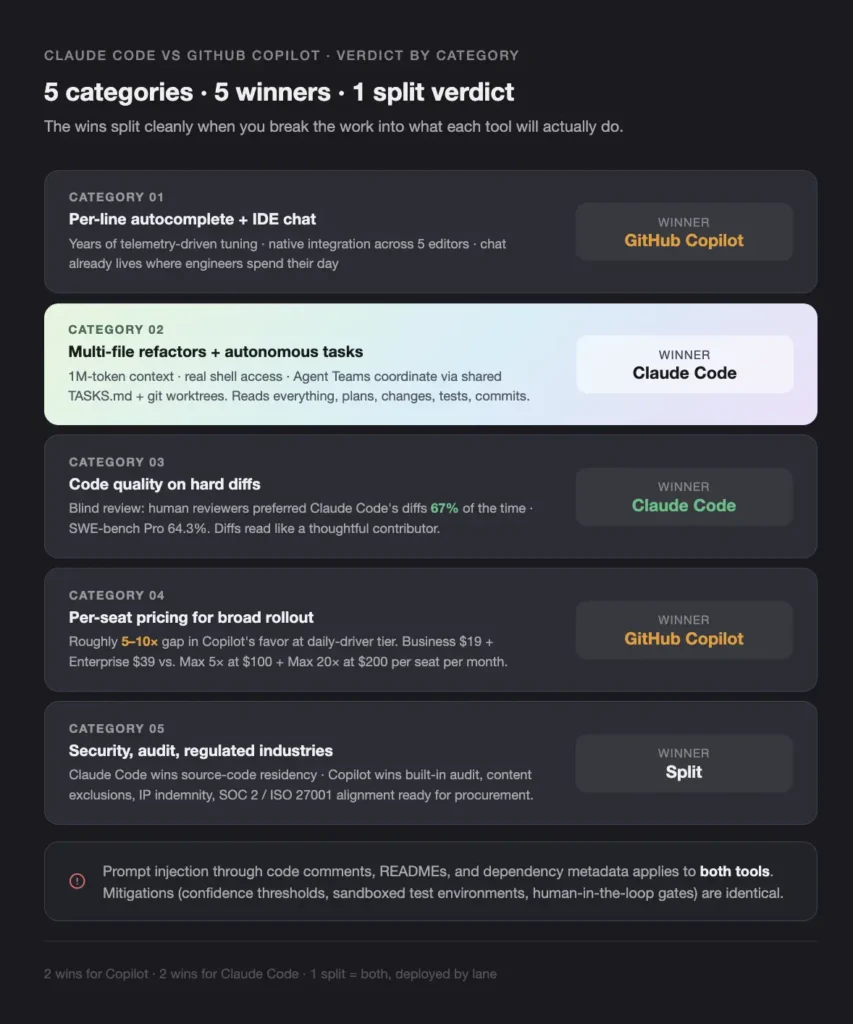
For raw “make a human type faster inside the editor,” GitHub Copilot wins. Copilot’s autocomplete has years of telemetry-driven tuning, native integration across VS Code, JetBrains, Visual Studio, Neovim, and Xcode, and a chat surface that already lives where engineers spend their day. Claude Code can be wired into editors through community extensions, but the canonical interface is a terminal session, not a cursor in a buffer.
The trade-off Copilot asks you to accept: the autocomplete surface is shallow by design. It is solid at finishing a line, mid-quality on a function, and not the right tool for restructuring a service. Engineers who lean entirely on autocomplete to do design work tend to ship plausible-looking code with the wrong invariants.
Claude code vs Copilot on multi-file refactors and autonomous tasks. Winner: Claude Code
For long-running, multi-file work that crosses service boundaries, Claude Code wins. The 1M-token context window, real shell access, and the Agent Teams model (multiple instances coordinating through a shared task file and git worktrees) make Claude Code the closer fit for the way a senior engineer actually approaches a refactor: read everything, plan, change, test, commit. We have used Agent Teams for multi-service migrations with one instance on API contracts, one on database migrations, and one on the test suite, all coordinating through a shared TASKS.md.
The trade-off Claude Code asks you to accept: agent loops burn tokens. A documented Express.js refactor came in around ten times more expensive on Claude Code than on a cloud-sandboxed equivalent, and the cost only makes sense when the output is measurably better. On well-scoped issues with a narrow fix surface, Copilot’s coding agent often gets there for less money.
Github copilot vs claude code on benchmarks and code quality. Winner: Claude Code
On hard, non-trivial diffs, Claude Code wins on code quality. The cleanest signal is blind code review: when human reviewers were shown diffs from Claude Code and from leading cloud-agent peers without labels, they preferred Claude Code’s output 67% of the time. On contamination-resistant SWE-bench Pro, Claude Opus 4.7 sits at 64.3%, ahead of cloud agents on the harder, leak-resistant set [VERIFY]. The numbers map to what senior engineers report after merging the PRs. Claude Code’s diffs read like they came from a thoughtful contributor, not a confident pattern-matcher.
The trade-off: Copilot’s benchmark numbers on curated SWE-bench Verified style sets are competitive and improving fast. If the work is well-scoped, the quality gap on easy tasks is small and shrinking.
Copilot vs claude pricing in 2026. Winner: GitHub Copilot
On per-seat pricing for a broad rollout across an engineering org, Copilot vs claude is not close. The copilot vs claude headline gap runs roughly five to ten times in Copilot’s favor at the daily-driver tier. After the April 2026 reset on the Anthropic side, the daily-driver Claude Code tier sits at $100 per seat per month, with a $200 power tier for engineers running parallel agent workflows. Copilot’s published tiers come in below that across the board, and the Enterprise tier includes the governance features that make a CISO sign off in days, not weeks.
| Tier | GitHub Copilot | Claude Code |
| Individual entry | Copilot Pro at roughly $10–$20 per month | Pro at $20 per month |
| Daily driver | Copilot Business at roughly $19 per seat per month [VERIFY] | Max 5× at $100 per seat per month |
| Power user | Copilot Enterprise at roughly $39 per seat per month [VERIFY] | Max 20× at $200 per seat per month |
| Agent-heavy add-on | Copilot Workspace and coding-agent consumption metered separately | Included in Max tiers, with token-level visibility |
Across a 50-person engineering org, the difference works out to roughly $11,400 to $23,400 per year on Copilot Business and Enterprise versus $60,000 to $120,000 per year on Claude Max. That is the order-of-magnitude reason CFOs ask whether Claude Code earns its keep on every seat or only on senior engineers running the hard work.
The trade-off Copilot asks you to accept on cost: the headline seat number does not include the agent surfaces. Copilot Workspace and the coding agent meter consumption separately, and a team that lives in those surfaces will see the gap close.
claude code vs github copilot on security, audit, and regulated industries. Split verdict
For regulated industries the verdict splits. Claude Code wins on source-code residency: code stays on the developer’s machine, so a CISO at a bank or insurer is not signing a data-handling agreement to let source leave the network. Copilot wins on built-in audit and admin: Copilot Enterprise ships with content exclusions, IP indemnity, audit logs into the GitHub admin surface, and SOC 2 / ISO 27001 alignment that procurement teams already accept.
For a NYDFS-regulated bank or a DORA-scoped European insurer, the most defensible split we deploy looks like this. Claude Code on hardened developer environments for source-bearing work, with explicit egress controls and audit hooks wired through MCP servers. Copilot inside GitHub for review, draft PRs, and the long tail of non-source-bearing engineering work. The detailed pattern, including confidence thresholds and human-in-the-loop gates, is in our CI/CD playbook for tech leads.
The trade-off either way: prompt injection through code comments, README files, and dependency metadata applies to both tools. The mitigations (confidence thresholds, sandboxed test environments, human-in-the-loop gates) are identical.
When should you pick claude code vs github copilot for your engineering org?

The right copilot vs claude code call depends on the lane. If you are funding a single, organization-wide AI coding standard for the first time, Copilot is the safer default because the rollout cost is low and the governance is built in. If you have already done a Copilot rollout and you are now trying to move serious engineering work off your senior engineers’ plate, Claude Code is the next purchase, layered on top.
The decision matrix below is the screenshot block of this article. Most CTOs we work with reach for it during procurement reviews.
| If your priority is… | Pick |
| Broad-distribution autocomplete and chat across every engineer | GitHub Copilot |
| Lowest per-seat cost for org-wide adoption | GitHub Copilot |
| Complex multi-file refactors inside an existing codebase | Claude Code |
| Async, fire-and-forget work on a GitHub Issue | GitHub Copilot (coding agent) |
| Coordinating multiple agents on one project | Claude Code (Agent Teams) |
| Onboarding non-staff engineers fast | GitHub Copilot |
| GUI automation against legacy admin systems | Claude Code (computer use) |
| Source code never leaving the developer’s machine | Claude Code |
| Built-in audit, content exclusions, and IP indemnity from day one | GitHub Copilot Enterprise |
| Highest blind-review code quality on hard diffs | Claude Code |
| Encoding tribal knowledge as reusable behaviors | Claude Code Skills |
| Running agents inside a regulated-industry rollout | Both, split by lane |
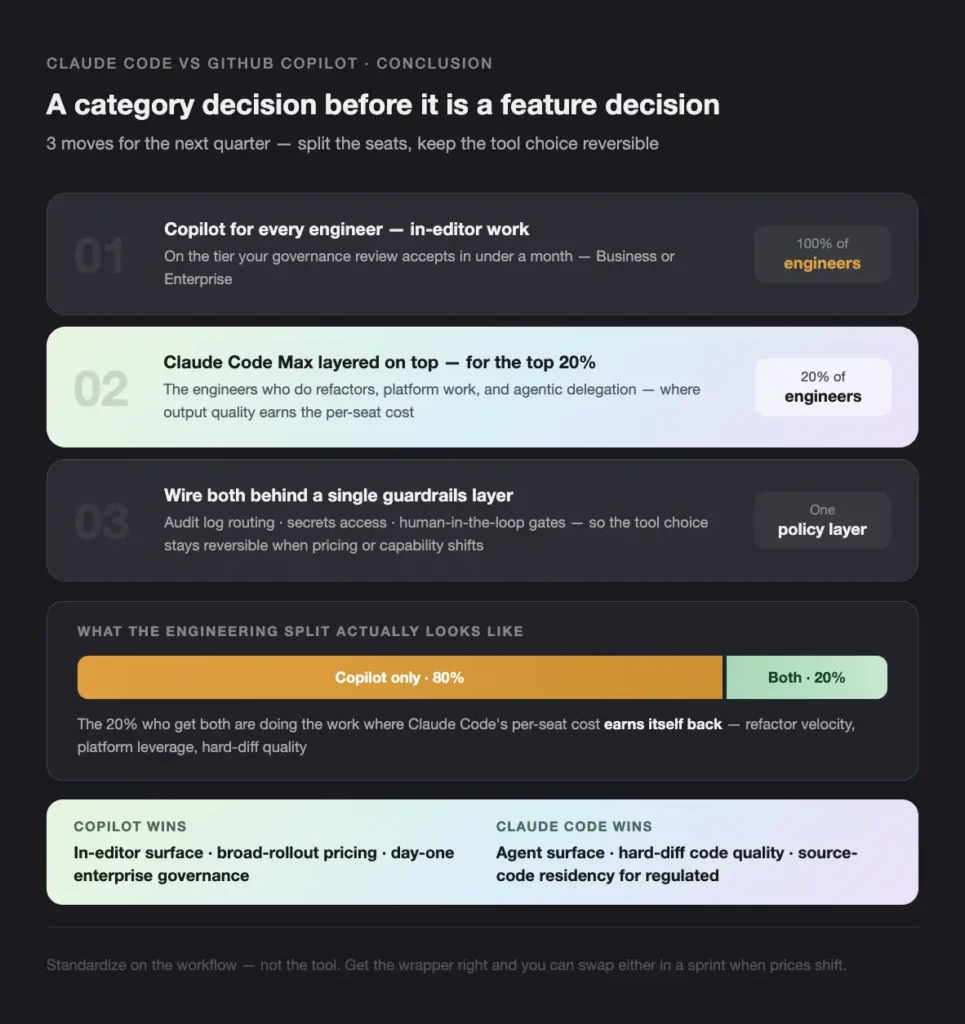
The honest commercial read for a regulated-industry CTO: budget for both, but split the seats. Give every engineer Copilot Business or Enterprise for in-editor work, and give your top 20% of engineers (the ones who actually do refactors and platform work) Claude Code Max on top.
Conclusion
The claude code vs github copilot call is a category decision before it is a feature decision. Copilot wins the in-editor surface, the broad-rollout pricing, and the day-one enterprise governance story. Claude Code wins the agent surface, the hard-diff code quality, and the source-code residency story for regulated industries.
Three moves for a CTO planning the next quarter:
- Give every engineer Copilot for in-editor work, on the tier your governance review accepts in under a month.
- Layer Claude Code Max on top for the 20% of engineers who do refactors, platform work, and agentic delegation.
- Wire both behind a single guardrails layer (audit log routing, secrets access, human-in-the-loop gates) so the tool choice stays reversible.
For a 30-minute conversation with a senior AI engineer about how Claude Code, GitHub Copilot, or both fit your regulated stack, book a Quick Start session with Teamvoy.
FAQ
Sources and further reading: pricing references in this article reflect publicly reported figures as of June 2026 from GitHub’s Copilot pricing page and Anthropic’s Claude Code documentation. Benchmark figures (SWE-bench Verified, SWE-bench Pro, blind code-review preferences) reflect publicly reported results and should be re-validated before any procurement decision.