

Key takeaways:
- No-code fits simple, departmental workflows owned by business users — forms, approvals, internal tools.
- Low-code fits complex, integrated, frequently-changing processes that IT still needs to control.
- Custom development is required for core, high-scale, regulated, or highly differentiated systems.
- The strongest modernization roadmap is hybrid — no-code at the edge, low-code in the middle, custom code at the core, connected by APIs.
- Decision criteria that matter most: workflow complexity, integration depth, regulatory load, expected scale, and how often the rules change.
The short answer: it’s not “either/or” — it’s “what goes where”
The biggest mistake in modernization decisions is treating no-code, low-code, and custom development as competitors. They are not. They are three layers of the same stack, and the question is which layer owns which workflow.
Here is the rule Teamvoy uses with clients:
Use no-code at the edge, low-code in the middle, and custom code at the core. Connect them with APIs.
The rest of this article is the decision frame that gets you there.
The decision matrix
The seven questions below will place any workflow into the right layer. Score each workflow against them before you pick a tool.
| Question | Points to no-code | Points to low-code | Points to custom |
|---|---|---|---|
| Who owns it? | A single business team | IT + business together | IT / engineering |
| How many systems must it integrate with? | 0–1 (data lives in the tool) | 2–5 (CRM, ERP, ticketing) | 5+, including legacy or proprietary |
| How complex is the business logic? | Linear forms and approvals | Branching workflows, decision tables | Algorithms, optimization, ML |
| How regulated is the data? | Low (internal only) | Moderate (GDPR, SOC 2) | High (HIPAA, PCI, BaFin, DORA) |
| What’s the expected scale? | Tens of users | Hundreds to low thousands | Tens of thousands to millions |
| How often do the rules change? | Monthly | Weekly | Quarterly, but unique each time |
| Is the capability a differentiator? | No — table stakes | Mixed | Yes — competitive moat |
A workflow that scores 4+ in the no-code column belongs in no-code. A workflow with even one item in the custom column for regulation or differentiation belongs in custom. Everything in between is a low-code candidate.
When to use no-code
Direct answer: No-code is the right choice when a single team owns a simple, internal workflow and needs to update it without waiting for IT.
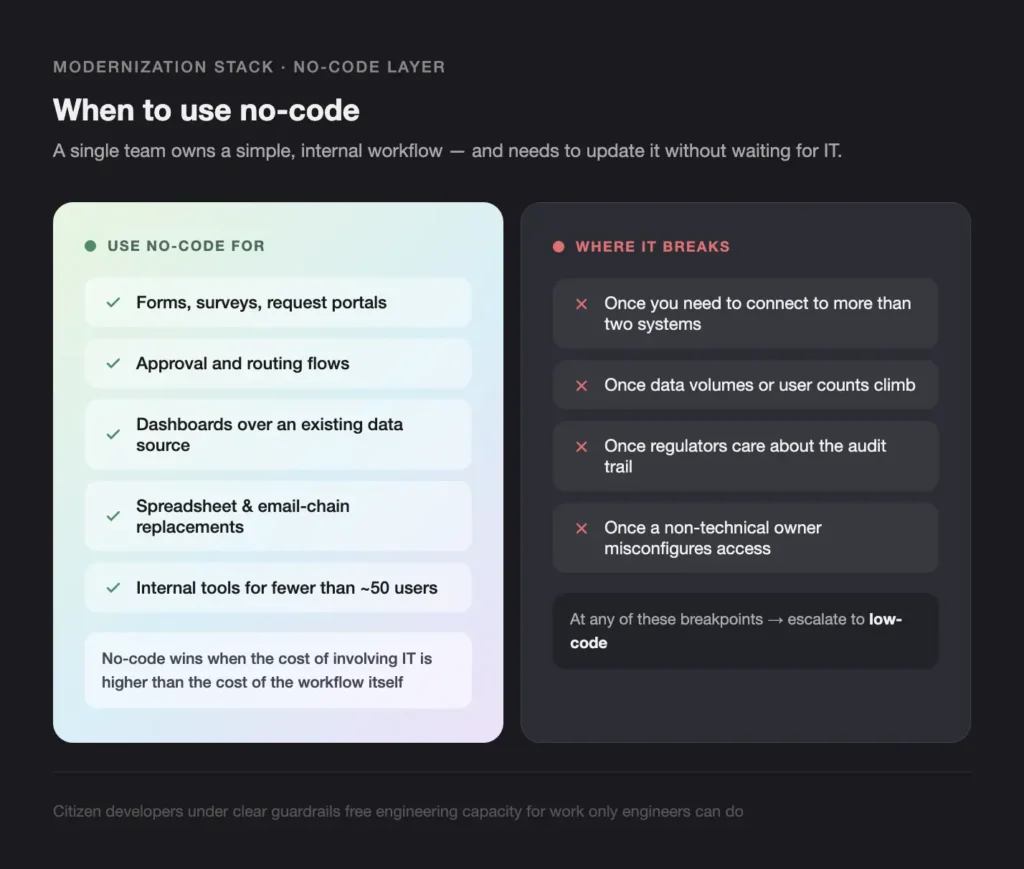
Use no-code for:
- Forms, surveys, and request portals
- Approval and routing flows
- Dashboards over an existing data source
- Replacements for spreadsheets and email-chain processes
- Internal tools for fewer than ~50 users
Teamvoy’s view: no-code wins when the cost of involving IT is higher than the cost of the workflow itself. Citizen developers, under clear guardrails, free engineering capacity for work only engineers can do.
Where no-code breaks:
- Once a non-technical owner misconfigures access and exposes data
- Once you need to connect to more than two systems
- Once data volumes or user counts climb
- Once regulators care about the audit trail
When to use low-code
Direct answer: Low-code is the right choice when a workflow is complex enough to need IT oversight but standard enough that hand-coding it would be wasteful.
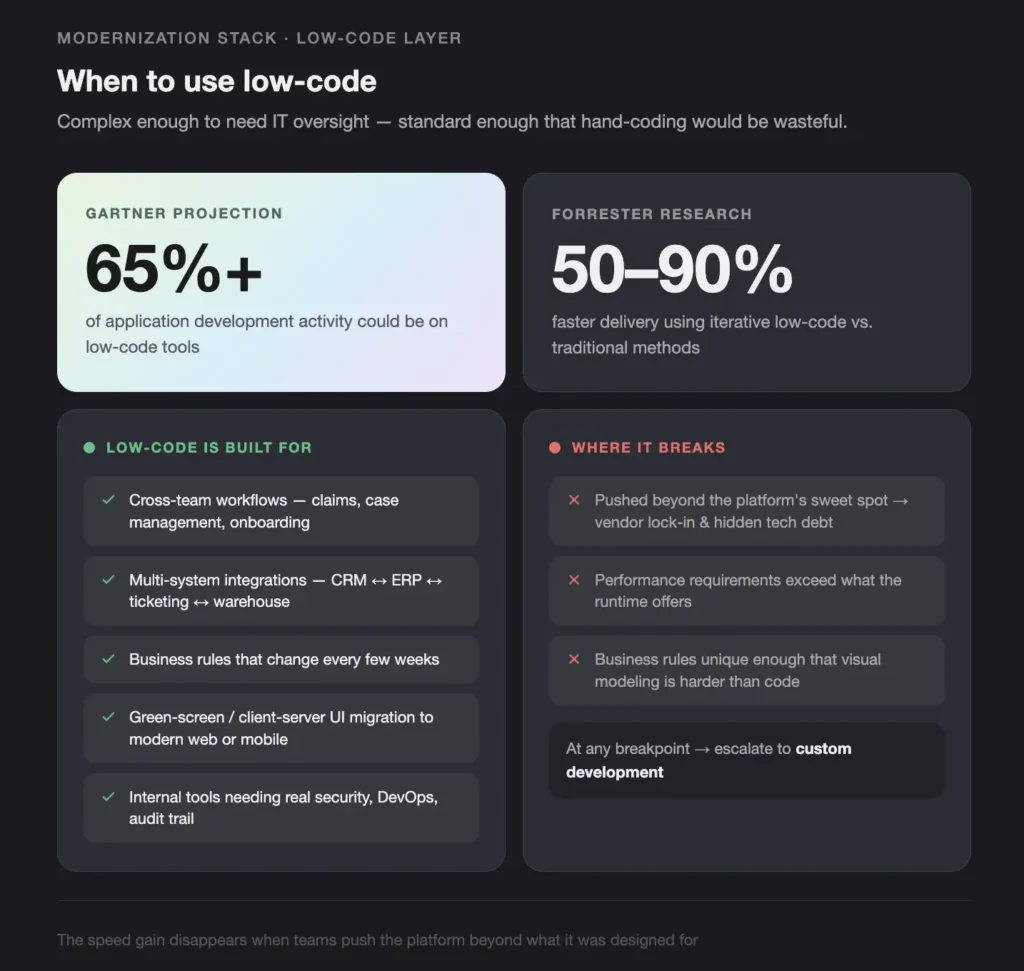
Low-code is built for:
- Cross-team workflows (claims, case management, onboarding)
- Multi-system integrations (CRM ↔ ERP ↔ ticketing ↔ data warehouse)
- Workflows where business rules change every few weeks
- Migration of green-screen or client-server UIs to modern web or mobile
- Internal tools that need real security, real DevOps, and a real audit trail
Gartner has projected that low-code tools could account for more than 65% of application development activity by 2024. Forrester research finds organizations using iterative low-code-based approaches can cut development time by 50–90% compared to traditional methods.
Where low-code breaks:
- When the business rules are unique enough that visual modeling becomes harder than just writing code
- When you push the platform beyond its sweet spot — vendor lock-in and hidden technical debt accumulate fast
- When performance requirements exceed what the runtime can offer
When you still need custom development
Direct answer: Custom software development is required for core, high-scale, regulated, or highly differentiated systems — the places where platform limits will eventually become business limits.
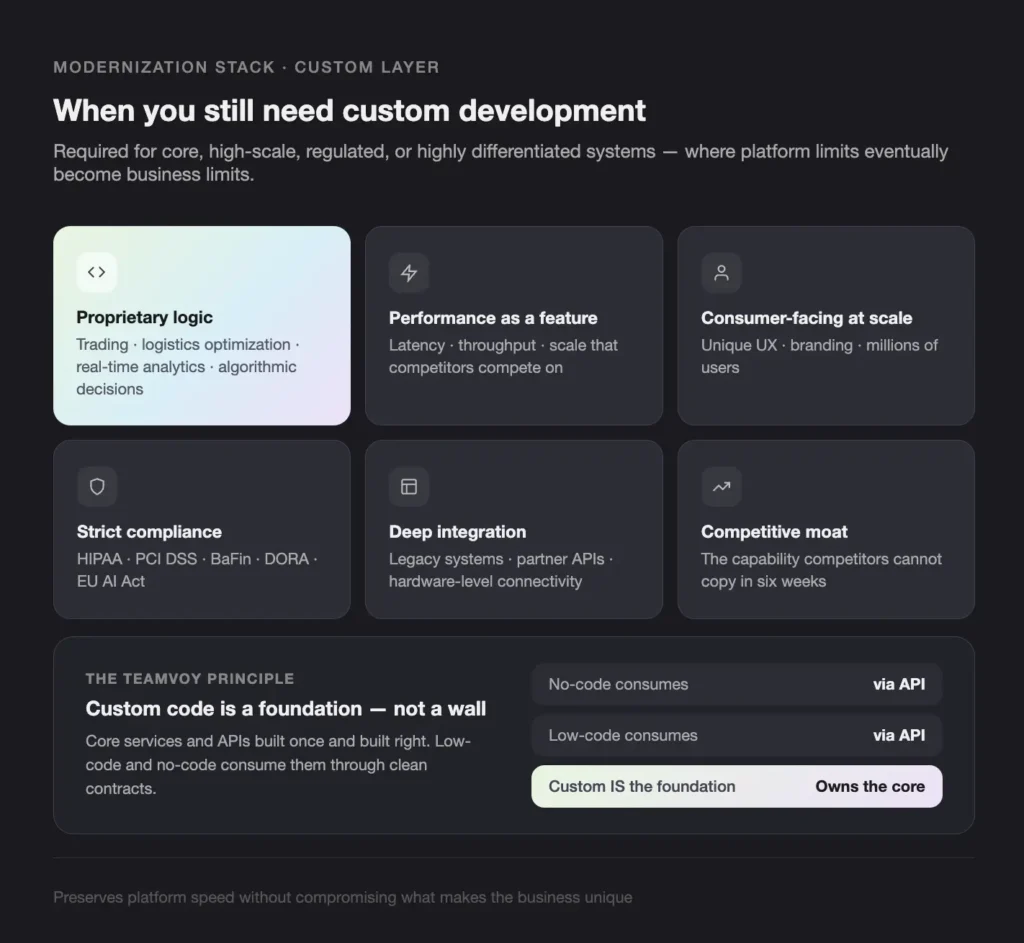
Custom code is the right answer when:
- Your business logic is proprietary or algorithmic (trading, logistics optimization, real-time analytics)
- Performance, latency, or throughput is a competitive feature
- The system is consumer-facing at scale with unique UX or branding
- Compliance is non-negotiable (HIPAA, PCI DSS, BaFin, DORA, EU AI Act)
- Integration goes deep into legacy systems, partner APIs, or hardware
- The capability is a differentiator — the thing competitors cannot copy in six weeks
Teamvoy designs custom code as a foundation, not as a wall. Core services and APIs are built once and built right; low-code and no-code consume them through clean contracts. That preserves the speed of platforms without compromising what makes the business unique.
The hybrid model — how the three layers connect
Direct answer: A hybrid modernization model layers no-code, low-code, and custom development in a single architecture, connected by APIs, so each tool runs only where it is strongest.
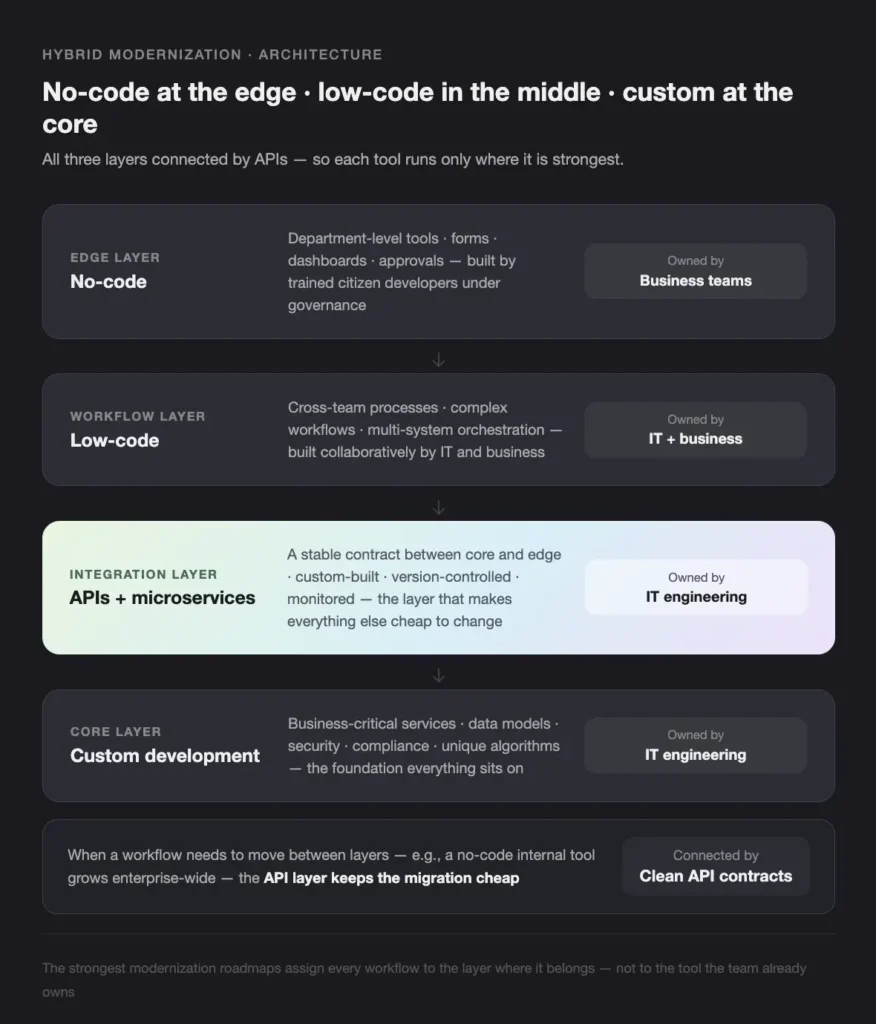
What the layered architecture looks like in practice:
- Core layer — custom development. Business-critical services, data models, security, compliance, and unique algorithms. Owned by IT engineering.
- Integration layer — APIs and microservices. A stable contract between core and edge. Custom-built, version-controlled, and monitored.
- Workflow layer — low-code. Cross-team processes, complex workflows, multi-system orchestration. Built collaboratively by IT and business.
- Edge layer — no-code. Department-level tools, forms, dashboards, and approvals. Built by trained citizen developers under governance.
When a workflow needs to move between layers — for example, when a no-code internal tool grows into something the whole company depends on — the API layer keeps the migration cheap.
What can go wrong (and how to prevent it)
Low-code and no-code create new risk if governance is missing. Teamvoy sees three failure modes most often:
- Shadow IT and app sprawl. Business teams build hundreds of small apps with no oversight, ownership, or backup plan.
- Inconsistent data models. Different departments model the same entity (a customer, a claim, a part) in different ways, polluting downstream reporting.
- Security misconfiguration. A non-technical owner makes a sensitive table public, or wires an integration with credentials that should never have been shared.
Mitigations that work:
- Clear ownership for every app and workflow, IT or business
- Templates, standards, and a starter kit for citizen developers
- Mandatory IT review for any app touching regulated or sensitive data
- Integration of low-code and no-code platforms into the same monitoring, logging, and backup as the rest of the stack
A 5-step playbook for hybrid modernization
- Map the portfolio. Score every legacy app on business criticality, user pain, technical fragility, and modernization complexity.
- Pick the platform. Evaluate enterprise low-code platforms and no-code tools on integration, governance, security, scalability, and exit options. Run a 2-week proof of concept before committing.
- Build in parallel. Mirror a target workflow in the new platform while the legacy system stays live. Test with real users, iterate, sync data.
- Migrate incrementally. Move user groups in phases, not in a big-bang cutover. Train citizen developers as you go.
- Retire deliberately. Define explicit shut-down criteria for each legacy module (users moved, data reconciled, compliance signed off), then archive and decommission.
This sequence keeps risk low and benefit visible at every stage.
Where Teamvoy fits
Teamvoy helps organizations design and run hybrid modernization — selecting the right low-code and no-code platforms, building the custom core and API layers underneath, and setting up the governance that keeps the whole stack safe in production. We work with clients across fintech, insurance, healthcare, manufacturing, and hi-tech, where the cost of getting modernization wrong is highest.
A typical Teamvoy engagement starts with a free 3–5 day AI & System Readiness Audit: architecture review, risk surface, prioritized action plan. No obligation.
Conclusion
The decision between no-code, low-code, and custom development is not a tooling question. It is an architecture question. Each tool has a sweet spot, and the strongest modernization roadmaps assign every workflow to the layer where it belongs — no-code at the edge for speed, low-code in the middle for collaboration, custom code at the core for control, all connected by clean APIs.
If you want a written, prioritized read on where your portfolio belongs in that stack, book the free 3–5 day Teamvoy Readiness Audit. A senior engineer reviews your architecture, surfaces the risks, and returns a phased action plan. No sales pitch, no obligation.