


TL;DR
React Native is the right choice for a primary, secure mobile banking app in a hybrid cloud setup. PWAs fit low-risk, browser-based journeys — onboarding, calculators, support, and internal portals. For most banks in 2026, the winning pattern is a React Native flagship app plus focused PWAs, both sitting on the same API-first hybrid cloud backend with shared identity, logging, and monitoring.
Key takeaways:
- Use React Native for core mobile banking, high-risk transactions, biometrics, and offline-aware features where trust and security are central.
- Use PWAs for low-risk portals, onboarding flows, calculators, help centers, and internal tools where reach, speed, and cost matter more than device access.
- Both clients should sit on the same API-first hybrid cloud backend with shared IAM, logging, and monitoring.
- React Native costs more and adds app store overhead, but delivers stronger biometrics, secure storage, and MDM support than PWAs.
- A combined strategy works when guided by clear risk tiers, regulatory needs (PSD2, DORA, SOC 2, PCI DSS, EU AI Act), and a shared design and security framework.
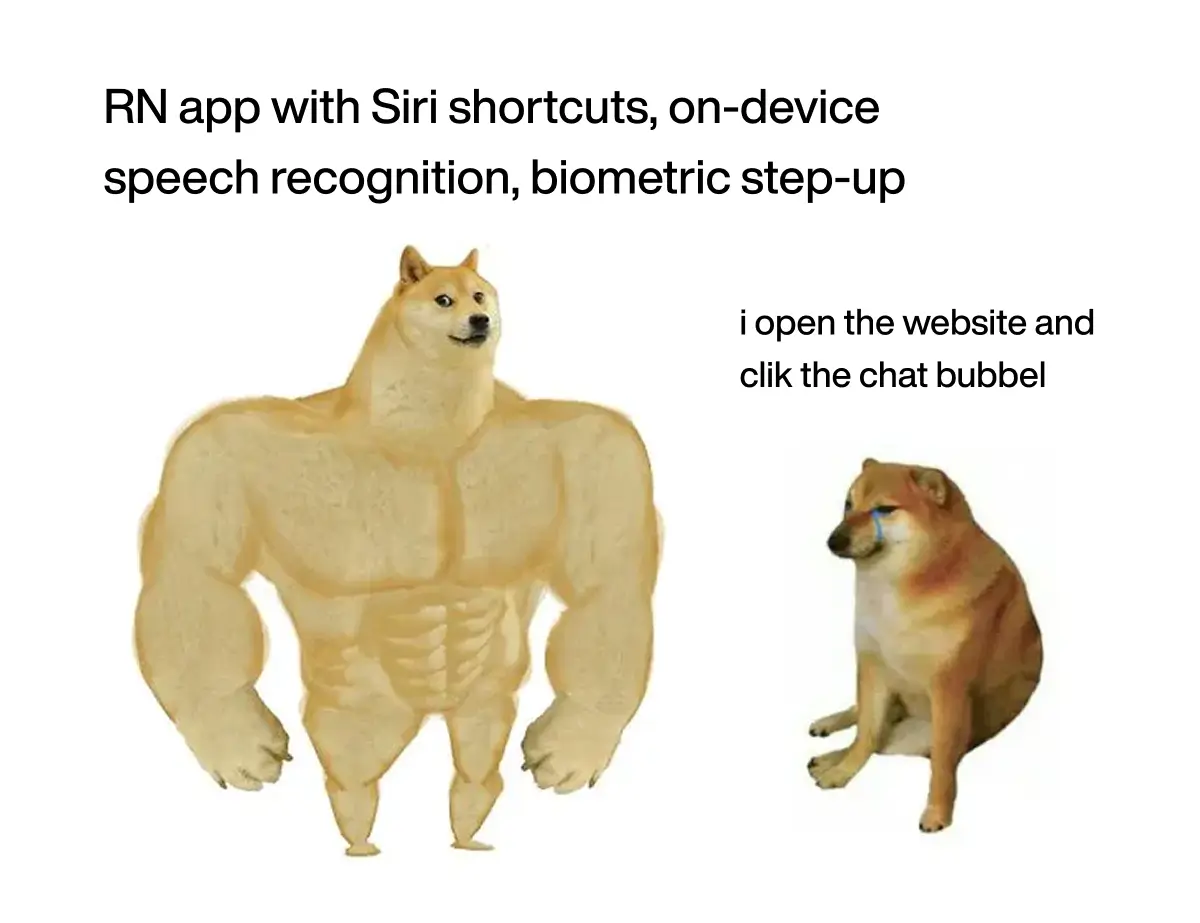
- An AI assistant inside the app can run in either client, but React Native wins on voice, proactive push, OS-level entry points (Siri / Google Assistant), and secure on-device conversation memory — PWAs work for text-only chat over a central AI gateway.
| Topic | Key insight | Why it matters | Action |
|---|---|---|---|
| Role of React Native | Best for primary, secure mobile banking — payments, cards, investments | Matches 2026 security, biometric, and UX expectations | Use it for any journey with high financial or regulatory risk |
| Role of PWAs | Best for lightweight, low-risk, browser-friendly flows | Faster time to market and lower cost for simple use cases | Use for onboarding, calculators, support content, internal portals |
| Security & compliance | React Native gets stronger biometrics, secure storage, device binding | PSD2 (EU) and FFIEC (US) expect device-bound, strongly authenticated sessions | Keep high-risk actions in React Native; limit PWA storage of sensitive data |
| Performance & UX | React Native delivers steady native-like UX; PWAs depend on browser and device | Customer trust in banking is tightly tied to app speed and secure feel | Use React Native for complex and offline-aware flows; PWAs for linear ones |
| Hybrid cloud integration | Both clients consume the same APIs and events across on-prem and public cloud | One backend avoids duplicated logic and fragmented risk controls | Design API-first services with shared IAM and monitoring for both clients |
| Cost & delivery | PWAs cheaper for simple portals; React Native pays off when risk is high | TCO depends more on risk level than on the framework | Start PWAs for low-risk MVPs; invest in React Native as risk exposure grows |
| Organizational setup | React Native needs mobile-savvy teams; PWAs lean on web teams | Skill or governance gaps slow delivery and weaken security | Build cross-functional teams or partner with a vendor covering mobile, web, cloud, security |
| Combined strategy | A React Native flagship plus focused PWAs balances risk and reach | Avoids one-size-fits-all tech choices | Map each journey by risk and assign it to React Native, PWA, or a mix |
| AI assistant inside the app | Both clients can host a chat assistant; React Native adds voice, proactive push, Siri/Assistant shortcuts, and secure conversation memory | EU AI Act classifies banking assistants as high-risk — full audit trail required | Build one AI gateway with tool calling, PII redaction, and biometric step-up; reuse across clients |
Introduction
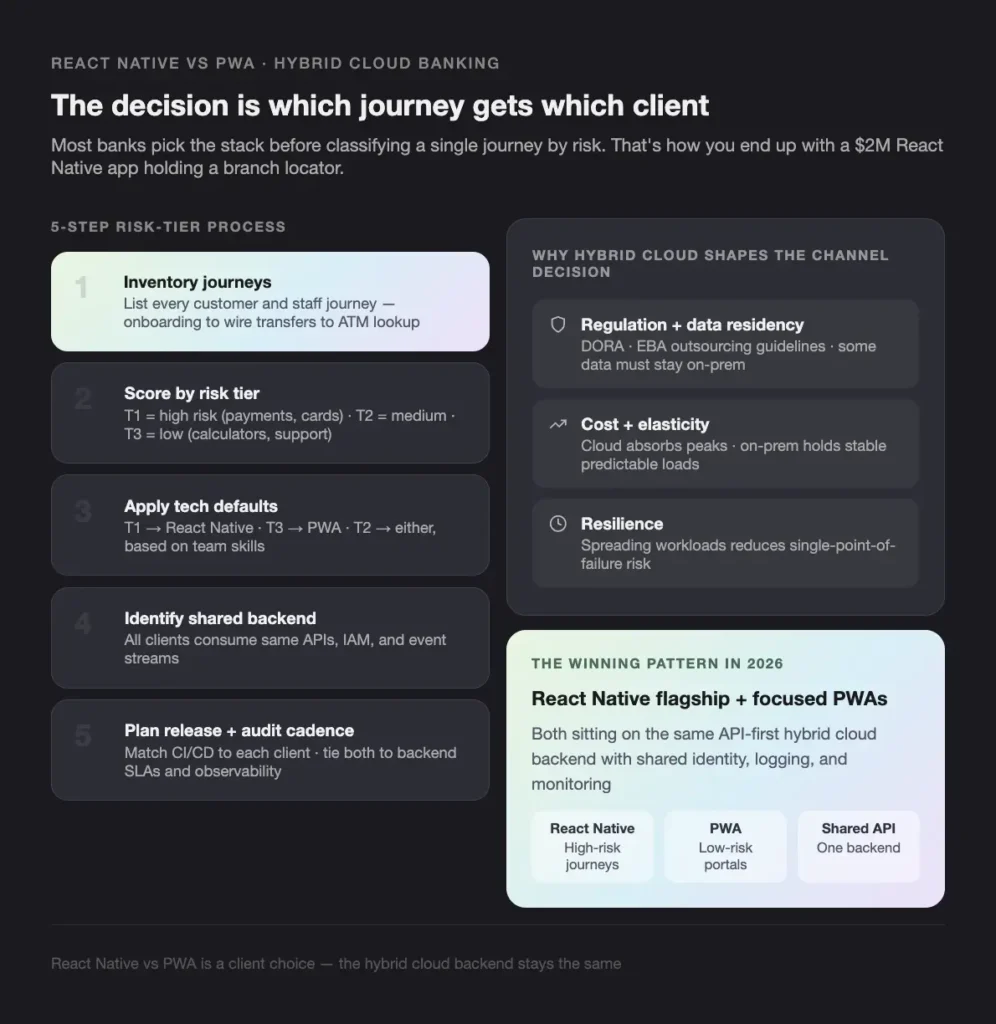
Most banks pick their mobile stack before they’ve classified a single customer journey by risk. That’s how you end up with a $2M React Native app holding a branch locator, and a PWA quietly handling wire transfers from shared devices. The React Native vs PWA debate isn’t the real question — the real question is which journey gets which client, and most digital roadmaps skip it.
This guide is for CTOs, CIOs, heads of digital, and product leads at banks and fintechs deciding how to deliver mobile and web in a hybrid cloud architecture. We compare React Native and Progressive Web Apps across security, performance, cost, regulatory fit (PSD2, DORA, SOC 2, PCI DSS), and integration with on-prem and public cloud workloads. By the end, you’ll have a risk-tiered framework for assigning each customer journey to the right client — and a clear view of where a partner like Teamvoy fits in.
What is the React Native vs PWA decision in hybrid cloud banking, and why does it matter?
The React Native vs PWA decision is a client-architecture choice for how customers reach your hybrid cloud banking backend — through a native-feeling mobile app, a browser-based progressive web experience, or both. It matters because regulators expect device-bound authentication for sensitive actions, while customers expect biometric, sub-second access on every device.
The 6x cost spread comes from three honest variables that drive scope:
Hybrid cloud banking in 2026 means workloads run across on-prem data centers and one or more public clouds — core banking, payments, KYC, analytics, and channels — connected by secure networks and shared governance.
Key drivers we see with clients:
- Regulation and data residency. Some data must stay on-prem or in a specific region; less sensitive workloads move to public cloud. The European Banking Authority’s guidelines on outsourcing arrangements and the EU’s Digital Operational Resilience Act (DORA) both shape what can sit where.
- Cost and elasticity. Public cloud absorbs peaks; on-prem hosts stable, predictable loads.
- Release speed. Cloud-native services shorten product cycles and unlock modern tooling.
- Resilience. Spreading workloads across environments reduces single-point-of-failure risk.
Modern mobile and web channels sit on top of this hybrid landscape through API-first design, modular services, and event-driven integrations. The mobile app or PWA is one more client of the hybrid cloud, consuming secure APIs and events.
What hybrid cloud banking requires from your channels
A hybrid cloud setup adds complexity, so digital channels have to be consistent and secure by design:
- Consistent experience across mobile, web, and branch, so a customer can start a process in one channel and finish in another.
- Strong security across every channel — MFA, biometric authentication, and encryption in transit and at rest.
- Reliable deployment and operations — CI/CD, observability, and incident response that cover both frontends and the hybrid backend.
When we design a React Native banking app or a PWA banking portal, we align channel behavior with the hybrid cloud architecture rather than treating it as a separate island.
How do you decide between React Native and PWA for banking apps?
YoYou decide by risk tier. Score each customer journey on financial risk, regulatory exposure, and the depth of device access it needs — then apply the technology that fits, not the framework you already own.
Use this five-step process:
Plan release cadence, observability, and audit. Match mobile CI/CD to React Native and web pipelines to PWAs; tie both to backend SLAs.
Inventory journeys. List every customer or staff journey, from onboarding to wire transfers to ATM lookup.
Score each one by risk tier. Tier 1 = high financial or regulatory risk (payments, card controls, trading). Tier 2 = medium risk (account view, basic transfers). Tier 3 = low risk (marketing, calculators, support).
Apply technology defaults. Tier 1 → React Native. Tier 3 → PWA. Tier 2 → either, depending on team skills and roadmap.
Identify shared backend services. All clients should consume the same APIs, IAM, and event streams.
What React Native gives you for banking
React Native is a framework for building mobile apps in JavaScript or TypeScript that render real native UI components on iOS and Android. With the New Architecture (Fabric + TurboModules) now standard, it covers iOS, Android, and — through related projects — desktop and web when needed.
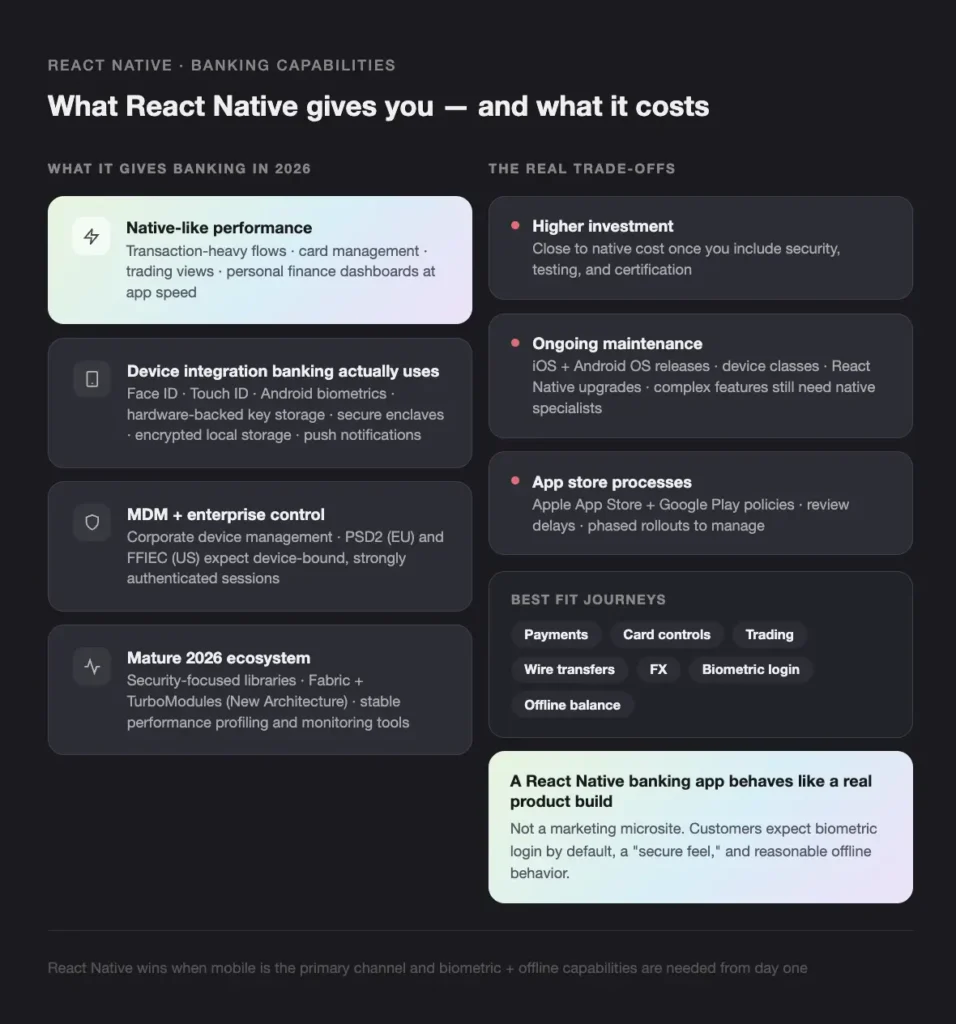
For mobile banking in 2026, React Native gives you:
- Native-like performance for transaction-heavy flows, card management, trading views, and personal finance dashboards.
- Device integration that banking actually uses — Face ID, Touch ID, Android biometrics, hardware-backed key storage and secure enclaves, encrypted local storage, push notifications for fraud alerts and payment confirmations.
- Solid UX and accessibility — platform-native navigation, accessibility support, and animations that help build trust.
- A mature 2026 ecosystem — security-focused libraries, performance profiling, and monitoring tools that are stable and well-tested.
The trade-offs are real:
- Higher investment than a basic PWA. A production React Native banking app gets close to native costs once you include security, testing, and certification.
- Ongoing maintenance. iOS and Android OS changes, new device classes, and React Native upgrades all need attention. Complex features still pull in native iOS/Android specialists.
- App store processes. Apple App Store and Google Play policies, review delays, and version rollouts have to be managed.
In other words, a React Native banking app behaves like a real product build, not a marketing microsite.
What PWAs give you for banking
A Progressive Web App is a web app that uses service workers, web app manifests, and caching to feel app-like. PWAs can work offline in limited scenarios, send limited notifications on some platforms, and be “installed” to a home screen straight from the browser.
PWAs work well for specific banking and fintech use cases:
- Cross-platform reach. Any modern browser on mobile, tablet, or desktop opens it.
- No app store friction. Customers open a URL; updates ship server-side.
- Lower upfront cost. One team, one codebase, all form factors.
- Daily release cadence. No store approval queues.
Where we use PWAs: loan calculators, branch and ATM locators, help centers, onboarding microsites, and internal staff portals on controlled devices.
The limits in 2026 still matter for serious banking:
- Biometric support depends on browser and OS and is not always reliable enough for step-up auth.
- Secure storage is weaker — IndexedDB, localStorage, and cookies are exposed to XSS and shared-device risk.
- Background tasks and offline behavior are restricted by browser rules.
- Trust and brand. Many customers trust a dedicated banking app more than a browser tab for high-value transactions, and PWAs have no app store presence to anchor the brand.
We rarely recommend a PWA-only solution for full retail banking. We use PWAs where risk and expectations are lower.
Security and compliance side by side
| Dimension | React Native | PWA |
|---|---|---|
| Biometric auth | Native APIs (Face ID, Touch ID, Android biometrics) | WebAuthn / FIDO2; varies by browser and OS |
| Secure storage | iOS Keychain, Android Keystore, encrypted local storage | IndexedDB, localStorage, cookies — exposed to XSS |
| Device binding | Hardware-backed keys, secure enclaves | Limited; device-bound credentials where supported |
| MDM / enterprise control | Strong (corporate device management) | Web policy + content security tooling |
| Offline use | Encrypted local cache, background sync | Service worker cache, narrower scope |
| Audit & logging | Mobile crash + APM tools | Web RUM + browser metrics |
| Best for | Payments, card controls, trading, wires, FX | Calculators, locators, help, onboarding portals |
Two practical rules from our work with banks:
- Don’t store sensitive banking data in browser storage for long, especially on shared or unmanaged devices.
- Keep session tokens short-lived and push high-risk actions back to a stronger native channel when the situation calls for it. PSD2 in the EU and FFIEC guidance in the US both push you in this direction.
Performance and UX in real-world banking
Mobile app performance in banking is about confidence. Customers want instant account overviews, smooth transfers, reliable card controls, and fast trading updates where relevant. React Native handles these flows with the New Architecture and disciplined API use. PWA performance can be excellent on modern devices and networks, but slow networks, older devices, or heavy JavaScript bundles can cause lag. Service workers and caching help, but you’re still bound by browser lifecycle rules.
By 2026, customers expect biometric login by default, a clean interface, a “secure feel” with clear confirmations, and reasonable offline behavior — cached balances, recent transactions. React Native maps well to those expectations. PWAs cover simpler flows and look app-like when installed, but gaps in biometrics, offline depth, and OS integration keep them behind for full financial journeys.
Architecture and integration with hybrid cloud
Both clients should consume the same backend:
- API-first, microservices-based services
- API gateways with central auth, rate limits, and logging
- Event buses or streams for transactions and notifications
In a hybrid cloud setup, we design:
- Secure north-south entry points for all channels
- Shared identity and access management for mobile and web
- Encryption and data classification across on-prem and cloud
React Native vs PWA is a client choice. The backend stays the same.
Release management differs:
- React Native — mobile CI/CD pipelines, build and signing, app store submissions, phased rollouts, feature flags.
- PWA — deployment pipelines to hosting or Kubernetes, blue-green or canary releases, CDN caching, rollback strategies.
PWAs give you faster, simpler rollout control. React Native gives you stronger installed-app presence and deeper device capability.
For observability, we track crash reports, performance traces, and API response times inside React Native apps; web analytics, RUM, and browser performance metrics for PWAs. Both feed back into backend SLAs so we can see, for example, when a payments microservice slowdown in one region hits the React Native app and the PWA portal at the same time.
How do you integrate an AI assistant into a banking app?
An AI assistant inside a banking app is a chat or voice copilot that can answer questions (“what did I spend on groceries last month?”), draft actions (“set up a $500 monthly transfer to my savings”), and trigger banking APIs through tool/function calling — with step-up biometric confirmation for anything sensitive. Both React Native and PWA can host one, but the experience splits along the same security and device-access line as the rest of the app.
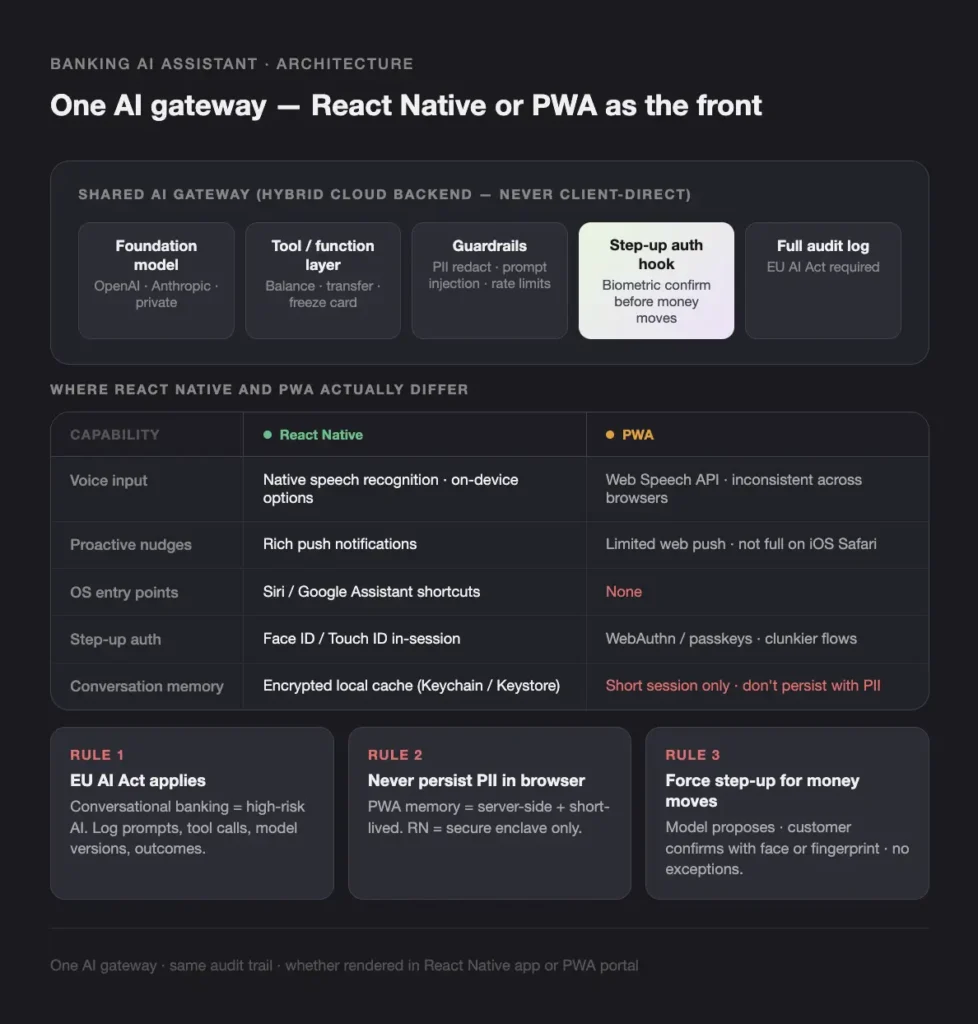
Architecture stays the same regardless of client:
- AI gateway service in your hybrid cloud — a single backend that fronts the foundation model (OpenAI, Anthropic, Mistral, or a private deployment). The frontend never talks to a model directly.
- Tool/function layer — the gateway calls your existing banking APIs (balance, transfer, card freeze, statements) with the logged-in customer’s scope.
- Guardrails — PII redaction, prompt-injection filters, content policy, per-customer rate limits, full audit logging.
- Step-up auth hook — high-risk tool calls (transfers above a threshold, new payees, card limit changes) bounce back to the client for biometric confirmation before executing.
- Streaming transport — Server-Sent Events or WebSockets from gateway to client.
Where React Native and PWA actually differ for an AI assistant:
| Capability | React Native | PWA | Why it matters |
|---|---|---|---|
| Streaming responses | SSE / WebSocket, no browser quirks | SSE / fetch streams, works but watch Safari quirks | Token-by-token UX in chat |
| Voice input | Native speech recognition with on-device options | Web Speech API; inconsistent across browsers | Voice banking only really works in RN |
| Voice output | Native TTS with voice selection | SpeechSynthesis API; quality and latency vary | Hands-free assistant flows |
| Proactive nudges | Rich push notifications | Limited web push; not supported on iOS Safari for full feature set | Assistant as a proactive channel |
| OS-level entry points | Siri / Google Assistant App Intents and shortcuts | None | “Hey Siri, ask my bank…” only works in RN |
| Step-up confirmation | Face ID / Touch ID inside the same session | WebAuthn / passkeys; flows are clunkier | Required for sensitive actions |
| Conversation memory | Encrypted local cache (Keychain / Keystore) | Short session memory only; don’t persist with PII | Multi-turn assistants need durable, secure memory |
| Document upload to assistant | Camera + on-device pre-processing | File input, no on-device OCR | “Pay this bill” by photo of an invoice |
| Offline / degraded mode | Cached recent context, queue prompts for later | Limited; depends on service worker | Assistant works in tunnels and elevators |
Three rules we hold to regardless of client:
- Treat the assistant as a high-risk AI system under the EU AI Act. Conversational banking, payment drafting, and any credit or fraud reasoning fall into governance regimes you have to document. Log prompts, tool calls, model versions, and outcomes.
- Never persist assistant history with PII in browser storage. PWA conversation memory should be server-side and short-lived; React Native can cache locally only inside the secure enclave-backed keystore.
- Force step-up biometric confirmation for any tool call that moves money or changes account settings. The model proposes; the customer confirms with their face or fingerprint.
In a hybrid cloud setup, keep the model gateway and PII redaction in your private region or on-prem, and use public cloud for cheaper non-sensitive inference (search, FAQ retrieval). Same gateway, same audit trail, whether the assistant is rendered in your React Native app or your PWA portal.
Cost, time to market, and ownership
| Dimension | React Native | PWA |
|---|---|---|
| Initial cost | Higher; close to native in complex cases | Lower for simple portals |
| Cross-platform reach | iOS + Android (web via related projects) | Any modern browser |
| Maintenance | OS releases, store policies, library upgrades | Browser compatibility testing |
| Release cadence | Tied to app store review | Continuous via web pipelines |
| Best fit | Mobile is the primary channel; rich features and biometrics required | Lightweight web portal with limited sensitivity |
PWAs win for fast MVPs, limited product rollouts, and content/calculator portals. React Native wins when mobile is your primary channel, biometric and offline capabilities are needed early, and app store visibility is part of your growth plan. We often start clients with a PWA for early validation, then move to a structured React Native app once the product proves out.
When should you hire Teamvoy to build your banking mobile strategy?
Hire Teamvoy when the React Native vs PWA decision is no longer a tooling question but a delivery question — meaning you need a mixed mobile and web strategy on a hybrid cloud backend, with security and audit baked in from day one, and you don’t have a complete in-house team across mobile, web, cloud, and security.
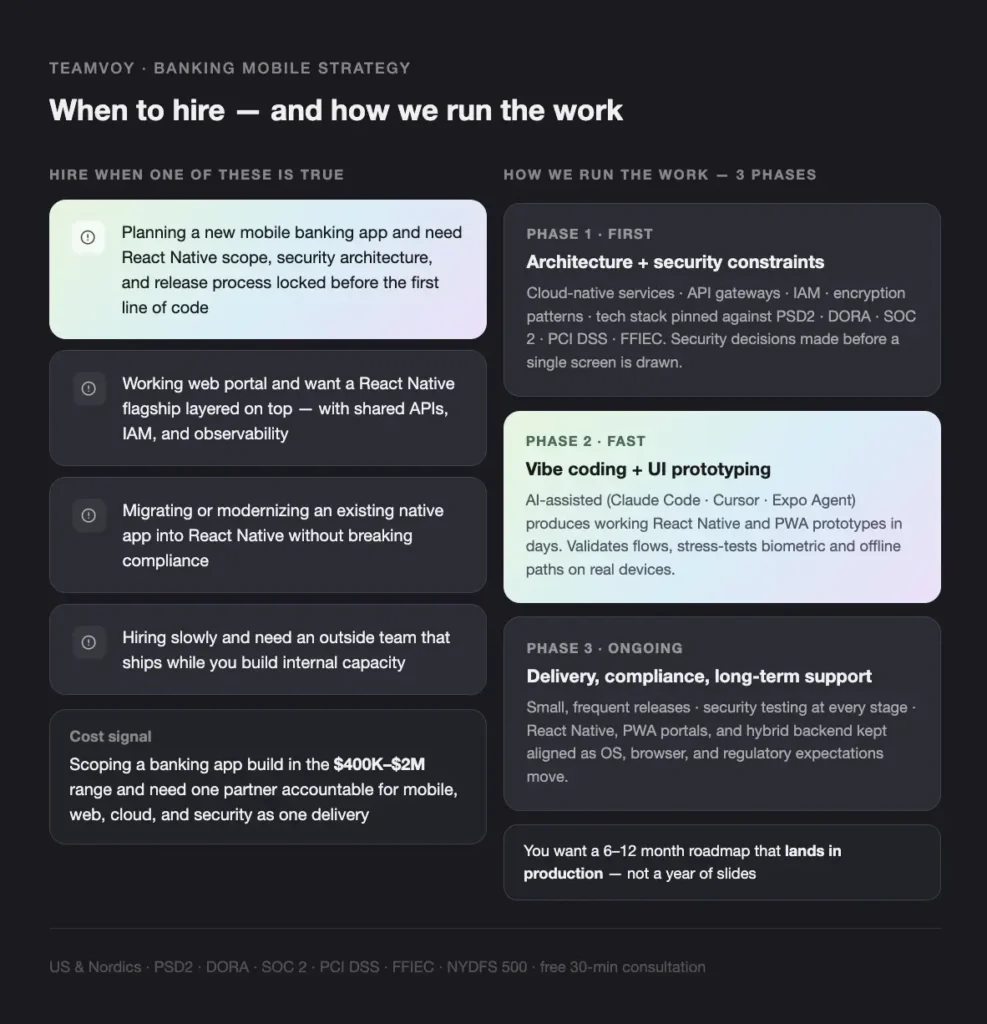
We typically come in when one of the following is true:
You’re hiring slowly and need an outside team that can ship while you build internal capacity.
You’re planning a new mobile banking app and need to settle on React Native scope, security architecture, and release process before you write the first line of code.
You have a working web portal and want to layer a React Native flagship app on top, with shared APIs, IAM, and observability.
You need to migrate or modernize an existing native app into React Native or a hybrid mix, without breaking compliance.
You’re hiring slowly and need an outside team that can ship while you build internal capacity. (See dedicated development team.)
How we run the work
- Architecture, tech stack, and security constraints first. Before any UI work, we lock down the architecture — cloud-native services across on-prem and public clouds, API gateways, IAM, encryption patterns — and pin the tech stack against your regulatory obligations (PSD2, DORA, SOC 2, PCI DSS, FFIEC, NYDFS Part 500). Security and data classification decisions are made before a single screen is drawn, so downstream choices don’t trigger rework.
- Vibe coding and UI prototyping. Once the backbone is set, we move fast on the frontend. AI-assisted vibe coding (Claude Code, Cursor, Expo Agent) produces working React Native and PWA prototypes in days, not weeks. We use these to validate flows with stakeholders, stress-test biometric and offline paths on real devices, and lock UX patterns shared across both clients before full build.
- Delivery, compliance, and long-term support. We ship in small, frequent releases with security testing and observability at every stage, then keep React Native, PWA portals, and the hybrid backend aligned over time as OS, browser, and regulatory expectations move.
Cost signals that we make sense
- You’re scoping a banking app build in the $400K-$2M (~€370K-€1.85M) range and don’t want to underspend on security or overpay on hype.
- You need a partner that can hold accountability for mobile, web, cloud, and security as one delivery, not four vendors.
- You want a 6-12 month roadmap that lands in production, not a year of slides.
Conclusion
For hybrid cloud banking in 2026, the answer isn’t “React Native or PWA” — it’s “which client for which journey”. Use React Native for the secure flagship app and high-risk flows where biometrics, offline behavior, and deep OS integration matter. Use PWAs for lightweight, low-risk journeys where reach and cost win. A combined strategy on a single API-first hybrid cloud backend is what most modern banks should aim for. Three takeaways to act on:
- Score every customer journey by risk tier before you pick a framework.
- Keep one backend, one IAM, and one observability layer behind both clients.
- Build the team — or pick the partner — that can hold mobile, web, cloud, and security accountability together.
Ready to map your journeys to the right client? Get a project estimate from Teamvoy and we’ll put together a custom plan that connects React Native, PWAs, and your hybrid cloud banking architecture into one coherent strategy.