

Key takeaways:
Cursor works best as an IDE-first pair programmer that keeps developers in control, while Claude Code works best as a terminal-first agent for large, automated, cross file changes. For most CTOs, the smart move is to use both under clear guardrails, measure impact, and treat AI coding tools as core delivery infrastructure, not side experiments.
Key points:
- Start with your SDLC, pain points, and risk profile, then decide where Cursor and Claude Code fit, instead of picking a tool first.
- Use Cursor for everyday coding, reviews, and local refactors inside the IDE, and use Claude Code for big refactors, repo wide automation, and CI/CD tasks.
- Put strong guardrails in place, including data policies, branch protection, audit logs, and clear rules on where autonomous agents can run.
- Run a 4–8 week pilot with a few teams, track metrics like lead time, defect rates, and developer sentiment, then scale based on real ROI.
- Treat adoption as a change program, with clear ownership, training, internal champions, and regular review of cost, usage, and quality.
| Topic | Key insight | Why it matters | Action item |
|---|---|---|---|
| Cursor vs Claude Code role | Cursor is IDE-first and control-heavy; Claude Code is terminal-first and autonomy-heavy | Matching the tool to the workflow avoids friction and poor adoption | Map which teams are IDE-centric vs terminal-centric and assign a primary tool to each |
| Adoption approach | Tool choice should follow SDLC analysis and pain points, not marketing | You reduce wasted spend and focus AI where it actually moves the needle | Run a short assessment of your delivery flow, bottlenecks, and current tooling before buying licenses |
| Use cases across SDLC | Cursor shines in implementation and review; Claude Code in refactoring, automation, and maintenance | A hybrid approach covers most stages of software delivery with fewer gaps | Define a simple internal playbook: “use Cursor for X, Claude Code for Y” with concrete examples |
| Autonomy and risk | More autonomy means more risk, so Claude Code needs stricter guardrails than Cursor | Large, opaque diffs and command execution can create security and quality issues | Set branch rules, scope limits, and review policies for AI-driven changes, especially for Claude Code runs |
| Security and compliance | Both tools can be safe if you design data flows, logging, and approvals up front | Regulated sectors risk policy violations if code or secrets leave approved boundaries | Involve CISO or DPO early, decide which repos are AI-eligible, and exclude secrets and sensitive data by default |
| Cost and ROI | Cursor is per-seat and predictable; Claude Code is usage-based and variable — real value is in time saved and quality gains | Without measurement, AI tools can become a cost center instead of a performance driver | During pilots, track hours saved, defect trends, and coverage changes, then compare to license and usage costs |
| Team segmentation | Power users should own Claude Code; broad engineering should use Cursor daily | Clear ownership and champions speed learning and reduce misuse | Nominate staff engineers or platform leads as Claude Code owners and give all developers basic Cursor training |
| Implementation playbook | A staged path — assess, pilot, guardrails, scale — works better than a big-bang rollout | You avoid chaos and can tune policies based on real feedback | Start with a 4–8 week pilot on 1–2 teams, then tighten governance and expand to more repos and teams |
| Role of partners like Teamvoy | External help can speed strategy, integration, training, and measurement | Most orgs lack internal experience to design and tune an AI coding stack on first try | If you lack bandwidth or expertise, engage a partner to co-design pilots, guardrails, and dashboards, then hand over ownership |
Cursor vs Claude Code for CTOs Answer first
Cursor is stronger when you want developers to stay in their IDE and get continuous, controlled AI help, while Claude Code is stronger when you want an autonomous terminal agent to run bigger, cross‑file tasks and automation. For most CTOs, the right answer is not “Cursor vs Claude Code” but “where should we use each, under which guardrails, and how do we prove ROI.” At Teamvoy, we help design and run that strategy end to end.
How Teamvoy thinks about AI coding tools strategy
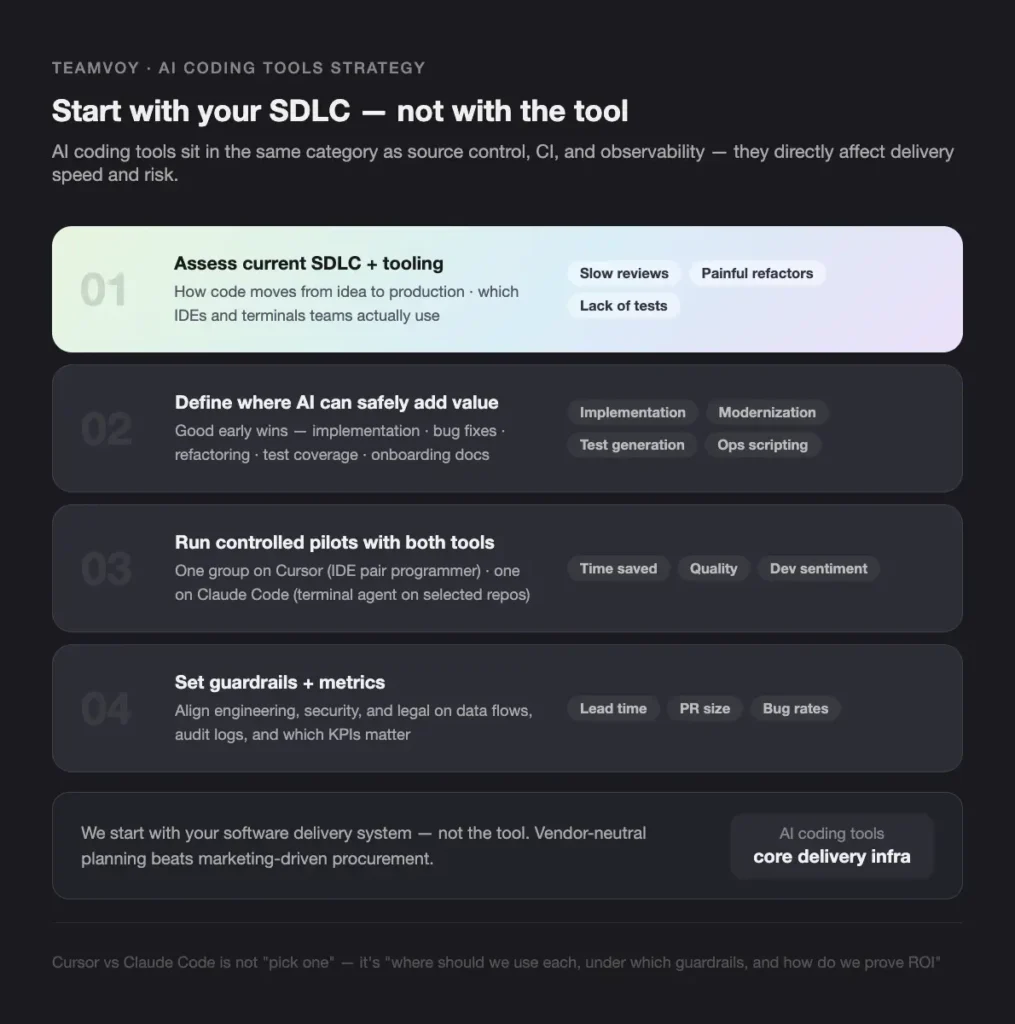
For us at Teamvoy, AI coding tools are no longer side projects. They sit in the same category as source control, CI, and observability, because they directly affect delivery speed and risk. When we work with CTOs on cursor vs claude code decisions, we do not start with the tool. We start with your software delivery system.
We usually follow this pattern:
1. Assess your current SDLC and tooling
We look at:
- How code moves from idea to production
- Which IDEs and terminals your teams actually use
- Where the friction is, for example, slow reviews, painful refactors, lack of tests
2. Define where AI can safely add value
In our projects, we see good early wins in:
- Implementation and bug fixing
- Refactoring and modernization
- Test generation and coverage
- Documentation and onboarding
- Ops scripting and small automation tasks
3. Run controlled pilots with Cursor and Claude Code
We design short, focused pilots:
- One group uses Cursor as an IDE-first AI pair programmer
- Another tries Claude Code as a terminal AI agent on selected repos
- Both collect metrics on time saved, quality, and developer sentiment
4. Set guardrails and metrics
We align with engineering leadership, security, and sometimes legal on:
- What code can be sent to external models
- How we log and review AI-generated changes
- Which KPIs matter, for example, lead time, PR size, bug rates
Because we have already gone through this inside Teamvoy and with clients, this article is intentionally vendor neutral. Our aim is to give you a practical cursor vs claude code comparison you can use in planning, not to cheer for one tool.
Executive summary Cursor vs Claude Code at a glance
For busy CTOs, the core tradeoff in cursor vs claude code is simple.
Cursor
- An IDE-first AI pair programmer based on a VS Code fork
- You stay in control, the AI suggests and edits inline
- Best for interactive, day-to-day development work
Claude Code
- A terminal-first, agent-style coding assistant
- You give a high-level goal, it plans and executes tasks in your repo
- Best for larger, autonomous changes and automation
External reviews describe the same pattern: Cursor focuses on interactive editing inside an IDE, while Claude Code favors agent-like tasks from the terminal where you describe the goal and let the tool run across files and commands.
From a leadership view, the main differences are:
Control vs autonomy
- Cursor keeps developers in the driver seat, with visual diffs and small steps
- Claude Code acts more like a junior developer you delegate work to
Coding session vs background tasks
- Cursor fits active coding sessions and feature work
- Claude Code fits background or batch jobs, like refactors and mass test generation
Workflow impact and learning curve
- Cursor feels like “VS Code with superpowers”
- Claude Code fits teams that are already terminal heavy
In our experience at Teamvoy:
- If your top priority is fast developer adoption and productivity inside existing IDE habits, you lean toward Cursor.
- If your top priority is large refactors, codebase-wide automation, and CI/CD agents, you lean toward Claude Code.
- Many mature teams end up using both, plugging each into a different part of the SDLC.
Understanding Cursor IDE first AI coding assistant
What Cursor is and how it works
Answer first: Cursor is an AI-native version of VS Code that wraps the full editor experience around an AI pair programmer.
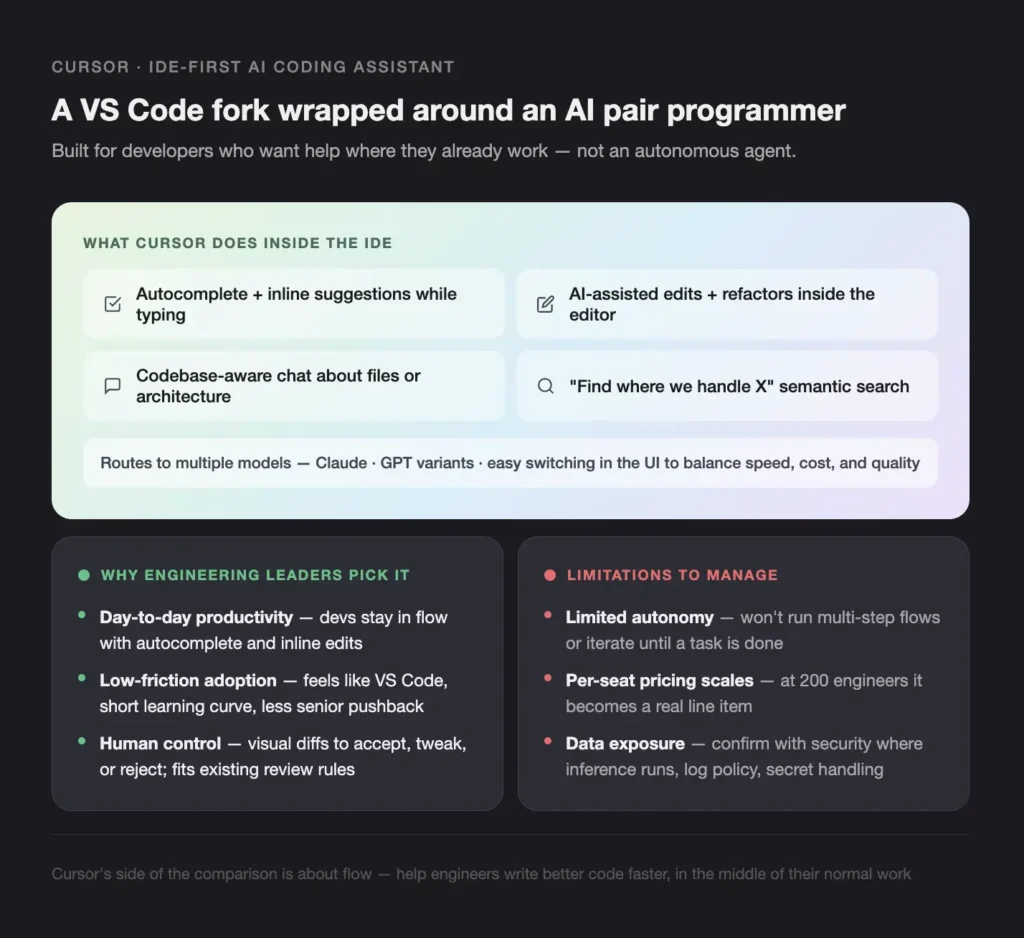
Cursor is built as a fork of VS Code, so to most developers it feels familiar from day one. At the time of writing, it typically offers:
- Autocomplete and inline suggestions while typing
- AI-assisted edits and refactors inside the editor
- Codebase-aware chat, where you can ask questions about files or architecture
- Search and navigation that can leverage the model for “find where we handle X” style queries
According to public comparisons, Cursor can route to multiple large language models, including Claude and GPT variants, with easy model switching in the UI as noted here. That means you can pick different models for different tasks, which matters when you want to balance speed, cost, and quality. From a CTO view, Cursor is an IDE-first AI coding tool, not an autonomous agent. It fits best when your developers want help where they already work.
Cursor strengths for engineering leaders
Answer first: Cursor makes individual developers faster without forcing a big workflow change. In real projects, we see Cursor help in several ways:
Day-to-day productivity
Developers stay in flow with:
– Strong autocomplete
– Smart suggestions for next steps
– Quick “fix this bug” style inline edits
Low-friction adoption
Because Cursor feels like VS Code, we rarely see more than a short learning curve. For a CTO, this means:
– Lower training cost
– Less pushback from senior engineers
– Faster time to measurable impact
Human control and review
Cursor presents diffs that your developers can accept, tweak, or reject. This:
– Keeps engineers in the loop
– Aligns with existing code review and branch protection rules
– Reduces the risk of massive, opaque changes
We see Cursor work especially well for:
- Feature implementation and incremental improvements
- Code review assistance, for example, suggesting tests or edge cases
- Localized refactors inside one or a few files
This side of the cursor vs claude code comparison is about flow. Cursor helps engineers write better code faster, in the middle of their normal work.
Cursor limitations and risks to consider
Answer first: Cursor has limited autonomy and needs careful handling of data and licensing at scale.
Main things CTOs should watch:
Context scope
Cursor works mostly with:
– The files open in the editor
– The project context it can index
It is less suited to orchestrating full, multi-step flows across the repo without human guidance.
Autonomy limits
It does not naturally manage:
– Running complex command sequences
– Iterating on its own until a task is done
A human is expected to steer the process.
Pricing at scale
Cursor usually follows per-seat subscription pricing. For a 200-person team, this becomes a real line item. You need:
– Usage tracking
– A clear view of which roles benefit most
– Policies for who gets a license and when
Governance and data exposure
You should confirm with your security team:
– Where model inference runs (region, VPC, on-prem options if any)
– What logs are kept and for how long
– How secrets and sensitive IP are handled
For regulated industries, we always involve the CISO or DPO early, long before any code is sent to AI services.
Understanding Claude Code terminal first autonomous coding agent
What Claude Code is and how it works
Answer first: Claude Code is a terminal-first AI agent that works at the repo level and can run commands and edit many files in one go.
Developers interact with Claude Code from the command line, inside their git repository. Typical behavior, based on public sources, looks like this:
- It reads files directly from the repo
- It proposes changes and can write them to disk
- It can run shell commands, tests, or builds, depending on your configuration
- It keeps a stable task context, often via a file like `claude.md` that tracks goals and progress as described here
Claude Code uses Claude models as the engine. Unlike Cursor, which supports several models, Claude Code is tightly bound to the Anthropic model family, which simplifies some choices but increases vendor dependence.
In the cursor vs claude code picture, this is the “agent-first” side, where you describe the outcome and let the AI drive more of the process.
Claude Code strengths for engineering leaders
Answer first: Claude Code shines when you want an autonomous, terminal-native helper for big, systematic work.
We view Claude Code as a good fit for:
Autonomous multi-file tasks
It can:
- Perform large refactors across the repo
- Update APIs or framework versions in many files
- Generate or update tests at scale
- Create or refresh documentation from code comments and behavior
Background and long-running jobs
Because it runs from the terminal, you can:
- Launch tasks that operate over many files
- Let them run while developers focus on feature work
- Review the diffs later
DevOps and CI/CD integration
Claude Code can be:
- Launch tasks that operate over many files
- Let them run while developers focus on feature work
- Review the diffs later
External comparisons point out that this agent-like, end-to-end execution makes Claude Code better for large refactors and automation-heavy scenarios than many IDE-only tools as seen here.
Claude Code limitations and risks to consider
Answer first: Claude Code’s autonomy is powerful but can be risky without strong controls.
CTOs should keep in mind:
Large diffs and review pressure
An autonomous agent can easily:
- Touch hundreds of files
- Produce changes that are hard to review line by line
You need firm branch protection, clear review practices, and probably smaller scoped tasks.
Terminal-first learning curve
Developers who are not comfortable in the terminal may:
- Struggle to adopt the tool
- Trust it too much or too little
- Avoid using it for anything beyond simple tasks
Usage-based pricing and cost visibility
Claude Code typically uses a token-based pricing model for API calls. Without limits, you risk:
- Unpredictable bills
- Spikes from a few large experiments
Plan for:
- Rate limits
- Usage dashboards
- Budget agreements with finance
Vendor lock-in
Claude Code depends on Claude models only. If you later want a different model for some tasks, you need to:
- Add other tools in parallel
- Or build your own orchestration layer
These issues do not rule Claude Code out. They just mean you need a thoughtful governance wrapper around this agent-first tool.
Key dimensions to compare Cursor vs Claude Code
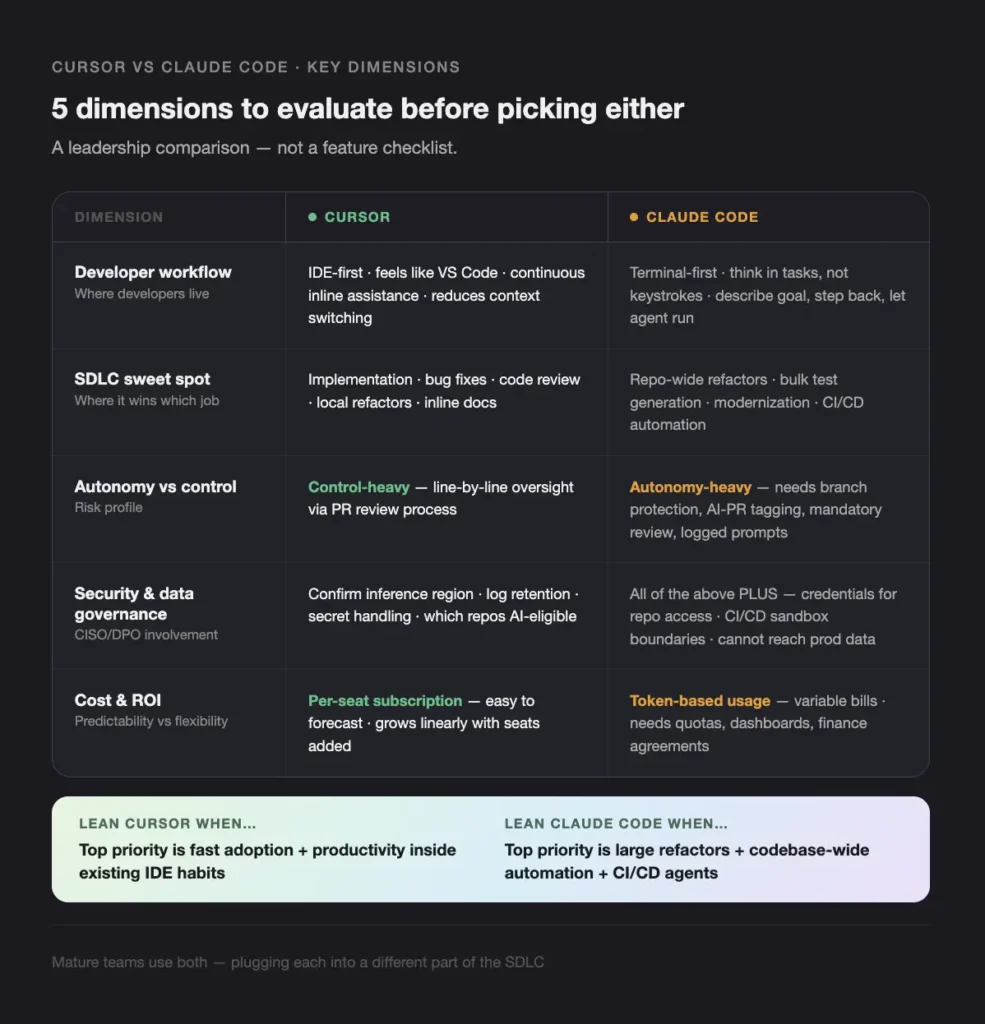
Developer workflow and adoption
Answer first: Cursor usually wins for fast adoption in IDE-centric teams, Claude Code for terminal-heavy power users.
When we look at cursor vs claude code across real teams:
Existing environments
- If your developers live in VS Code or similar editors, Cursor feels natural.
- If they prefer tmux, Vim, or terminal workflows, Claude Code feels closer to home.
Training and onboarding
- Cursor needs basic training on prompts and safe usage, but the UI is intuitive.
- Claude Code requires comfort with CLI, git, and scripting. It tends to attract senior or systems-minded engineers first.
Cognitive load and flow
- Cursor supports continuous, inline assistance while coding. It reduces context switching.
- Claude Code works best when you think in tasks, not keystrokes. You step back, describe the goal, and let the agent run.
We sometimes define internal “personas” for each, so engineers know when to reach for which tool.
Use cases across the SDLC
Answer first: Cursor is strong in implementation and review, Claude Code in refactoring, automation, and maintenance, and together they cover most of the SDLC.
If we narrate a table in words for cursor vs claude code:
Requirements and design
- Cursor: quick prototypes, stubs, and example snippets inside the IDE.
- Claude Code: less relevant, unless you generate scaffolding from the CLI.
Implementation and feature work
- Cursor: very strong for day-to-day coding, bug fixes, and small refactors.
- Claude Code: helpful for scaffolding modules or services across many files.
Refactoring and modernization
- Cursor: fine for local refactors and safe, human-in-the-loop work.
- Claude Code: better for broad changes, for example, migrating a logging library or updating ORM usage across the repo.
Testing
- Cursor: good for writing unit tests while you code.
- Claude Code: better for generating a large batch of missing tests or raising coverage in bulk.
Documentation and knowledge sharing
- Cursor: inline docstrings, comments, and quick README updates.
- Claude Code: large documentation passes, readme generation or syncing docs with code behavior.
Maintenance and ops
- Cursor: inline docstrings, comments, and quick README updates.
- Claude Code: large documentation passes, readme generation or syncing docs with code behavior.
A hybrid approach often means: Claude Code handles the heavy lifting, Cursor helps developers polish and finalize.
Autonomy vs control
Answer first: Cursor is IDE-first and control-heavy, Claude Code is agent-first and autonomy-heavy, and governance decides where each is acceptable.
In leadership terms:
When you want line-by-line oversight
– Choose Cursor.
– Keep AI changes within normal PR and review processes.
– Use it where errors are cheap and recoverable.
When autonomous change is acceptable
– Use Claude Code for:
– Non-critical repos
– Maintenance branches
– Experimental refactors
– Gate merges with approvals and tests.
Guardrails that we help clients set:
- Branch protection rules for AI-generated branches
- Labels or metadata tagging AI-created PRs
- Mandatory code review for all AI-driven changes
- Logging of prompts, actions, and diffs for audit and learning
This autonomy vs control framing is central to any serious cursor vs claude code decision.
Security, compliance, and data governance
Answer first: both tools can be safe with the right setup, but you must design data flows and approvals before rollout.
Typical questions we walk through with a CISO or DPO:
What code leaves our infrastructure?
– Which repos are allowed to send prompts to cloud models
– Are there local or VPC-hosted options for the models
– How logs and histories are stored and who can access them
How are secrets handled?
– Do tools scan for keys before sending content
– Are .env files and secret folders excluded
– Are there redaction layers in place
Industry-specific needs
Finance, healthcare, and public sector often need:
– Clear data processing agreements
– Region-specific hosting
– Sometimes, on-prem or private deployments
Because Claude Code interacts via API and can run commands, we also pay attention to:
- Which credentials it uses to access repositories
- Sandbox boundaries in CI/CD environments
- How we ensure it cannot accidentally access production data
These topics are not unique to cursor vs claude code, but each tool interacts with your estate in a different way and needs its own threat model.
Cost, licensing, and ROI
Answer first: Cursor has predictable per-seat costs, Claude Code has flexible but variable usage-based costs, and the real value is in measurable time saved and quality gains.
High-level patterns:
Cursor cost style
- Per-developer subscription, often with team plans.
- Easy to forecast but can grow quickly as you add seats.
Claude Code cost style
- Token-based or API usage pricing.
- Fine-grained control with quotas, but you must monitor consumption.
Total cost of ownership is broader than license fees: Time to onboard developers
Time saved on:
- Implementing features
- Refactors you would otherwise postpone
- Test writing and documentation
Impact on:
- Defect rates
- PR size and lead times
- On-call load
You can build a simple ROI model for board-level discussion, for example:
1. Estimate hours saved per developer per week using pilot data
2. Multiply by loaded cost per developer
3. Compare to combined tool and rollout costs
4. Track quality metrics over time to avoid “faster but sloppier” outcomes
Some external benchmarks suggest that AI pair programmers can significantly reduce repetitive coding workload, but actual impact varies by organization. The key is to validate ROI with your own pilots.
Choosing Cursor vs Claude Code for different team types
Early-stage startups and small teams
Answer first: most startups start with Cursor, then add Claude Code for occasional big tasks.
Constraints here are predictable:
- Limited budget
- High urgency
- Mostly greenfield codebases
We typically see:
Cursor as the primary tool
- Helps a small team ship faster
- Provides AI help in the editor where everyone already lives
- Keeps coordination overhead low
Claude Code as a targeted helper
- Used when you need a big refactor or across-the-repo change
- Or when one engineer is a terminal power user and can own the tool
In this stage, simplicity is more important than squeezing every last bit from the cursor vs claude code mix.
Mid-size product companies
Answer first: mid-size teams benefit from a structured pilot that uses Cursor for everyday work and Claude Code for shared code and platform tasks.
Common traits:
- Multiple teams and services
- Growing technical debt
- A mix of mature and newer code
A practical approach:
- Run pilots with 1–2 representative teams
- Standardize on Cursor as the default IDE assistant
Introduce Claude Code where:
- You maintain shared libraries
- You plan regular cleanup or migration work
- You have CI/CD pipelines that can incorporate an agent safely
This lets you compare cursor vs claude code impact in different contexts while still keeping tooling manageable.
Enterprises and regulated organizations
Answer first: large organizations usually need a combined strategy with strong policies, audits, and staged rollout.
Typical features:
- Legacy systems
- Strict compliance rules
- Central security and architecture oversight
We often see:
Policy-first approach
- Define allowed use cases and data classes
- Decide which repos are “AI eligible”
- Approve tool configurations with CISO and legal
Combined usage
- Cursor for daily work, bound by policies and logging
- Claude Code only in specific sandboxes or under stricter processes, especially for autonomous changes
Heavy emphasis on guardrails
- More review for Claude Code’s output
- Clear documentation for any AI-involved deployment steps
In these environments, the cursor vs claude code decision is less about features and more about control surfaces and risk profiles.
Hybrid strategy Why many teams use both Cursor and Claude Code
Complementary strengths in one workflow
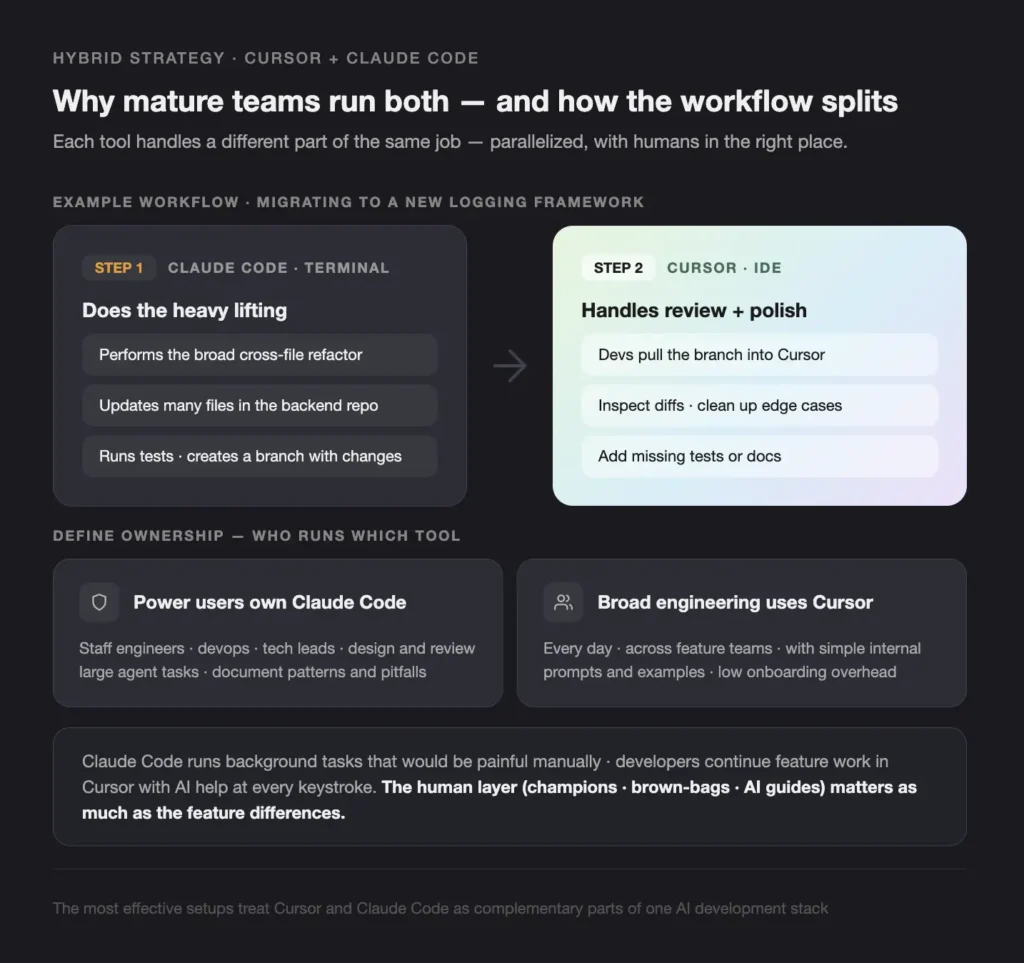
Answer first: the most effective setups treat Cursor and Claude Code as complementary parts of one AI development stack.
A simple example workflow we have used:
1. Claude Code does the heavy lifting
– You ask Claude Code to perform a broad refactor, for example, migrating from one logging framework to another across the backend repo.
– It updates files, runs tests, and creates a branch with changes.
2. Cursor handles review and polish
– Developers pull the branch into Cursor.
– They use the IDE assistant to:
– Inspect diffs
– Clean up edge cases
– Add missing tests or docs
This pattern lets you parallelize work:
– Claude Code runs background tasks that would be painful manually
– Developers continue feature work in Cursor, with AI help at every keystroke
The result is a practical, high-leverage answer to cursor vs claude code: you use each where it wins.
Team roles and tool ownership
Answer first: define clear owners for each tool and train them well. What we see work in practice:
Power users own Claude Code
– Staff engineers, devops, and tech leads are the first wave.
– They design and review large tasks for the agent.
– They document patterns and pitfalls.
Broad engineering uses Cursor
– Every day, across feature teams.
– With simple internal prompts and examples.
We often help clients set up:
- Internal champions
- Brown-bag sessions and demo repos
- Short internal “AI coding guide” docs
This human layer is as important as any cursor vs claude code feature difference.
Implementation playbook for CTOs
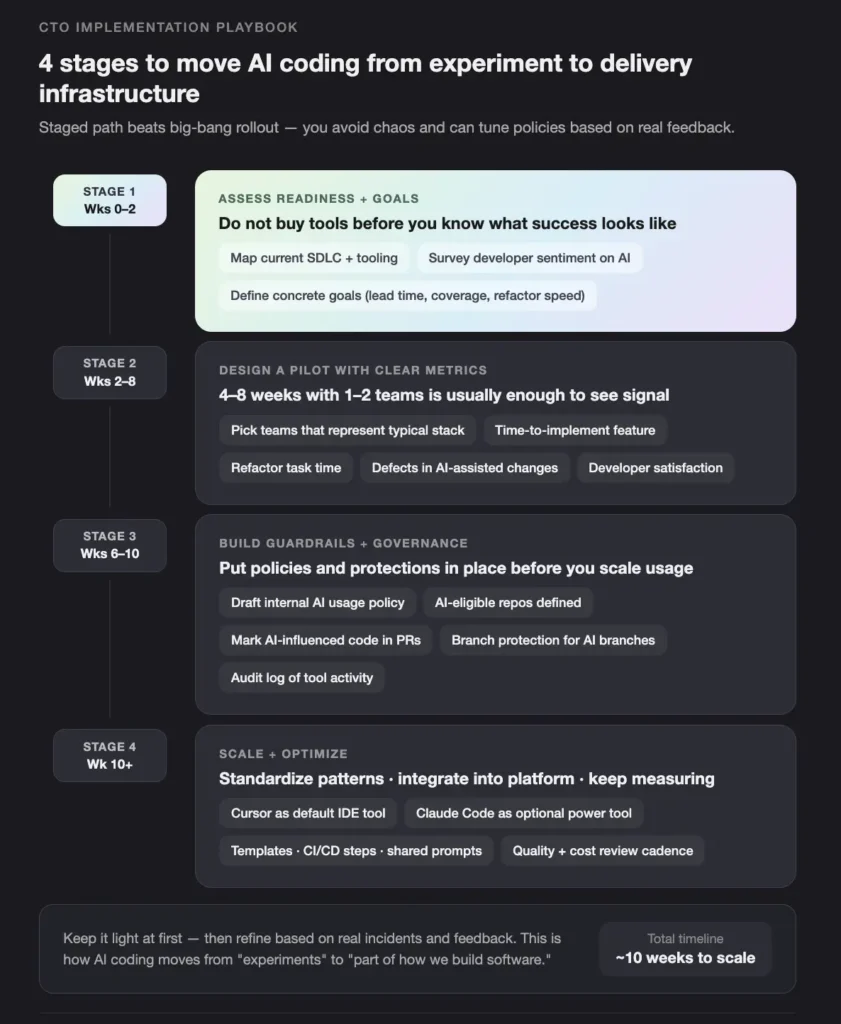
Step 1 Assess readiness and goals
Answer first: do not buy tools before you know what success looks like.
We start with:
- Current SDLC and tooling mapping
- Developer sentiment on AI
- Pain points, for example:
– slow refactors
– weak test coverage
– onboarding time for new engineers
Then we define goals, such as:
- Reduce PR lead time by X percent
- Increase test coverage in key services
- Shorten the time for specific refactors
This gives you a concrete frame for evaluating cursor vs claude code.
Step 2 Design a pilot with clear metrics
Answer first: a 4–8 week pilot with 1–2 teams is usually enough to see signal.
Key design elements:
- Pick teams that represent your typical stack and process
- Give one or both tools, based on the questions you want to answer
- Define metrics:
– Time to implement a feature
– Time spent on refactor tasks
– Defects in AI-assisted changes
– Developer satisfaction and perceived productivity
This stage is where you move from marketing claims about cursor vs claude code to your own data.
Step 3 Build guardrails and governance
Answer first: put policies and protections in place before you scale usage.
You should:
- Draft an internal AI usage policy
- Decide:
– Which repos are allowed
– Which environments are out of bounds
– How to mark AI-influenced code in PRs
- Configure:
– Access control per team
– Logging and monitoring of tool activity
– Branch protection for AI-driven branches
You can keep it light at first, then refine based on real incidents and feedback.
Step 4 Scale and optimize
Answer first: once the pilot proves value and risk is understood, you standardize and integrate.
Typical steps:
- Decide standard patterns:
– Cursor as default IDE tool
– Claude Code as optional power tool for certain teams or tasks
- Integrate with your platform:
– Templates for new repos
– CI/CD scripts including Claude Code steps where useful
– Shared prompt libraries or guidance documents
- Keep measuring:
– Regularly review tool usage
– Watch for drift in quality or process
– Adjust training and policies as needed
This is where AI coding moves from “experiments” to “part of how we build software.”
How Teamvoy helps CTOs with Cursor and Claude Code adoption
Answer first: we help you choose, implement, and scale an AI coding stack that fits your architecture, culture, and risk posture, whether that means Cursor, Claude Code, or both.
Based on our own projects and client work, we support at four levels:
1. Advisory and strategy
– Evaluate cursor vs claude code against your tech stack and workflows
– Define which teams and repos should use which tool
– Align executive, security, and finance expectations
2. Implementation and integration
– Set up environments and permissions
– Integrate Claude Code into CI/CD or maintenance jobs
– Configure Cursor for your preferred models and org-level settings
3. Training and enablement
– Run hands-on sessions for developers and tech leads
– Share practical prompt patterns and anti-patterns
– Create internal playbooks and examples
4. Measurement and continuous improvement
– Design KPIs for AI-assisted software development
– Build dashboards for leadership, for example, cycle time, test coverage, defect rates
– Help you adjust the cursor vs claude code mix over time as your needs evolve
Our goal at Teamvoy is to stay customer-centric. We treat AI tools as building blocks that must serve your roadmap, not as goals in themselves.
Conclusion Making a strategic choice on Cursor vs Claude Code
Answer first: the real decision is not Cursor vs Claude Code, it is where each tool fits into your SDLC, risk model, and culture, and how you govern and measure their impact.
For CTOs and tech leaders, our guidance is:
- Choose based on workflows, risk tolerance, and goals, not hype
- Start with a small, well-defined pilot, then expand
- Treat autonomy as a spectrum and set guardrails accordingly
- Measure outcomes, both in speed and quality, before scaling
At Teamvoy, we support you through the full journey: from comparing cursor vs claude code for your stack, to piloting with real teams, to rolling out a sustainable AI-assisted development environment.
If you want to explore what an AI coding stack could look like for your organization, we can run a short assessment or pilot with your engineering leadership and core teams. Together, we can design the right mix of Cursor, Claude Code, and process so your developers ship faster, with less risk, and with tools they actually want to use.