AI Agents for CRM: 12 Tools, 20 Tenants, 1 Release
Building an AI agent for a CRM becomes much more complex when the platform serves multiple brands and the agent can do more than answer questions. Once it can search customer data, prepare emails, and trigger campaign actions, the main challenge is no longer the LLM itself. It is making sure every action stays within the right tenant, permission scope, and workflow.
- The platform serves twenty tenant brands through a shared CRM and email marketing stack.
- Teamvoy built the assistant as a bounded agent loop across twelve tools, with guardrails applied at four control points and tenant-level settings managed through configuration.
- The assistant, tenant-level guardrails, rate limiting, and evaluation workflow were released together on 23 April 2026
- AI shipped per tenant, not per release
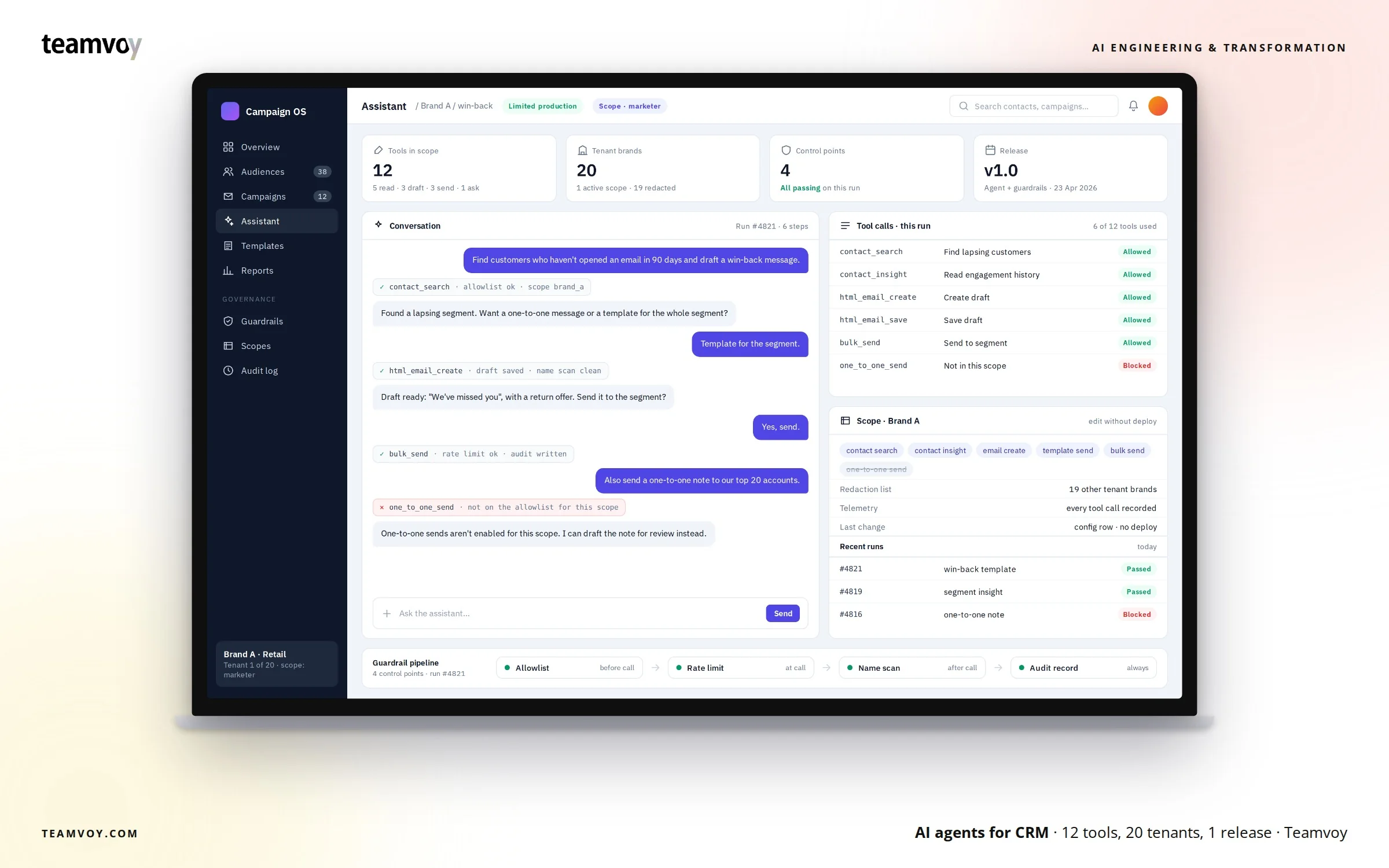
| PROJECT DETAIL | DESCRIPTION |
|---|---|
| Client | A multi-tenant CRM platform serving twenty tenant brands |
| Industry | CRM and email marketing platform |
| Status | Limited production |
| Tenancy | One codebase, ~20 white-labeled brands, isolated per tenant |
| Technology | ReAct-style agent loop, tenant-scoped tool allowlists, rate limiting, output checks, first-party telemetry, automated evaluation |
| Team and timeline | Agent and guardrail architecture released together on 23 April 2026 |
The client is presented under an agreed anonymization.
Key takeaways
Teamvoy built AI agents for CRM around one clear principle: the agent should only have access to the tools and data required for the current tenant and task.
The assistant works across twelve CRM and email tools through a bounded reasoning loop. Before each tool call, the platform checks whether the requested action is allowed for the active tenant. Calls are rate limited, outputs are checked for references to other tenant brands, and each step is recorded for review and evaluation.
For every active tenant, the output layer can also compare the response against up to 19 other tenant brand names before the result is returned to the user. This architecture allows one agent to support twenty brands while keeping access, permissions, and behavior controlled at tenant level.
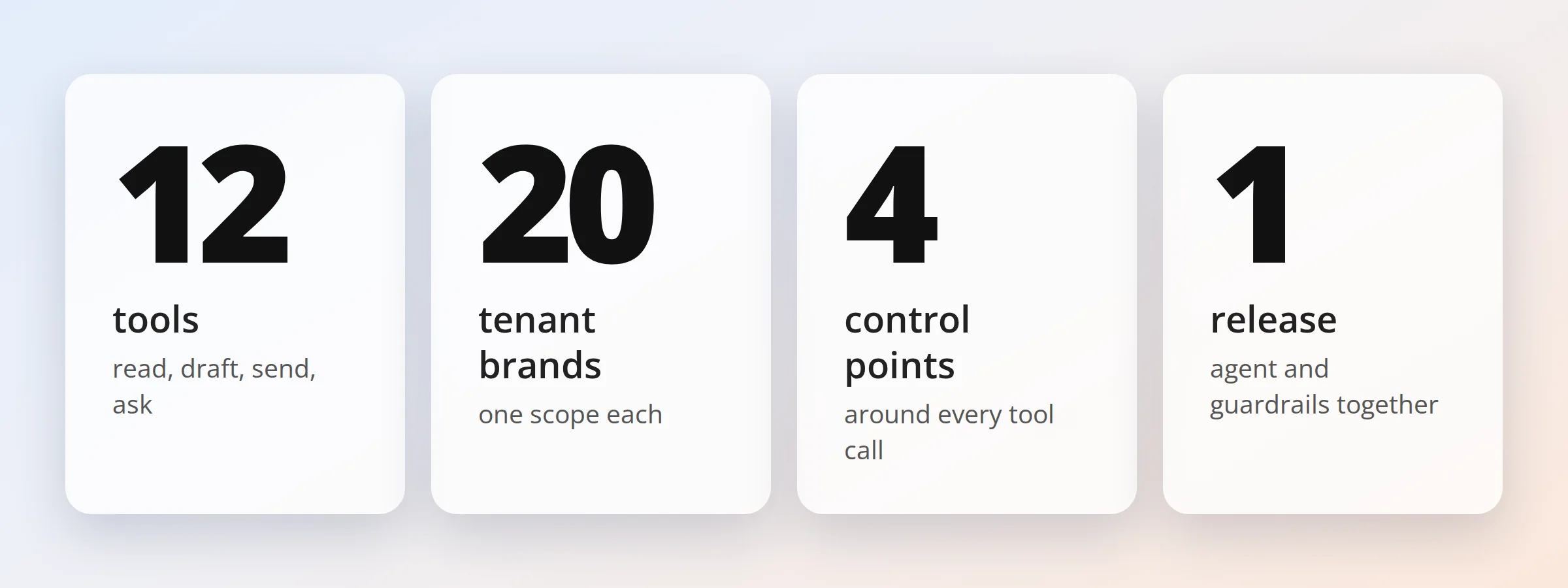
— 12 tools, 20 tenants, 4 guardrail control points, 1 release
01. Summary
For marketers, the experience stays simple. They can ask the assistant to find customers who are becoming inactive, review their history, prepare an email, and support the next campaign action without moving between several CRM screens and workflows.
Behind that simple interface, the platform has a more difficult job. The assistant works with customer data and can trigger real actions, so every request needs to stay within the correct tenant scope from the moment the agent starts reasoning until the final response is returned.
A wrong answer can be corrected. Cross-tenant data exposure is a different problem. If information from one brand appears in another brand’s workflow, the platform has already crossed a boundary that should never depend on the model following instructions correctly. That is why Teamvoy designed tenant control at the platform level. Tool access is scoped, calls are rate
limited, outputs are checked, and each action is recorded so the team can review how the agent reached a result. This case study explains how that architecture works in practice
— Teamvoy is an OpenAI Select Partner. Partner since 2026.
02. Problem
The platform serves twenty tenant brands through a shared CRM and email marketing stack.
Marketers wanted an assistant that could work inside the existing workflow, not another chat interface that only answered questions. The agent needed to search contacts, retrieve customer history, prepare emails, and support campaign execution. Once these actions became part of the scope, tenant separation and permission control became core to the architecture.
The project was therefore not only about connecting an LLM to CRM APIs. The main work was building a controlled agent architecture that could take useful actions while keeping tenant boundaries, permissions, and execution rules outside the model.
- Keep tenants separated. The agent works with customer and campaign data, so information from one brand must never appear in another tenant’s workflow.
- Treat actions differently. Searching for a contact is not the same as sending a bulk campaign. Read, write, and send actions need different levels of control.
- Evaluate behavior before release. LLM responses can vary, so the team needed repeatable evaluation across the full agent workflow rather than relying only on manual testing.
03. Solution
Teamvoy built the assistant as a bounded agent loop across twelve tools, with guardrails applied at four control points and tenant-level settings managed through configuration.
The goal was to keep the model focused on reasoning while the platform handled access, permissions, and operational limits. This separation made the system easier to test, control, and extend as new tools and tenant requirements were added.
How does the agent decide what to do?
The agent follows a ReAct-style loop that combines reasoning with tool use.
It interprets the user’s request, chooses an available tool, reviews the result, and decides whether another action is needed. The loop continues until the request is complete, an answer can be returned, or the agent needs more information from the user.
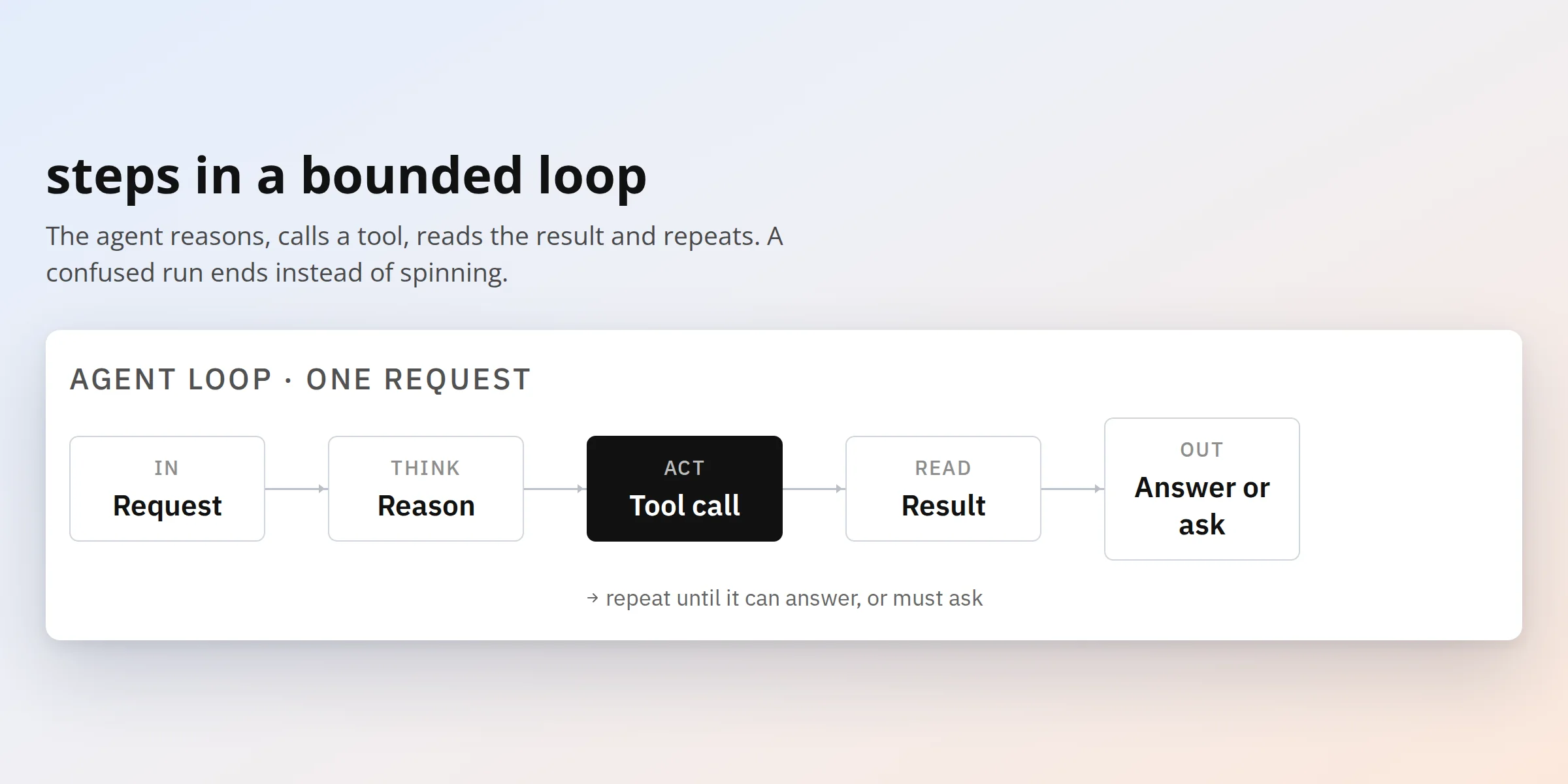
– The loop: request, reason, call a tool, read the result, answer or ask.
The loop has a clear limit, so the agent cannot continue making calls without control. If the request is incomplete or unclear, the assistant uses a clarification tool rather than filling in missing information itself.
This matters because the agent can work with actions that affect real customer data and communication. Asking one more question is safer than making an assumption that leads to the wrong action.
Which tools does an AI agent for CRM need?
The twelve tools are grouped by what they do and by the level of control they require.
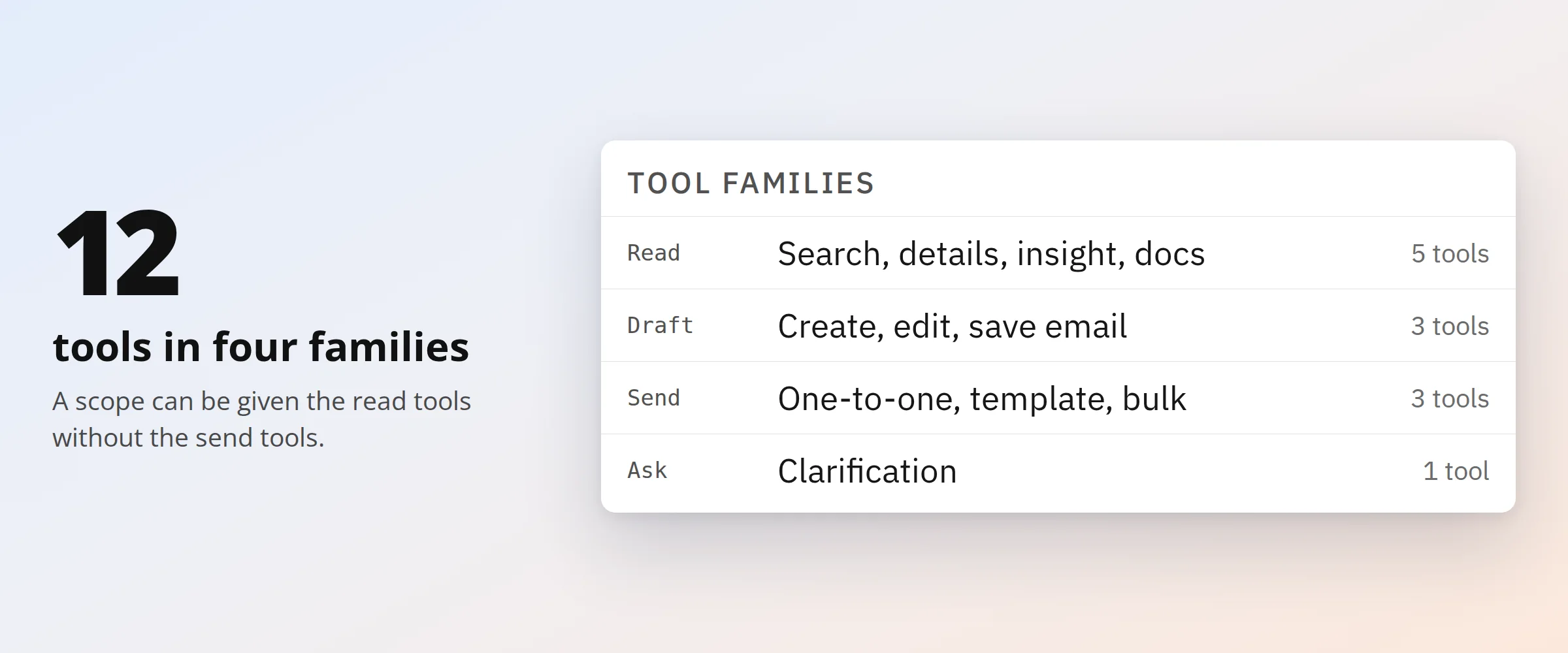
– Twelve tools in four families: read, write, send and clarify.
| Family | Tools | Can change data |
|---|---|---|
| Find and read | Contact search, search-result rendering, contact details, contact insight, documentation help | No |
| Write email | HTML email creation, edit, save | Drafts only |
| Send | Personalized one-to-one send, template send, bulk send | Yes |
| Ask | Clarification | No |
This split allows the platform to give each tenant only the capabilities it needs. One tenant may have access to search and insight tools but no sending permissions. Another may be allowed to create drafts while bulk campaign sending remains unavailable. The agent therefore does not receive access to all CRM functionality by default. It only sees the tools approved for the active tenant scope.
How do AI agent guardrails keep tenants apart?
The AI agent guardrails work at four points around the tool workflow.
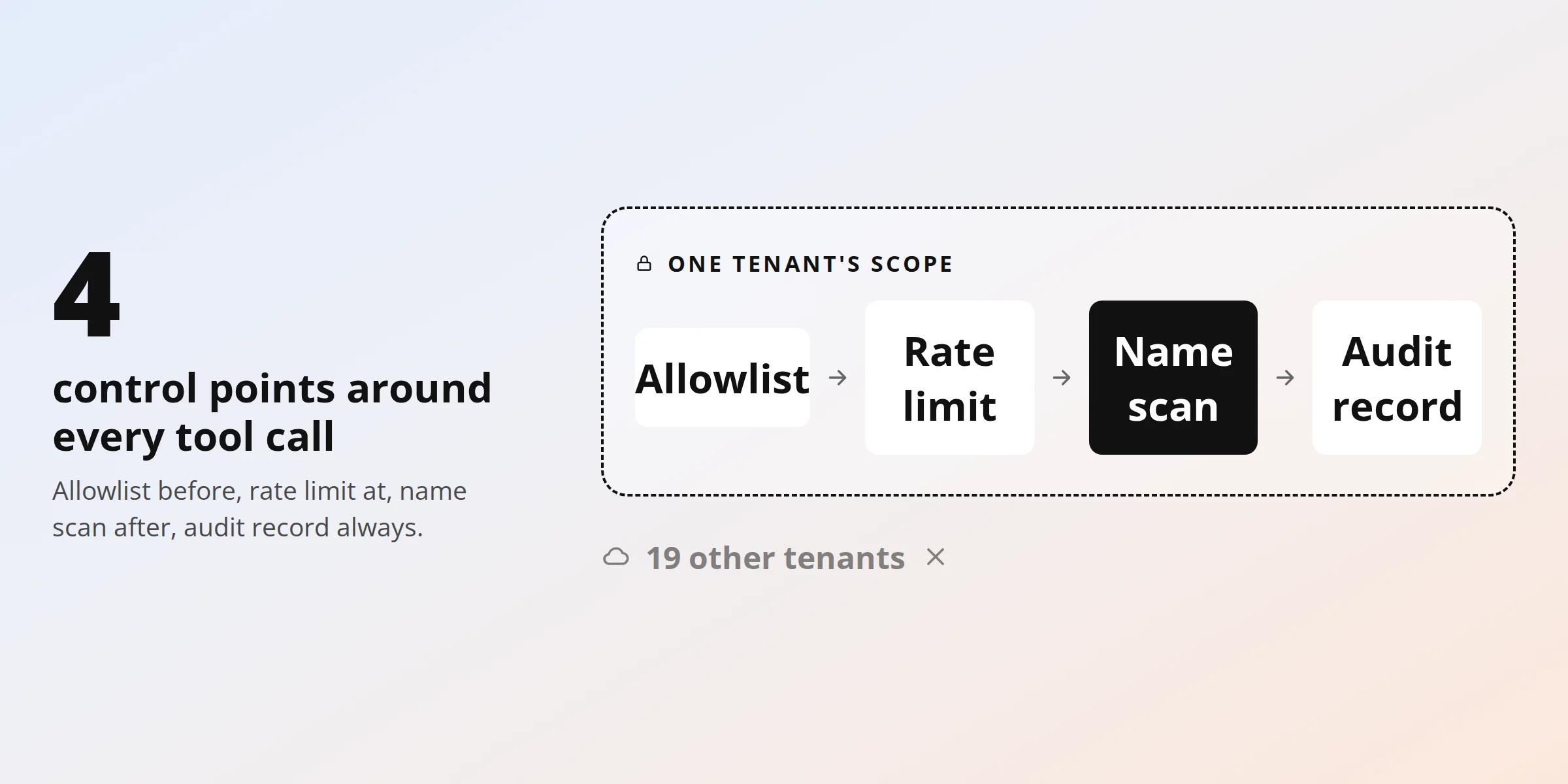
– Four control points around every tool call. The other nineteen tenants remain outside the active tenant boundary.
- Before the call: the tool must be included in the allowlist for the current tenant scope.
- During the call: rate limits control how often the agent can perform an action.
- After the call: the output is checked for references to other tenant brands before it reaches the user.
- Across the full run: each tool interaction is recorded in first-party telemetry for review and evaluation.
For a platform with twenty tenant brands, the response for one tenant can be checked against up to 19 other brand identities as an additional safeguard. The output check is not the main isolation mechanism. Tenant separation starts earlier, with access and scope. The platform defines which tools the agent can use and which data those tools can reach. The output check adds another layer of protection if unwanted information reaches the response stage.
For AI agents for CRM data security, this layered approach is more reliable than expecting a model prompt to enforce the full boundary on its own.
How are tenant scopes configured without a deploy?
Tenant scopes are managed through configuration rather than hard-coded into the agent logic. Each scope defines which tools the agent can use and which other brand identities should be excluded from its responses.
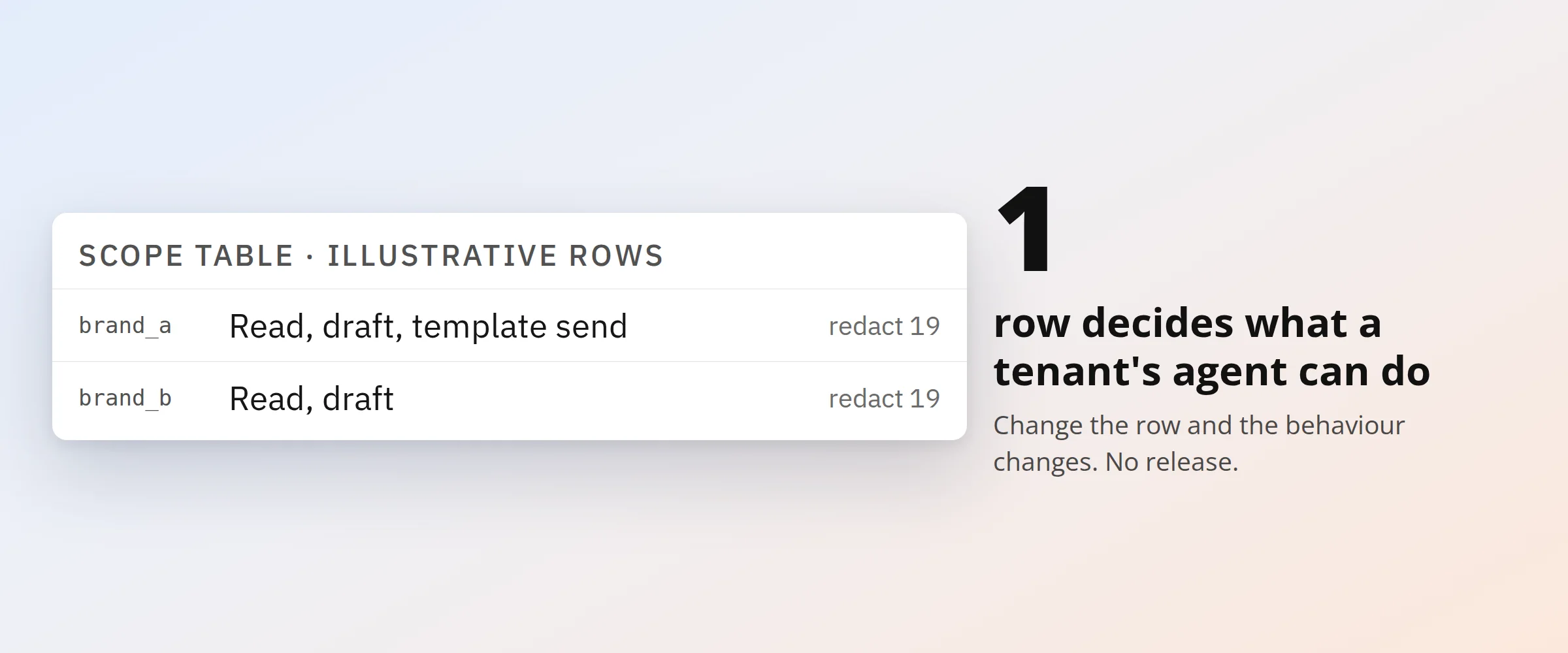
— One scope configuration determines which tools a tenant’s agent can access.
This makes tenant-level changes easier to manage. If a tenant should gain access to another approved tool, you can update the configuration without changing the core reasoning flow. For a multi-tenant AI agent, this reduces operational complexity. One shared architecture can support different capability sets across twenty brands without creating a separate agent implementation for every tenant.
What does an audit trail record?
Each tool interaction is recorded in first-party telemetry so the engineering team can review how the agent reached a result. The trace connects the run to its tenant scope and tool activity, supporting debugging, evaluation, and investigation of unexpected behavior. This gives the team more context than the final answer alone. If the assistant behaves unexpectedly, engineers can review which tools were available, which tool was selected, what happened during the run, and where the behavior moved away from the expected path.
| Technology | Role in the solution |
|---|---|
| Agent loop (ReAct-style) | Interprets requests, selects tools, and stops when it can answer or needs clarification |
| Tool allowlist per scope | Defines which of the twelve tools an individual tenant’s agent may use |
| Rate limits | Control how frequently the agent can perform actions |
| Cross-tenant brand check | Checks output against up to 19 other tenant brand identities |
| Scope configuration | Allows tenant-level permissions to change without modifying the core agent workflow |
| First-party telemetry | Records agent activity for debugging, audit, and evaluation |
| Evaluation suite | Tests expected agent behavior before release |
What was hard
- The most important design decision was deciding which responsibilities belonged to the model and which should remain under application control.
- The model can interpret a marketer’s request, decide which approved tool may help, and determine the next step in the workflow. It should not decide which tenants it can access, which tools are available, or how often those tools can be used.
- Those rules stay outside the model.
- This separation keeps the architecture easier to review and gives the platform team more control as the agent becomes more capable.
04. Results
The assistant, tenant-level guardrails, rate limiting, and evaluation workflow were released together on 23 April 2026
The same architecture now supports a CRM and email platform serving twenty tenant brands in limited production. Because the implementation is still in limited production, Teamvoy does not present unverified productivity or ROI figures as measured outcomes. Current results focus on the capabilities, controls, and platform changes already in place.
| Metric | Before | After | Change | Status |
|---|---|---|---|---|
| Agent-accessible CRM and email actions | Limited conversational and search capability | 12 controlled tools | Broader action coverage | Released |
| Tenant coverage | No shared agent architecture | 20 tenant brands supported | Shared multi-tenant architecture | Limited production |
| Guardrail checkpoints | Application-level controls | 4 control points around the agent workflow | Structured control across the agent flow | Released |
| Cross-tenant output checks | No agent-specific check | Up to 19 other brand identities per tenant | Additional output protection | Released |
| Tenant capability changes | Application-level change | Scope configuration | Less dependency on agent releases | Released |
| Agent and safety rollout | Separate capabilities | 1 coordinated release | Agent and controls released together | 23 April 2026 |
The next stage is focused on operational measurement. Tool-call success rate, task completion, clarification frequency, usage by tenant, and overall adoption will show how the assistant performs as more users rely on it in day-to-day work. These metrics will also help the team understand where the agent creates value, where users still need support, and which parts of the workflow should be improved next.
Numbered outcome
The numbers that describe this release, and what each one means for the platform.
| Numbered outcome | What it means |
|---|---|
| 12 tools | The agent can search contacts, retrieve customer context, create and edit emails, send campaigns, and ask for clarification. Each tool is available only within the active tenant scope. |
| 20 tenants | One agent architecture supports twenty brands while keeping data, permissions, and available actions separated. |
| 4 control points | Tool allowlists, rate limits, output checks, and telemetry provide control around each agent action. |
| 1 release | The agent, guardrails, rate limits, and evaluation suite were released together on 23 April 2026. |
05. Conclusion
AI shipped per tenant, not per release
Effective AI agents for CRM need more than access to CRM APIs and a capable language model. The platform also needs clear control over what the agent can do, which data it can reach, and where tenant boundaries are enforced. In this implementation, those controls sit around the model rather than inside it. Tenant-level permissions manage twelve tools, four control points govern the workflow, and one shared architecture supports twenty brands.
The model decides how to approach the user’s request within the available options. The platform decides which options are available in the first place. This separation gives the assistant enough flexibility to be useful while keeping access, permissions, and tenant isolation under application control.
As the rollout expands, operational metrics will show how the assistant performs at scale. The architecture already provides the visibility and control needed to measure that progress.
Talk to Teamvoy About Your CRM Agent
Teamvoy designs and builds AI agents with scoped permissions, controlled tool access, and integration into existing CRM workflows, so the agent can work with real business processes without moving control into the model itself.