


- The Microsoft Outlook outage of November 12, 2026 took down more than email. Defender for Office 365, Purview DLP and eDiscovery, Copilot, and Teams calendar invites all degraded with it, because each one reads from Exchange Online. More than 12 hours after the first Exchange Online warning, Microsoft was still returning frontend servers to service, and at our 06:17 UTC November 13 cutoff the incident was still an active service degradation with no root cause published.
- A county sheriff took bond payments in person and a public company delayed its earnings release, yet a second email vendor is the wrong fix for most of the dependencies this exposed; the body shows which few flows need a provider-independent path and what the rest need instead. This is a dated analysis, not a live monitor; check Microsoft Service Health for the current state.

Status check: what’s confirmed and what isn’t
Last verified: November 13, 2026, 06:17 UTC (01:17 ET). Source: Microsoft Service Health. Next Microsoft update was due by: 07:00 UTC. Teamvoy doesn’t operate a live status service, so re-check Microsoft before acting on this box.
Confirmed by Microsoft at the cutoff
- State: “Service degradation.” Users may be unable to connect to multiple Microsoft 365 services.
- Exchange Online connections over Outlook on the web, Outlook desktop (MAPI), Exchange ActiveSync, and REST may fail; email delivery may be delayed.
- Microsoft was recovering frontend servers and evaluating traffic throttling, protocol adjustments, and failover routing.
- Microsoft said it was not aware of malicious activity causing the incident.
- A post-incident report was promised after mitigation.
Unresolved at the cutoff
- Admin-center incident IDs EX1550543 / MO1550821
- Root cause. Microsoft described symptoms and mitigations, not a cause.
- Exact start time, affected tenant count, affected user count, and geography.
- Mitigation and full-resolution timestamps.
What happened in the Microsoft Outlook outage?
Exchange Online lost a share of its frontend servers on the afternoon of November 12, 2026 (ET), and Microsoft spent the night returning them to service. Microsoft first described elevated load across multiple regions, then said that load came from servers being unexpectedly unavailable rather than from a traffic increase, per CNBC (November 12, 2026). Servers were failing automated health checks, and a core process on affected servers was becoming overwhelmed, per NBC News (November 12–13, 2026).
Those are observations, not a root-cause analysis. Keep the layers separate: “elevated load” is a contributing condition, failed health checks are a mechanism, and the initiating defect was still unpublished at the cutoff. Any post that upgrades this outlook outage to a traffic spike, a capacity failure, or a cyberattack is speculating ahead of Microsoft’s post-incident report.
Verified timeline of Microsoft’s updates
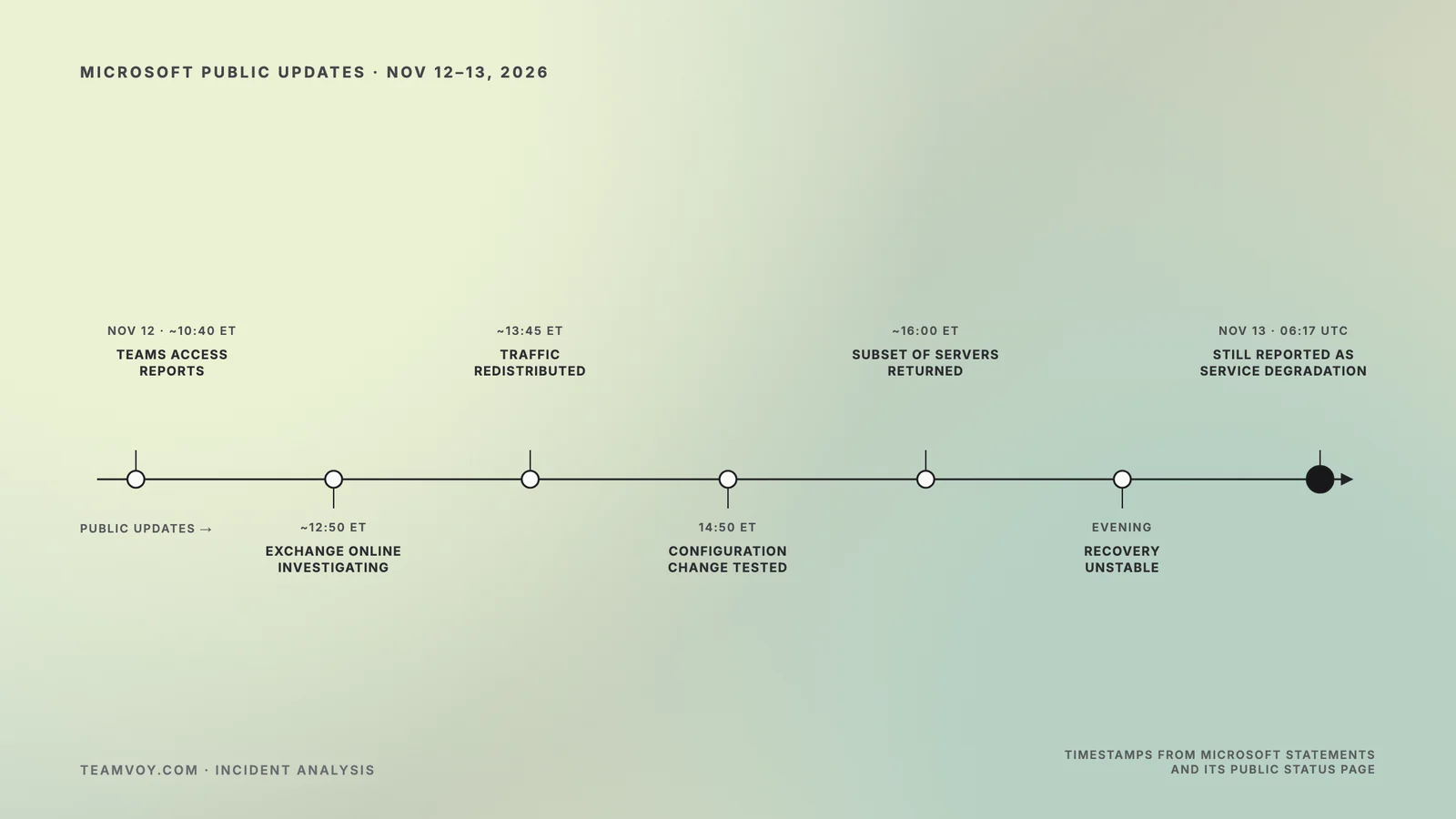
Timestamps come from Microsoft statements reproduced by WIRED, CNBC, NBC News, and Neowin, plus Microsoft’s status page at the cutoff. The first row is the earliest timestamp found in reporting, not a confirmed incident start.
| Time (ET) | Time (UTC) | What Microsoft said | Interpretation boundary |
| Nov 12, ~10:40 a.m. | ~15:40 | Investigating reports of Teams access or functionality issues in North America (WIRED, Nov 12, 2026). | Earliest public timestamp; not necessarily the incident start. |
| ~12:50 p.m. | ~17:50 | Investigating reports of issues accessing Exchange Online (NBC News, Nov 12, 2026). CNBC placed the start shortly before 1 p.m. ET, with about 130,000 user reports for Outlook on Downdetector (CNBC, Nov 12, 2026). | Downdetector counts are user reports, not Microsoft-confirmed affected users. |
| Early afternoon | — | Elevated load across multiple regions, coming from servers unexpectedly unavailable rather than a traffic increase (WIRED and CNBC, Nov 12, 2026). | A condition or contributor, not a root cause. |
| ~1:45–2:00 p.m. | ~18:45–19:00 | Redistributing connection traffic, pausing all deployments and configuration changes, restarting affected servers (WIRED, Nov 12, 2026; Neowin, Nov 12, 2026 [VERIFY — Neowin/X]). | Mitigation actions, not recovery. |
| 2:50 p.m. | 19:50 | Testing a configuration change for servers failing automated health checks (WIRED and NBC News, Nov 12, 2026). | Initiating defect still unknown. |
| ~4:00 p.m. | ~21:00 | Validated an alternative health check method that returned a subset of servers; preparing automated recovery to restart unresponsive servers (CNBC, Nov 12, 2026). | First reported partial recovery. |
| 4:40 p.m. and after | 21:40+ | Restarting and validating servers; assessing whether reverting a small number of recent configuration updates could speed recovery. Minutes later: a core process was becoming overwhelmed, causing capacity loss (NBC News, Nov 12, 2026). | Still no stated root cause. |
| Evening | — | Returned servers could become unresponsive again under traffic; some traffic types limited; serviceability changes “not taking as expected” (Neowin, Nov 12–13, 2026 [VERIFY — Neowin/X]). | Recovery was unstable, not merely slow. |
| Nov 13, 1:12 a.m. | 06:12 | Still recovering frontend servers while applying traffic optimization actions (NBC News, Nov 13, 2026). | More than 12 hours after the first Exchange Online warning. |
| Nov 13, 1:17 a.m. (cutoff) | 06:17 | Status page: “Service degradation”; mailbox access failures, delayed email, downstream Microsoft 365 impact; evaluating throttling, protocol adjustments, failover routing; no known malicious activity; post-incident report promised (Microsoft Service Health, Nov 13, 2026). | Unresolved at cutoff. Next update due by 07:00 UTC. |
What was affected, and what kept working?
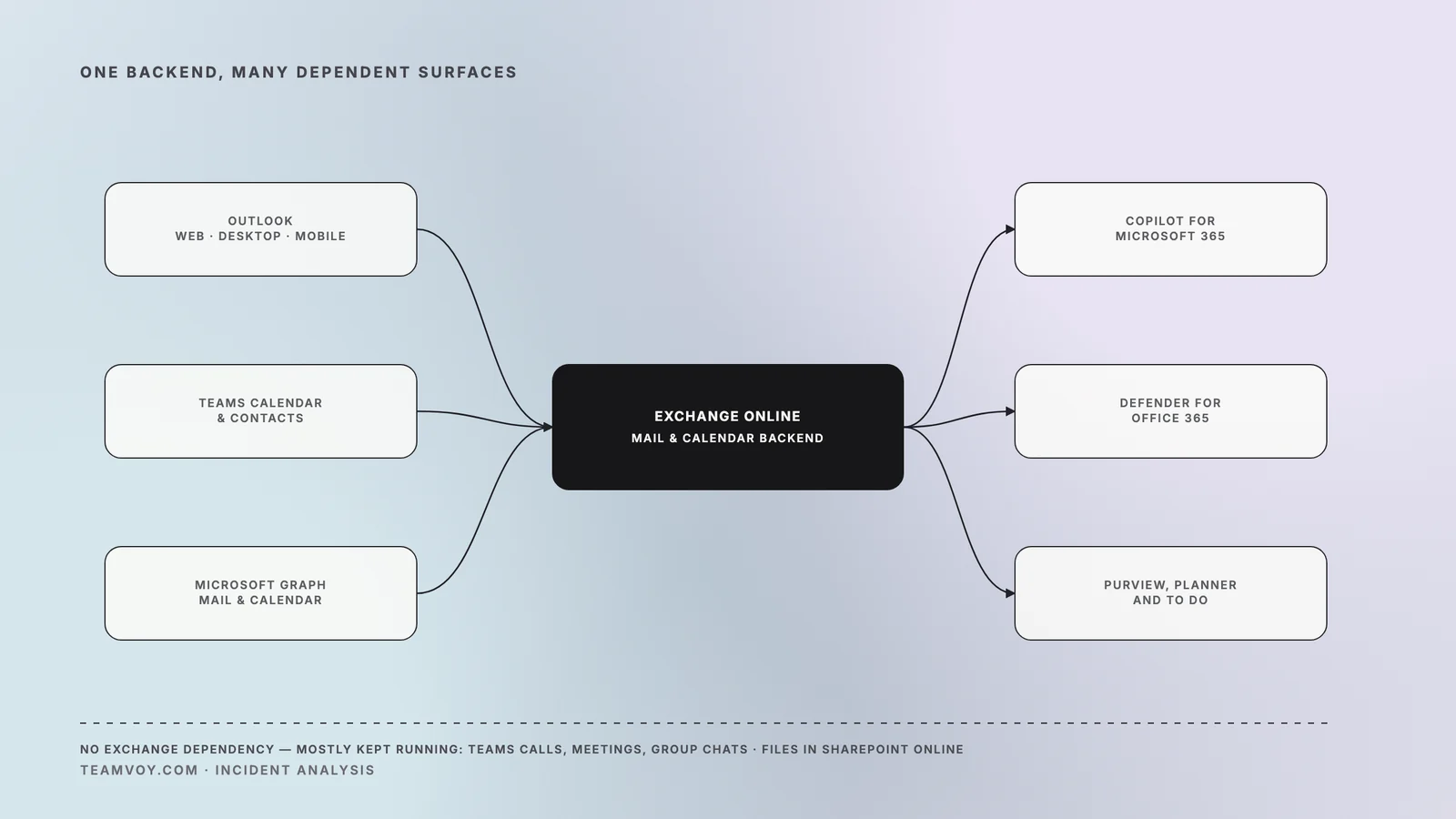
Services that read or write Exchange Online data degraded; services without that dependency mostly kept running. That single line explains why a Microsoft 365 outage headline and a “Teams is fine” experience were both accurate on the same afternoon. Microsoft’s status page at 06:17 UTC on November 13, 2026 listed the scope below, with Exchange Online named as the central dependency.
| Affected | Mostly unaffected |
| Outlook on the web, desktop (MAPI), Exchange ActiveSync, and REST connections to Exchange Online; delayed email delivery | Teams core calls, meetings, group chats, and channel messages |
| Microsoft 365 admin center pages; Microsoft Graph requests touching mail, calendar, and contacts | Files stored directly in SharePoint Online |
| Teams calendar, event creation, contacts, Copilot, and some private or shared channel operations | Microsoft 365 workloads with no Exchange Online dependency |
| Copilot for Microsoft 365; Defender for Office 365 and Defender XDR portals; Purview labeling, DLP, audit, and eDiscovery; Planner; To Do; selected Intune, Fabric, Power BI, SharePoint, Universal Print, and Windows 365 scenarios |
Consumer products, including Outlook.com, OneDrive, OneNote, and Microsoft 365 for the web, were also listed as affected, per NBC News (November 12–13, 2026). Microsoft told CNBC the problems were “primarily issues with Exchange Online” (November 12, 2026). People searching “outlook not working” that afternoon were mostly looking at a platform incident rather than a client fault.
Business consequences landed where email is a control rather than a convenience. Workhorse Group delayed an earnings release, and Los Angeles County agencies, federal agencies, and Capitol Hill email were affected, per NBC News (November 12–13, 2026). The Arapahoe County Sheriff’s Office moved bond payments in person, per the same report. The “450 million users” figure in coverage describes Microsoft’s user base, not an affected count.
A Microsoft Teams outage search would have returned a misleading answer. Teams had its own reported access issues around 10:40 a.m. ET, but by the cutoff Microsoft described core Teams functions as not impacted. The Teams features that broke were the ones calling Exchange Online: a group chat worked, a calendar invite didn’t.
What should enterprise teams do during an active SaaS outage?
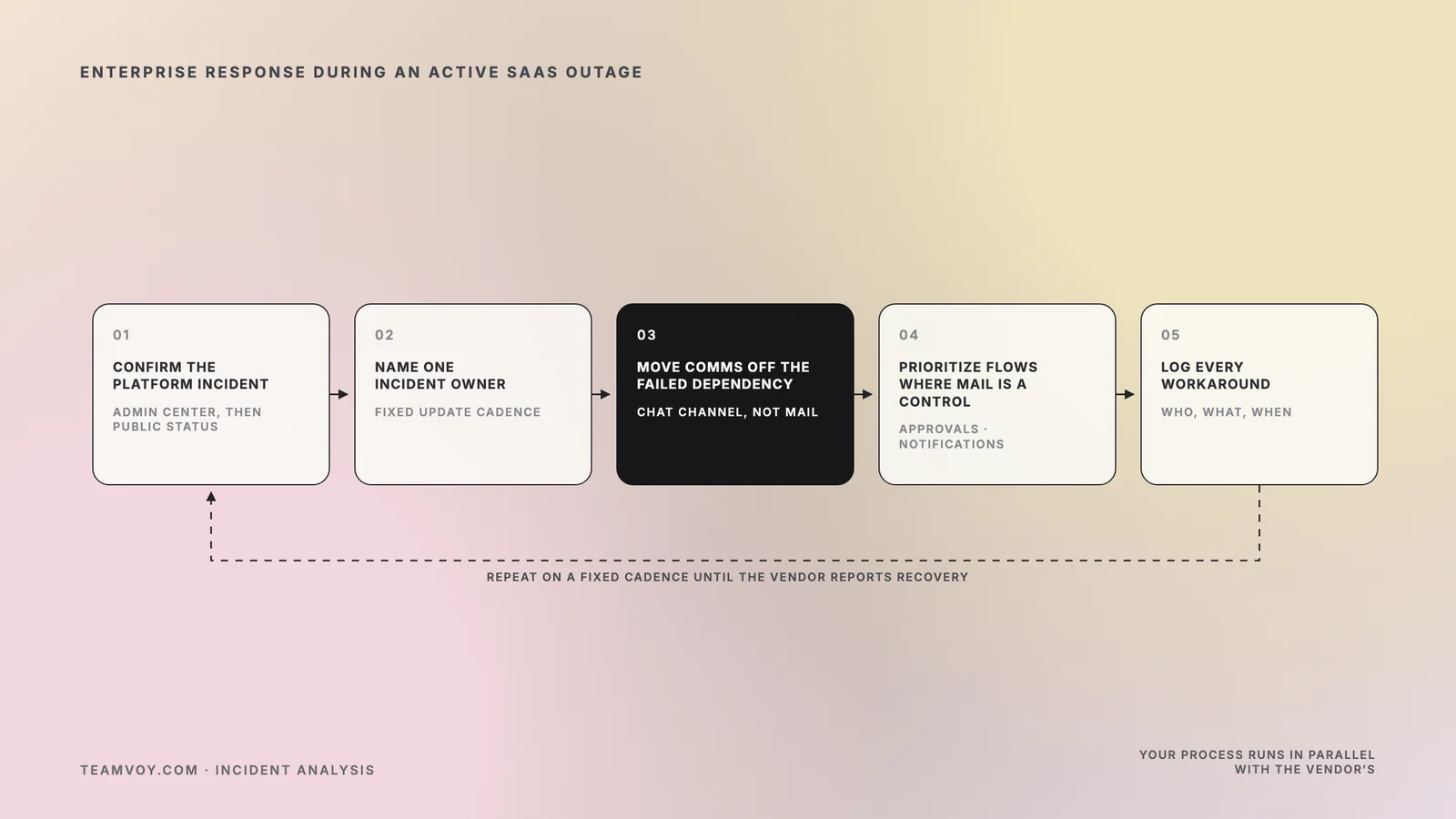
Verify the platform incident first, then run your own incident process on a fixed cadence instead of waiting on the vendor’s. Service health in the Microsoft 365 admin center is the tenant-specific source, and the public status page is the fallback when admins can’t sign in, per Microsoft Learn (updated February 9, 2026). Once confirmed, the question shifts from “is Outlook down” to “what do we lose while it is.”
Triage: confirm it’s the platform, not your tenant
- Check Service health in the admin center, then the public status page if the admin center won’t load.
- Compare symptoms across several users, networks, and clients. A platform incident shows up everywhere; a tenant or device problem doesn’t.
- Preserve error details and timestamps from your own monitoring for reconciliation and any SLA conversation.
- Hold off on mass reinstalls, profile resets, and credential resets. They add helpdesk load and fix nothing.
Communications: move off the dependency you’re waiting on
- Activate incident command with one named owner. Someone has to decide what gets delayed and who gets told.
- Move operational communications to a channel independent of Exchange Online. In this incident, Teams chat was available while mail and invites weren’t.
- Publish internal and customer updates on a fixed interval, each carrying the Microsoft timestamp you’re relying on.
- Flag phishing risk explicitly. Outage confusion invites “your mailbox has been migrated” lures, and Defender Safe Links sat on the affected list.
Manual fallback: protect the mail flows that are controls
- List the flows where email gates something: approvals, regulatory notifications, customer SLAs, disclosure communications, payment confirmations. Assign a manual path for each [VERIFY — legal/compliance].
- Decide which automated jobs should pause. Anything sending through Graph or an SMTP relay will queue, retry, or fail. Choose before the backlog grows.
- Log every workaround with who did what and when. After recovery, reconcile delayed and duplicated messages, especially approvals actioned twice.
What are the architecture lessons, without overreacting?
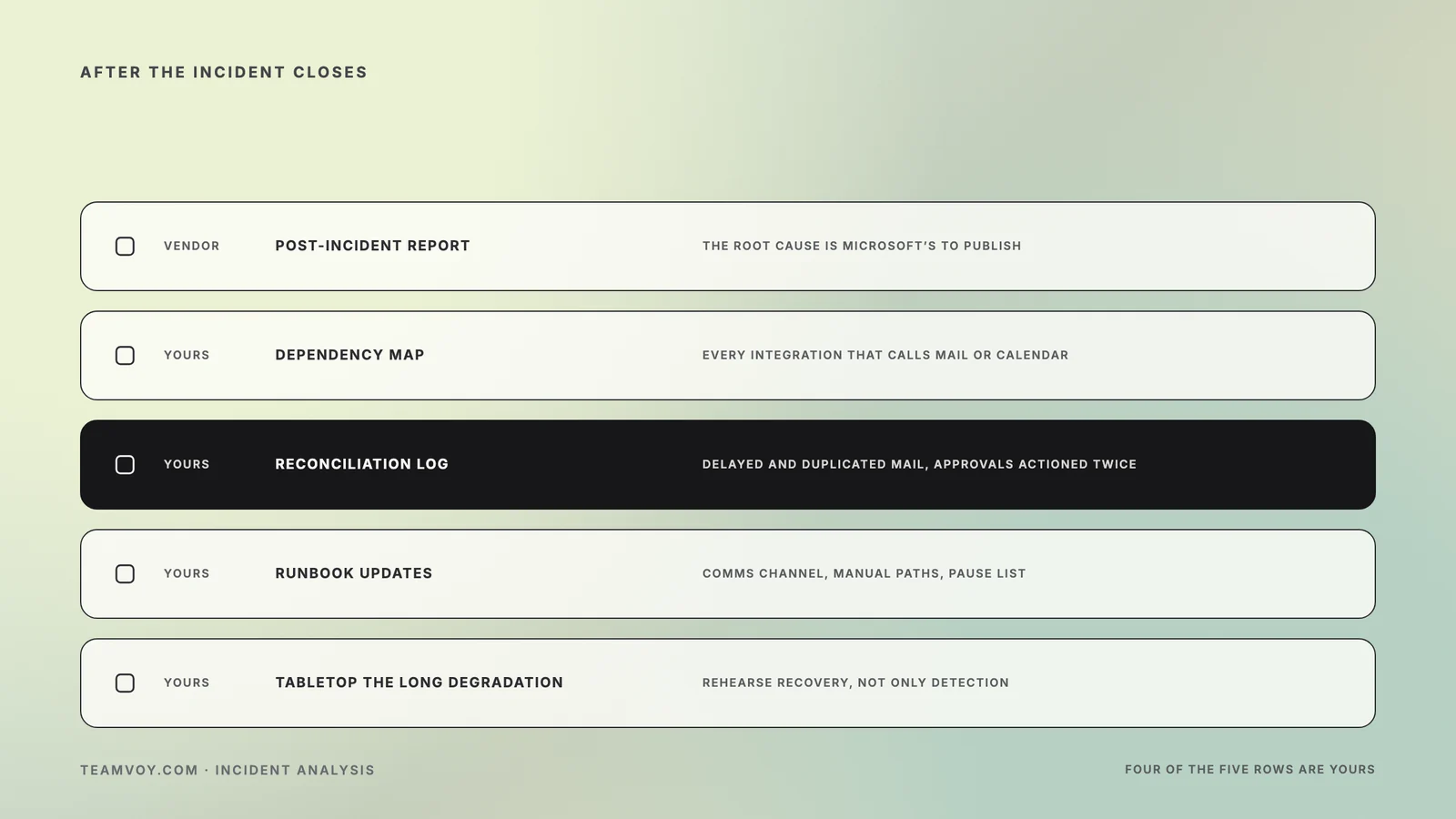
Map the dependency before you buy redundancy for it. The November 12 Microsoft Outlook outage exposed Exchange Online as a hidden dependency inside Teams calendar, Copilot, Defender, Purview, Planner, Graph, and admin tooling. Most teams know email depends on Exchange; fewer know their security tooling and meeting scheduling do. The first deliverable is a dependency map, not a vendor change.
Dependency mapping
Trace every integration calling Graph for mail, calendar, or contacts, every workflow that gates on an email arriving, and every alert routed through Exchange. NIST SP 800-34 Rev. 1 (published November 11, 2010) ties contingency planning to the system lifecycle because dependencies accumulate between reviews. When your integration inventory lives in people’s heads, a review of how your business systems connect costs less than a platform migration.
Single-vendor concentration
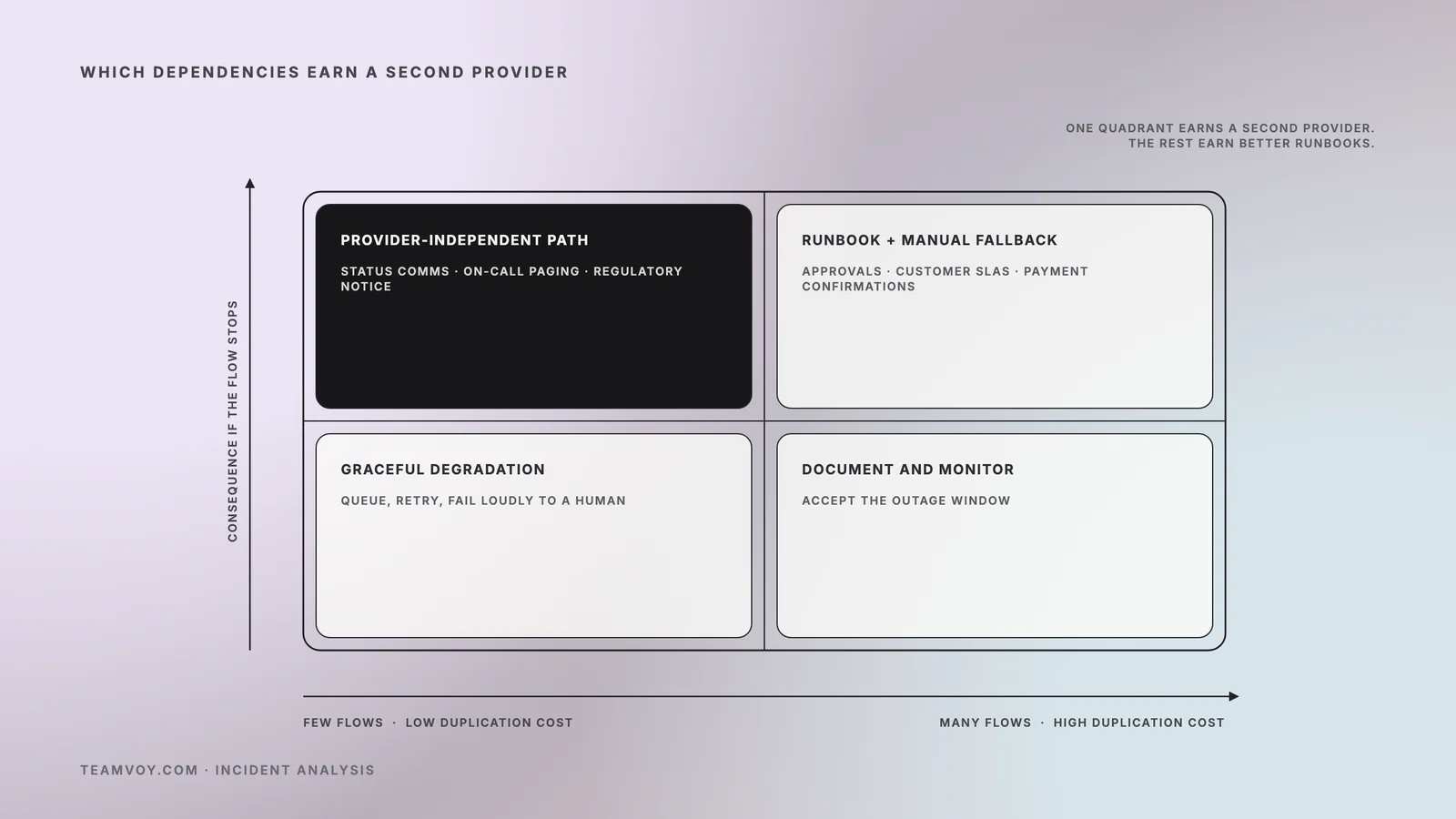
Concentration risk was real here, and the honest fix is selective. A second email platform in parallel adds cost, another identity and security surface, data-governance questions, and reconciliation work after every incident. For most mid-market companies that trade is bad for mail overall and good for a narrow set of flows: status communications, on-call paging, and regulatory notifications deserve a provider-independent path. The rest need better runbooks. Redundancy reduces specific dependencies; it doesn’t eliminate outages, and a consultant should say so even when it shrinks the engagement.
Graceful degradation
Workflows that merely notify by email should keep working when email is gone. Workflows that gate on email should fail loudly and route to a human. Visible queues, circuit breakers on Graph calls, and explicit timeouts turn a silent failure into a managed one. Reducing brittle dependencies in business-critical systems pays off here, provided the work starts from the map rather than a rewrite wish list.
Recovery discipline
Microsoft’s own recovery was unstable: returned servers became unresponsive again under traffic, per Neowin (November 12–13, 2026) [VERIFY — Neowin/X]. Yours will be too unless it’s rehearsed. Ready.gov (updated March 25, 2026) tells organizations to organize a continuity team and to compile and test a continuity plan, and testing is the part that gets skipped. Tabletop a 14-hour Exchange Online degradation, reconciliation included. Aggregate vendor uptime isn’t your uptime during an office 365 outage, so plan for the concentrated case and review failover, load balancing, and monitoring in the infrastructure you do control.
What to expect next from Microsoft
Expect a post-incident report with the root cause, timing depending on how Microsoft classifies the incident. Microsoft’s service description states that incidents affecting a large number of organizations receive a preliminary report within 48 hours of resolution and a final report within five business days. That’s per Microsoft Learn (updated July 21, 2026). That’s stated policy, not a prediction for this case [VERIFY — PIR classification].
Watch for three answers. Whether a configuration update was the initiating change. Why automated health checks removed capacity faster than recovery restored it. What Microsoft changes about deployment pausing and traffic shaping. Each one maps to a question you should ask about your own platform.
Conclusion
The Microsoft Outlook outage of November 12, 2026 was a single-dependency failure with a long tail: Exchange Online lost frontend capacity, recovery stayed unstable through the night, and every Microsoft 365 feature reading Exchange data degraded while core Teams kept working. Microsoft owes the root cause in its post-incident report. You owe your organization a dependency map, a provider-independent path for the few flows where email is a control, and a rehearsed recovery. Most dependencies deserve a better runbook, not a second vendor.
Talk to Teamvoy About Resilience Gaps
When this Office 365 outage exposed dependencies nobody could name before 1 p.m. ET on November 12, start with a map rather than a migration. Teamvoy’s IT audit helps you assess your technology resilience and recovery gaps across applications, cloud, data, and security, ending in a prioritized remediation plan. For a lower-friction first step, book a technical resilience call.