

- The ecommerce website development process is a seven-phase sequence running from discovery through launch and first optimization
- A mid-market build takes four to seven months and costs $40,000 to $100,000
- Maintenance adds 15% to 20% of the build cost every year after launch
- Pick one workflow with a measurable baseline before picking a model.rn
- PCI DSS v4.0.1 payment-page rules apply from 2025-03-31, EU accessibility law from 2025-06-28
- 70.22% of carts are abandoned, most often because extra costs appear too late
- Most readers should buy a platform rather than commission a custom build
Most ecommerce projects do not become difficult because of the storefront.
They become difficult when the storefront has to meet the needs of the rest of the business.
Inventory already lives somewhere. Orders need to land somewhere else. Finance has its own systems. Customer and product data need to move without creating a mess. Payments bring security and compliance into the scope. And the platform you choose today will define what is easy, expensive, or simply impossible to change two years from now.
This is why I would not start an ecommerce project by asking whether Shopify, Magento, WooCommerce, or a custom stack is better. There is no universally better option, and starting there usually means discussing features before understanding the actual constraints.
I would start with a simpler question: what are we actually trying to build, and which parts really need to be custom?
Because in many cases, the right answer is to buy a platform and move on. Custom development starts to make sense when the difficult part is not the store itself, but the systems, business rules, integrations, and scale behind it.
And that is the perspective I want to use in this guide: not how to build the most sophisticated ecommerce stack, but how to make the technical decisions that will still look reasonable after the launch.
What Is Ecommerce Website Development in 2026?
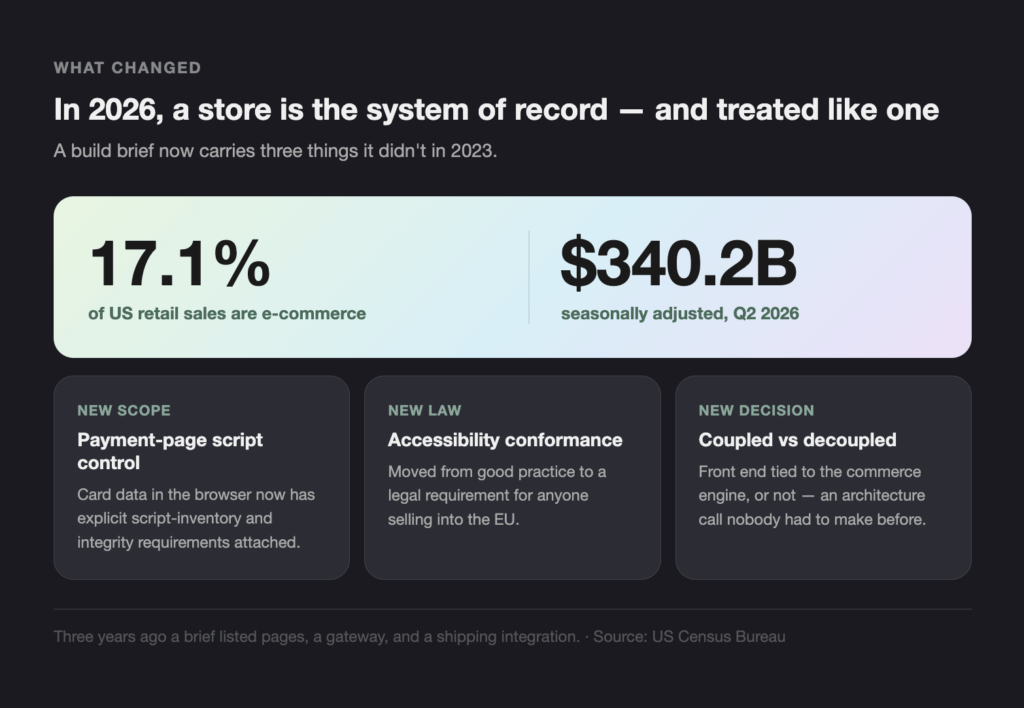
Ecommerce website development is the work of building and running an online store: the storefront, the catalog and search, the checkout and payment flow, and the integrations into inventory, order management, and finance. In 2026 it also covers three things it did not cover in 2023 — payment-page script controls, accessibility conformance as a legal requirement, and a decision about whether the front end and the commerce engine stay coupled.
Ecommerce web development has broadened as a discipline, and the change is clearest in what a scope document looks like now. Three years ago, a build brief listed pages, a payment gateway, and a shipping integration. A 2026 brief for the same business adds a script inventory for checkout, an accessibility acceptance criterion, and an architecture decision that nobody had to make before.
Scale explains part of the pressure. The US Census Bureau put e-commerce at 17.1% of total US retail sales in the second quarter of 2026, $340.2 billion seasonally adjusted. At that share, an online store is the system of record for a large part of the business, and it is treated as such by auditors, regulators, and the finance team.
What changed between 2023 and 2026
AI arrived in two forms, one of which pays back and one of which mostly does not.
Payment pages became a named compliance surface. Card data in the browser now has explicit script and integrity requirements attached to it.
Accessibility moved from good practice to law for anyone selling into the EU.
Composable architecture stopped being a slide. It is a real option with a real cost, covered further down.
What Is the Ecommerce Website Development Process, Step by Step?
The ecommerce website development process has seven phases: discovery and requirements, architecture and platform selection, design and UX, build and integration, data migration, compliance and security review, and launch with a first optimization cycle. A mid-market build runs four to seven months. The build phase is the longest, the integration nobody scoped is the usual cause of delay, and compliance review is the phase most often discovered late.
Here is the part that surprises people who have run a website project but not a commerce project. Discovery is not about pages. It is about finding every system that holds a number the store needs, and finding out who can grant access to it. That list is almost always longer than the brief says, and the difference lands in the schedule.
| Phase | What it produces | Typical duration | What slips it |
|---|---|---|---|
| 1. Discovery and requirements | Catalog model, integration inventory, compliance scope | 2–4 weeks | Getting access to third-party systems |
| 2. Architecture and platform selection | Architecture decision record, platform choice, integration map | 2–3 weeks | Waiting on vendor pricing and contract terms |
| 3. Design and UX | Checkout flow, design system, accessibility specification | 3–6 weeks | Product photography and copy |
| 4. Build and integration | Storefront, payments, ERP and OMS connections | 8–16 weeks | The integration nobody scoped in phase 1 |
| 5. Data migration | Products, customers, order history, URL redirect map | 2–5 weeks | Dirty product data in the source system |
| 6. Compliance and security review | PCI scope statement, accessibility audit, penetration test | 2–4 weeks | Remediation work found by the audit |
| 7. Launch and first optimization cycle | Cutover, monitoring, first round of changes | Ongoing | It does not end, and the budget should say so |
The sequence matters more than the labels. Running phases 2 and 6 in the wrong order is the most expensive mistake here, because choosing a platform without a compliance scope can force a re-architecture eight weeks into the build.
- Discovery and requirements. Model the catalog, list every system the store reads from or writes to, and write down which of them you control. Name the compliance scope now.
- Architecture and platform selection. Decide whether coupled or decoupled before choosing a vendor. Record the decision and what would reverse it.
- Design and UX. Start with the checkout, not the homepage. Accessibility is an acceptance criterion here, not a fix later.
- Build and integration. Ship the integrations first and the visual polish second, because the integrations carry the unknown work.
- Data migration. Clean the product data in the source system. Migrating dirty data faithfully reproduces the mess at a higher hosting cost.
- Compliance and security review. PCI scope, accessibility audit, penetration test. Book it in the plan rather than after the plan.
- Launch and first optimization cycle. Cutover with a rollback path, monitoring on the checkout, and a budget line for the changes the first month will demand.
Who owns each phase
Phases 1, 2 and 6 need somebody on your side, and staffing them is what separates a build that lands from one that drifts. Discovery needs a person who can get you into the ERP. Platform selection needs whoever will sign the contract. Compliance review needs a named owner for the payment page and for accessibility, because both require evidence that someone has to stand behind them. Phases 3, 4 and 5 can sit almost entirely with the build team. That split is worth agreeing in writing before the kickoff, since the three phases you staff are also the three that stall when nobody is free.
Where the process breaks
Two phases account for most overruns. Phase 4 slips when phase 1 misses a system, resulting in a discovery failure that shows up two months late. Phase 6 slips when it was treated as a formality, and remediation lands on a team that has already released its engineers. Both are schedule problems created earlier than they appear.
Key Features of High-Performing Ecommerce Websites
High-performing ecommerce web development is measured, not described. The thresholds worth writing into an acceptance criterion are the Core Web Vitals: Largest Contentful Paint at or under 2.5 seconds, Interaction to Next Paint at or under 200 milliseconds, and Cumulative Layout Shift at or under 0.1, each measured at the 75th percentile of real page loads on mobile and desktop separately.
“Fast” is the least useful word in a commerce brief, because everyone agrees with it and nobody has to prove it. A number in the contract changes the conversation with whoever is building the site, and it changes it before launch rather than after.
Performance you can measure
Google’s Core Web Vitals give three numbers and one measurement rule. INP replaced First Input Delay and became a stable metric in 2024, which matters for commerce specifically: it measures the delay on every interaction, so it catches a sluggish variant picker or a filter panel that FID never saw.
| Metric | Good | What it usually breaks on in commerce |
|---|---|---|
| LCP ≤ 2.5s | 75th percentile | Unoptimized hero and product imagery |
| INP ≤ 200ms | 75th percentile | Filter panels, variant selectors, cart drawers |
| CLS ≤ 0.1 | 75th percentile | Late-loading promo banners and review widgets |
The 75th percentile is the part people skip. A median that looks fine hides the quarter of your customers on mid-range phones with poor connections, which, in most catalogs, is a large share of the revenue.
Search and navigation carry more revenue than the homepage
On a catalog over a few thousand SKUs, internal search and faceted navigation are where most of the buying happens, and they are usually the least-tested part of the build. Two rules cover most of it. Search has to handle the words customers use rather than the words the catalog uses, which means synonyms, misspellings and part numbers all resolving to the same result. And facets must reflect the actual inventory, so a filter that returns no products should not be offered.
Both depend on product data quality, which is why phase 5 is a merchandising problem rather than a database problem. A catalog with inconsistent attributes cannot be faceted, no matter what the platform’s marketing says.
Accessibility is now a compliance question
Screen reader support, keyboard navigation, contrast ratios, and alternative text used to be a quality argument. For anyone selling to EU consumers, they are a legal requirement, and the yardstick is EN 301 549, which points at WCAG. The build implication is small and the timing implication is not: accessibility written as an acceptance criterion in phase 3 costs days, and accessibility discovered in phase 6 costs weeks.
Platform Choices: Shopify, WooCommerce, Magento & More
Pick Shopify or Shopify Plus for a standard catalog and a fast launch, WooCommerce when the store sits inside an existing WordPress publication, Magento or Adobe Commerce for large catalogs with B2B pricing rules, and a composable stack only when you sell across several channels from one inventory. The deciding question is rarely features. It is which constraint you can live with for three years.
Every platform comparison you will read is written by a platform. Here is one written to name the constraint instead, because the constraint is what you find out about in month nine.
| Ecommerce platform | Best for | Cost shape | Who it is not for |
|---|---|---|---|
| Shopify / Shopify Plus | Standard catalog, fast launch, hosted payments | Monthly fee plus transaction costs; Plus is a contract | Anyone whose checkout logic cannot fit Shopify’s checkout, or who needs contract-level B2B pricing |
| WooCommerce | Content-led stores already running WordPress | Hosting, plugins, and your own patching time | Teams with nobody to own security updates. The cost is a person, not a licence |
| Magento / Adobe Commerce | Large catalogs, B2B pricing, multi-store | Licence plus a substantial build and hosting bill | Businesses under roughly $5M online revenue. The running cost outruns the flexibility |
| BigCommerce | API-led builds without self-hosting | Tiered monthly, banded by sales volume | Teams that want template-level control of everything |
| Drupal Commerce | Content and commerce weighted equally | Build cost, open-source licence | Teams whose need is a store rather than a publication with a store attached |
| Composable / headless | Several channels, one inventory, unusual rules | Highest build cost, lowest cost per change afterwards | Anyone whose first release date is the priority |
Read the table as a set of trades rather than a ranking. Shopify wins on time-to-launch and loses on checkout control. Composable wins on the tenth change and loses on the first. There is no row where one option takes every column, and a comparison that produced one would be marketing.
For a full e-commerce website design and development engagement, the platform decision belongs in phase 2, before design starts. Choosing it later means designing around constraints you have not yet read.
Price the platform over three years rather than per month, because the three fee structures behave differently over time. A hosted platform that charges a percentage of revenue becomes more expensive as you succeed. A self-hosted stack charges you in engineering hours whether or not you grow. A licence-plus-build platform front-loads the cost and then holds steady. All three are defensible, and picking the one that matches your growth curve is worth more than any feature comparison. Ask each vendor what the bill looks like at three times your current volume, and get the answer in writing.
Intelligent Automation and AI in Ecommerce Website Development
AI earns its place in two jobs in a commerce build: demand forecasting that drives replenishment and fraud scoring at checkout. Both have a measurable output and a clear failure mode. Product recommendations are a third, weaker case that pays off in large catalogs and disappoints in small ones. Generating the site itself is not yet one of the jobs, whatever the demos suggest.
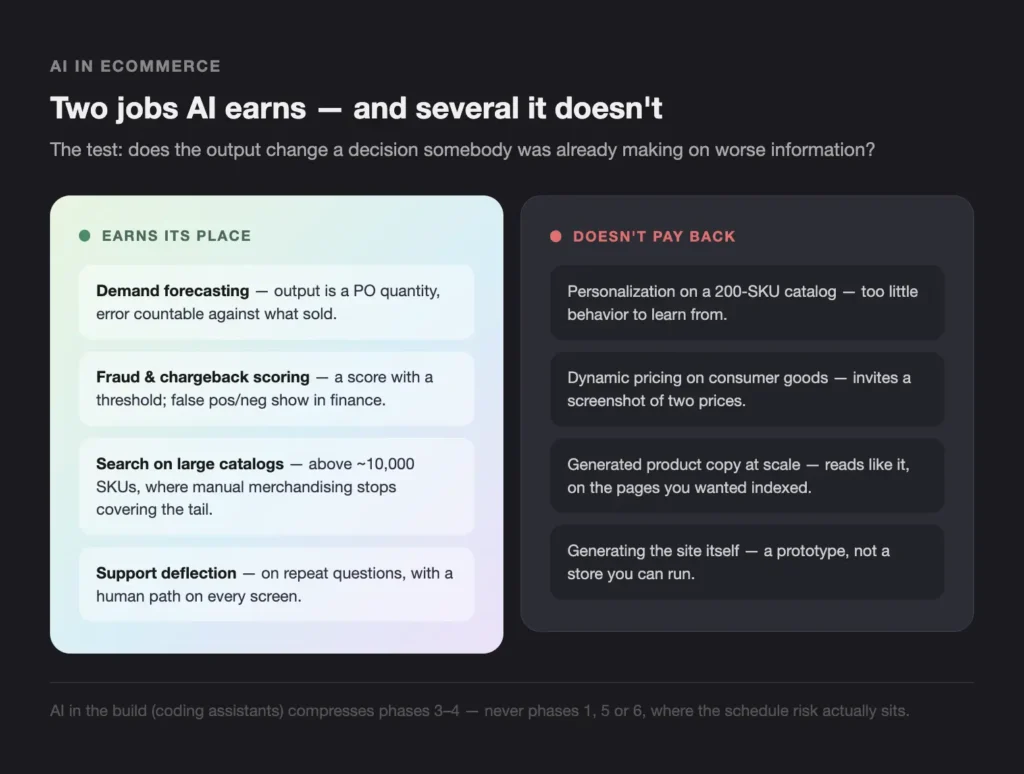
The useful test is whether the model’s output changes a decision somebody was already making. Replenishment and fraud both pass it, because a human was already deciding those things on worse information.
What AI actually earns its place doing
- Demand forecasting and replenishment. The output is a purchase order quantity, and the error is countable against what sold.
- Fraud and chargeback scoring. The output is a score with a threshold, and both false positives and false negatives show up in the finance report.
- Search and merchandising on large catalogs. AI ecommerce personalization pays back above roughly ten thousand SKUs, where manual merchandising has already stopped covering the tail.
- Support deflection on repeat questions. Worth it when the questions repeat and the answers stay stable, with a visible route to a person on every screen.
AI in the build is a different question from AI in the store
Two conversations get merged here and they have different answers. AI in the store means models running in production against your data, which is the forecasting and fraud work above. AI in the build means coding assistants inside the development process, and it shifts the cost curve rather than the product: the boilerplate parts of a storefront get faster, and the integration and compliance parts do not, because those are constrained by other people’s systems and by evidence somebody has to sign.
The practical consequence for a quote is small and specific. Expect AI-assisted delivery to somewhat compress phases 3 and 4. Do not expect it to touch phases 1, 5 or 6, which is where the schedule risk actually sits.
Where it does not
AI ecommerce personalization on a 200-SKU catalog has too little behavior to learn from, and the engineering cost lands anyway. Dynamic pricing on consumer goods invites a customer to screenshot two prices and post them. Generated product copy at scale reads like generated product copy at scale, and the pages it fills are the pages you wanted indexed.
The integration work is the real cost, and it looks like every other integration: connecting a model to systems that hold the records. We have written that up separately in how to integrate AI into your current software, and Teamvoy’s AI integration services work at that layer rather than at the storefront.at never appears in a portfolio. It is also the part our fintech product design practice spends the most time on.
Application Modernization: Composable Architecture and Future-Proofing
Composable commerce means assembling the store from independent services connected by APIs, with the front end decoupled from the commerce engine. Headless commerce is the front-end half of that idea. The benefit is that a change to one service does not require releasing everything. The cost is that the first feature takes longer, and the second and third do too.
That cost is the part vendor material leaves out, so here it is plainly. On a composable build, expect the first feature to take four to six weeks longer than it would on a coupled platform, and expect the payback to start around the third. If your roadmap has three changes in it, the arithmetic does not work.
What composable commerce costs you
- A service layer to own. Somebody maintains the glue, and that somebody is on your payroll or your retainer.
- More moving parts to monitor. Six services fail in more ways than one platform does.
- A slower first release, which is the trade you are making deliberately.
- A real reason. Multi-channel selling from one inventory, or business rules no vendor has productized. Wanting to be modern is not one.
One clarification worth making, because the terms get used interchangeably. Headless commerce decouples the front end and is available on several hosted platforms as a configuration option. Composable commerce replaces the whole engine with separate services. Headless commerce is a weekend of architecture; composable commerce is a program of work.
If you decide the reason is real, the migration is incremental rather than a rewrite. Put a routing layer in front of the existing store, move one capability behind it, run both for a while, then move the next. Search and product content are the usual first candidates because they are read-heavy and low-risk; checkout is near the end because it handles the money and the compliance scope. A team that moves checkout first has taken the largest risk in the program before learning anything, and the pattern shows up often enough to be worth naming.
The sequencing question underneath this is bigger than commerce, and it is the same question every modernization program runs into: what order do you fix things in. We set out our view of that in enterprise architecture modernization, and the delivery side sits in technology modernization services.
Optimizing User Experience and Conversion Rates
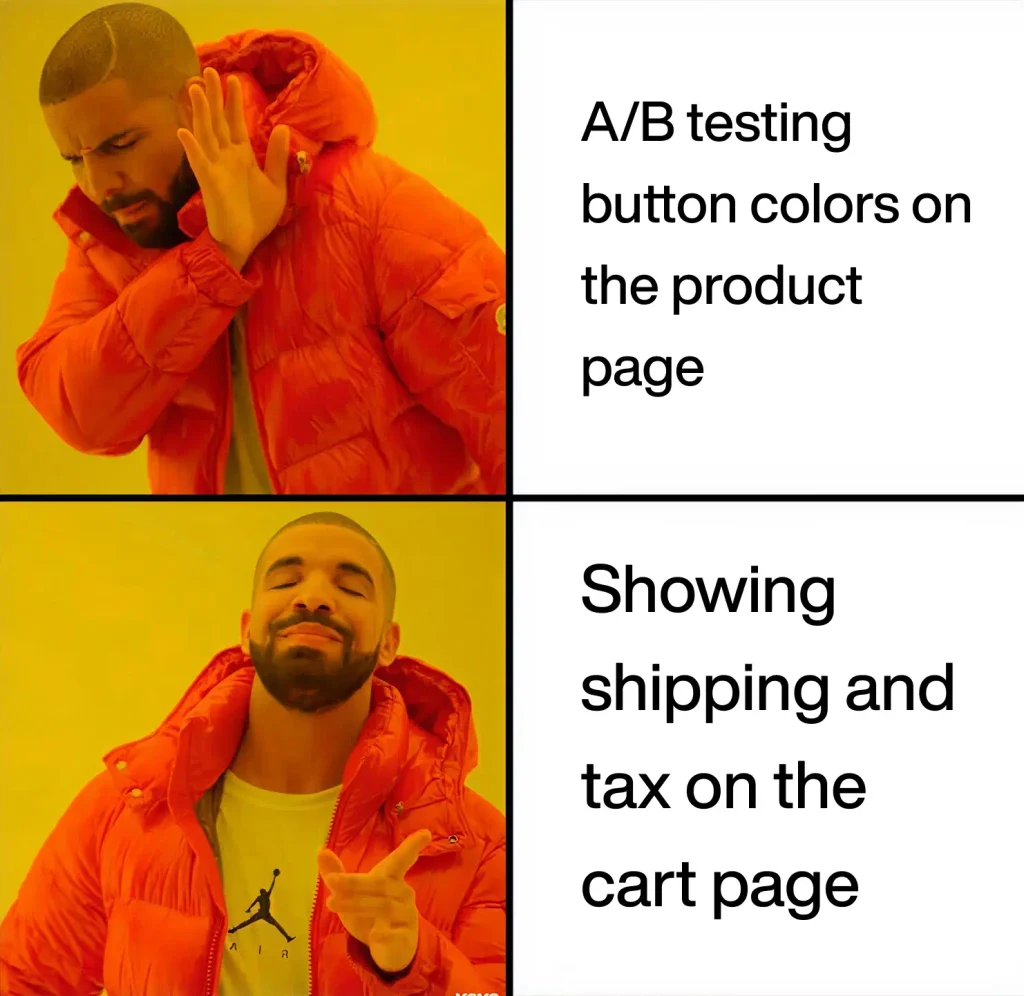
The average documented online cart abandonment rate is 70.22%, measured by the Baymard Institute across 50 studies and last updated 2025-09-22. Among shoppers who intended to buy, the largest single cause is extra costs shown too late — shipping, tax, and fees — cited by 40%. The next three are slow delivery at 20%, distrust of the payment form at 19%, and forced account creation at 18%.
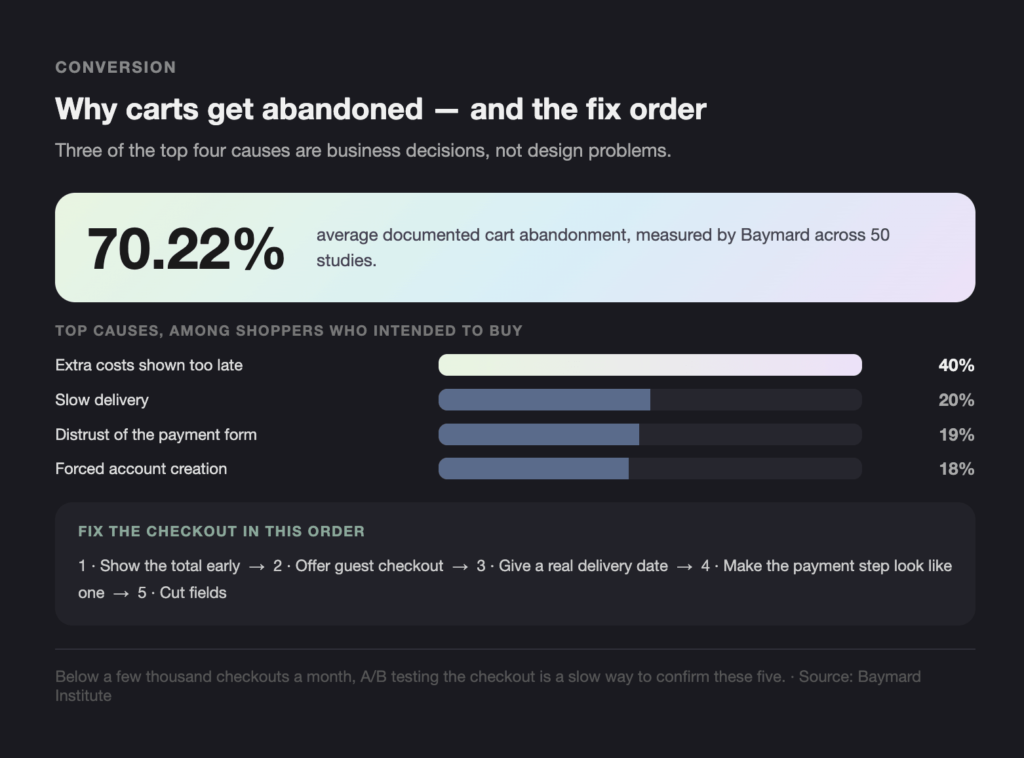
Those four causes are worth reading in order, because three of them are decisions rather than design problems. Showing the full cost earlier, offering guest checkout, and putting a credible delivery date on the page are business calls that a redesign cannot make on your behalf.
Checkout, in order of what abandons carts
- Show the total early. Shipping and tax estimated on the cart page, not revealed at step three.
- Offer guest checkout. Account creation after the order, if at all.
- Give a real delivery date, not a shipping-method name.
- Make the payment step look like a payment step. Recognizable card fields, wallet options, and no surprise redirect.
- Cut fields. Every optional field removed is one fewer reason to stop.
Mobile carries most of this traffic, so the checkout is a phone screen first. Where an existing app is part of the picture, the migration from React Native to a PWA is a common route to one codebase serving both. Run A/B tests on the checkout only after these five are in place, because a test on a broken flow measures which broken variant is less bad.
What a checkout test can and cannot tell you
Most commerce sites do not have the traffic to run a clean checkout test. Detecting a one-point conversion change at a typical order volume takes weeks per variant, and teams routinely call a result at day four because the chart looks decided. The honest version is that, below a few thousand checkouts a month, A/B testing the checkout is a slow way to confirm the five items above, and those five items are already known from other people’s research.
Where testing earns its place is on the pages above the checkout: category layouts, product page structure, and the presentation of price and delivery. Those get more traffic per decision and the effects are larger.
Read Baymard’s abandonment research directly before signing off a checkout design. It is the closest thing this category has to a primary source.
Security and Compliance in Ecommerce Website Development
Three requirements changed what a 2026 commerce build has to prove. PCI DSS v4.0.1 requirements 6.4.3 and 11.6.1 cover scripts and tamper detection on payment pages and have been in force since 2025-03-31. The European Accessibility Act brings e-commerce services into scope and applies after 2025-06-28. GDPR and CCPA/CPRA still govern the customer data model. All three belong in phase 1, not phase 6.
PCI compliance is where most of this lands in practice, and payment-page script control is the part that catches teams out, because the scripts in question are usually marketing tags that nobody in engineering added.
| Requirement | Applies to | In force | What it means for the build |
|---|---|---|---|
| PCI DSS v4.0.1 req 6.4.3 | Payment pages accepting card data in the browser | 2025-03-31 | Inventory every script on the payment page, authorize each one, and justify why it is there |
| PCI DSS v4.0.1 req 11.6.1 | The same pages | 2025-03-31 | Detect and alert on unauthorized change to payment page headers and content |
| European Accessibility Act, Art. 2(2)(f) | E-commerce services sold to EU consumers | after 2025-06-28 | Accessibility conformance as an acceptance criterion, measured against EN 301 549 and WCAG |
| GDPR / CCPA / CPRA | Personal data of EU and California residents | 2018 / 2020 | Consent, access, and deletion paths wired into the customer data model, not bolted on |
Customer identity is part of the compliance surface
Customer identity and access management, or CIAM, is where accounts, passwords, sessions and consent records live, and it carries obligations from every framework above at once. Three decisions matter at build time. Whether you run identity yourself or buy it, which determines who is responsible for credential storage. Whether consent and deletion requests can be executed against the customer record without an engineer, because doing them by hand does not scale past the first hundred. And whether a compromised account can be detected, since a store’s fraud exposure runs as much through account takeover as through stolen cards.
Fraud scoring belongs beside it, not after it. A model that flags a transaction is only useful when somebody can see why it was flagged and reverse the decision, so the review interface is part of the scope rather than a follow-up.
The three deadlines that already passed
The dates above are behind us, which changes the question from planning to evidence. The PCI Security Standards Council’s own guidance sets out how the SAQ A path changed for e-commerce merchants and what still applies underneath it. The accessibility scope is set in Article 2(2)(f) of Directive (EU) 2019/882.
Two practical consequences. PCI compliance now has an owner problem: marketing tag managers on the checkout need a named owner and an approval step. And “we will do accessibility after launch” is now a statement about legal exposure rather than about backlog priority.
Build vs Buy: When Should You Not Custom-Build?
Buy a platform unless you can name a specific business rule that no platform supports and attach a cost to living without it. Under roughly $5 million in annual online revenue, with a standard catalog and a standard checkout, buying wins on price, time, and risk. Custom ecommerce development earns its place on unusual rules, several sales channels sharing one inventory, or a checkout the platform forbids.
Most people reading this article are in the buy column, and saying otherwise would be selling.
| Signal | Buy a platform | Commission a custom build |
|---|---|---|
| Standard catalog, standard checkout | Yes, always | No |
| Under ~$5M annual online revenue | Yes | Rarely justifiable |
| No in-house engineers to own the result | Yes | No |
| Replatforming for the second time in three years | Yes, and fix the selection process first | No |
| You need a checkout the platform forbids | Try the workarounds first | Worth costing |
| Business rules no vendor has productized | Try extensions first | Worth costing |
| Five or more channels sharing one inventory | Try middleware first | Worth costing |
Four of seven rows land on buying, and the first four cover most businesses outright. Custom ecommerce development is the answer to a named constraint, never to a general preference for control. The other three are worth costing rather than worth doing, which is a different claim.
Above that line the question changes from which platform to which partner, and the criteria change with it: does the team ship into production or stop at a prototype, who owns the code, what happens at handover, and who is accountable for the compliance evidence. Teamvoy works at that tier through retail technology and commerce engineering, and it is the wrong purchase below the line.
Ecommerce Website Development Costs in 2026
A templated platform launch costs $3,000 to $25,000. A mid-market build with custom design, integrations, and migration runs $40,000 to $100,000. Enterprise and composable builds start around $250,000. Annual maintenance adds 15% to 20% of the build cost, every year, and it is the line most often missing from a first budget.
Ecommerce website development cost is driven by integration scope rather than by page count, which is why two quotes for the same catalog can differ by a factor of five. Marketplace gig prices are a different market again, and comparing against them misleads. A $200 storefront setup and a $60,000 integration project are answers to different questions, and a business with an ERP is only ever asking the second one.
| Build tier | Range | What is included | What is not |
|---|---|---|---|
| Templated platform launch | $3,000–$25,000 | Theme setup, hosted payments, basic catalog | Custom integrations, order history migration |
| Mid-market build | $40,000–$100,000 | Custom design, ERP and OMS integration, migration, accessibility work | Ongoing feature work, platform licence fees |
| Enterprise / composable | $250,000+ | Decoupled front end, service layer, multi-channel support | The same, at a larger scale |
| Annual maintenance | 15–20% of build cost | Security patching, platform upgrades, monitoring | New features |
These ranges come from Teamvoy’s own project data, set out in full in what a website redesign actually costs.
The three-year number is the one that matters
Build cost is the number in the quote and the smaller half of the decision. Over three years a mid-market store typically pays the build once, maintenance three times at 15% to 20% each, platform or licence fees monthly, and a feature budget that nobody writes down but everybody spends. A $70,000 build with $12,000 of annual maintenance and $1,500 a month in platform fees is a $160,000 commitment before a single new feature ships.
Costing it that way changes which platform wins about as often as it confirms the choice, which is why it belongs in phase 2 rather than in the post-launch review.
What pushes the number up
Photography and copy. Rarely in the development quote and always in the launch date.
Integrations you did not scope. The most common overrun, and it originates in phase 1.
Dirty product data. Cleaning 40,000 SKUs is a project, and somebody owns it.
Order history migration. Optional more often than teams assume, and expensive when it is not.
Compliance remediation. Cheap in phase 3, expensive in phase 6.
Conclusion
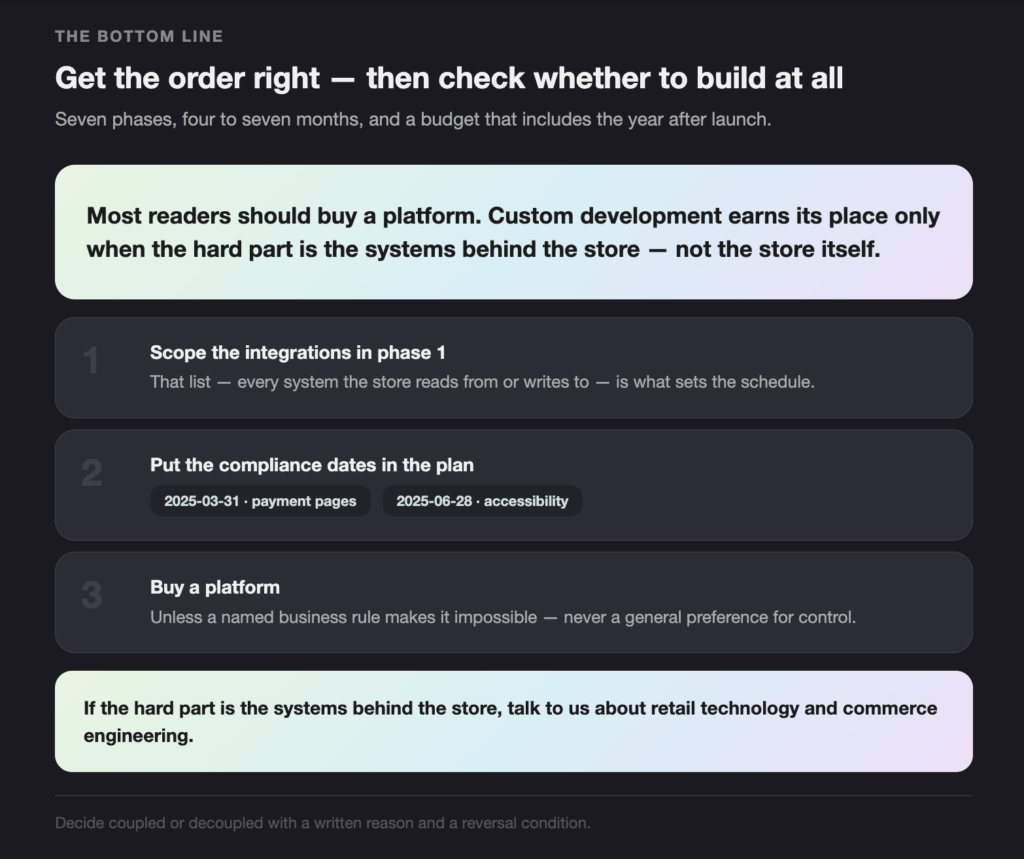
The ecommerce website development process is seven phases, four to seven months, and a budget that has to include the year after launch. Get the order right, book compliance early, and decide coupled or decoupled with a written reason. Then check whether you should be building at all.
- Scope the integrations in phase 1. That list sets the schedule.
- Put the compliance dates in the plan: 2025-03-31 for payment pages, 2025-06-28 for accessibility.
- Buy a platform unless a named business rule makes it impossible.
If the hard part of your build is the systems behind the store rather than the store itself, talk to us about retail technology and commerce engineering.